This is best Fabric, Power BI, SQL and AI community event. How do we know? The last event sold out! Save €200 with code FABCMTY200.
Register nowA new Data Days event is coming soon! This time we’re going bigger than ever. Fabric, Power BI, SQL, AI and more. Don't miss out.
Hi,
I created a card visual with text inside. Now, it seems it is not possible to copy the text from the visual in desktop or the app. The only way is to export the data, but is there an easier way?
Thank you already for your help,
AB
Solved! Go to Solution.
Hi @Anonymous ,
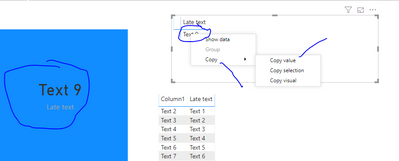
Add the measure to a matrix. Highlight the single value that shows. Right click on it to get to copy value. You can then paste it to Word or whatever. Or you can take a picture of it.
Let me know if you have any questions.
If this solves your issues, please mark it as the solution, so that others can find it easily. Kudos 👍are nice too.
Nathaniel
Proud to be a Super User!
Is there are short cut to copy and paste vs having to right click then select copy value?
Hi @Anonymous ,
Add the measure to a matrix. Highlight the single value that shows. Right click on it to get to copy value. You can then paste it to Word or whatever. Or you can take a picture of it.
Let me know if you have any questions.
If this solves your issues, please mark it as the solution, so that others can find it easily. Kudos 👍are nice too.
Nathaniel
Proud to be a Super User!
Thank you very much!
It works nicely. For long text it sometimes does not expand to the whole space and shows the scroll bar. But I can live with that 😉
Check out the May 2026 Power BI update to learn about new features.
Sign up to receive a private message when registration opens and key events begin.
If you have recently started exploring Fabric, we'd love to hear how it's going. Your feedback can help with product improvements.
| User | Count |
|---|---|
| 31 | |
| 26 | |
| 23 | |
| 22 | |
| 15 |
| User | Count |
|---|---|
| 62 | |
| 47 | |
| 28 | |
| 24 | |
| 21 |