cancel
Showing results for 
Search instead for 
Did you mean: 

July 7 - July 17 | Round 2 of the Power BI Dataviz World Championships. Don't miss your chance! Learn more

Reply
Anonymous
Not applicable

Convert to Number error

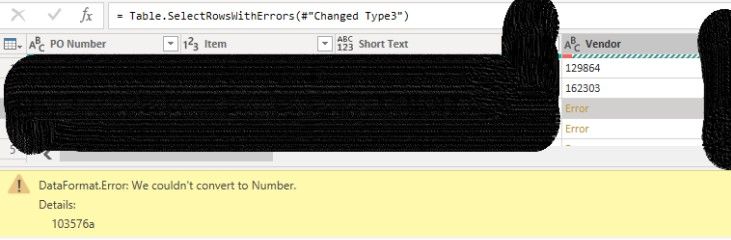
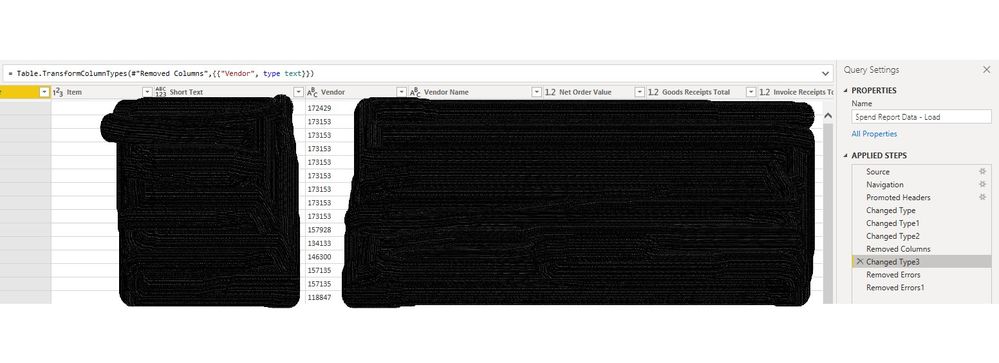
Hi, I am trying to upload an excel sheet into PowerBI I am in Power Query Editor, I have converted the column to text & it is still giving me the error "We couldn't convert to number" Number Error.jpg

any ideas? it is driving me crazy

1 ACCEPTED SOLUTION
Anonymous
Not applicable

Hi @Anonymous ,


If you don't want to automatically detect the data type, you can turn off the related functions through the following article.

Data types in Power Query | Microsoft Docs


Best Regards,

Stephen Tao


If this post helps, then please consider Accept it as the solution to help the other members find it more quickly.

View solution in original post

6 REPLIES 6
Anonymous
Not applicable

Hi @Anonymous ,


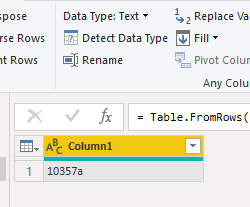
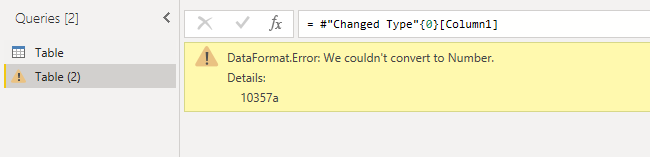
I may have reproduced your problem. This is because your Vendor column contains a value of ‘10357a’, which is not a number.

vstephenmsft_1-1637565193131.png

vstephenmsft_0-1637565132804.png

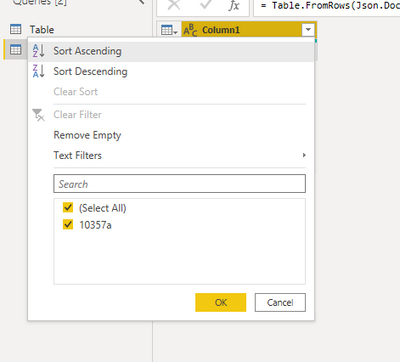
Please check your Vendor column, you can find the problematic row by filtering as follows.

vstephenmsft_2-1637565226290.png


Best Regards,

Stephen Tao


If this post helps, then please consider Accept it as the solution to help the other members find it more quickly.


Anonymous
Not applicable

Hi Stephen, That is why I converted the column to Text, but it is still trying to convert it to a number. I'm not sure what I have done wrong & why it won't accept that 

Anonymous
Not applicable

Hi @Anonymous ,


If you don't want to automatically detect the data type, you can turn off the related functions through the following article.

Data types in Power Query | Microsoft Docs


Best Regards,

Stephen Tao


If this post helps, then please consider Accept it as the solution to help the other members find it more quickly.

Anonymous
Not applicable

Thanks, I have done this as it was the easiest way to create the result I want, but not sure why it wouldn't accept my change data type

selimovd
Most Valuable Professional

Hey @Anonymous ,


I guess that happens in a step before.

Can you show all the steps on the very right side?


There is usually an automatic conversion, make sure this  conversion it not converting the column to a number.


If you need any help please let me know.
If I answered your question I would be happy if you could mark my post as a solution ✔️ and give it a thumbs up 👍
 
Best regards
Denis
 
Anonymous
Not applicable

Number Error2.jpg

Here is the step, the remove errors steps afterwards are me removing the error lines so I can move on to processing the visuals

Helpful resources

Announcements
FabCon and SQLCon Barcelona 2026

FabCon & SQLCon – Barcelona 2026

Join us in Barcelona for FabCon and SQLCon, the Fabric, Power BI, SQL, and AI community event. Save €200 with code FABCMTY200.

60 days of Data Days Carousel

Data Days 2026

Join Data Days 2026: 60 days of free live/on-demand sessions, challenges, study groups, and certification opportunities.

Power BI DataViz World Championships carousel

Power BI DataViz World Championships - June 2026

A new Power BI DataViz World Championship is coming this June! Don't miss out on submitting your entry.

Top Solution Authors