
cancel
Showing results for 
Search instead for 
Did you mean: 

Get Fabric Certified for FREE during Fabric Data Days. Don't miss your chance! Request now

Reply
nchand
Regular Visitor

Convert to 30min interval

Hello All,


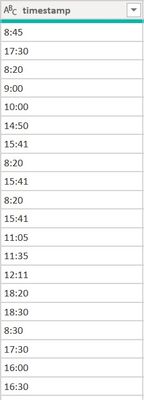
I am trying to plot a line graph with two variables—time in 30min intervals on the x-axis and count of #ppl in that time frame.


How to convert this column to represent time in every 30min interval? Many thanks for considering my request. 

PowerBI.jpg


1 ACCEPTED SOLUTION

You can make it easily:
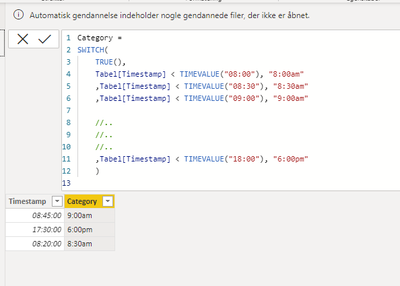
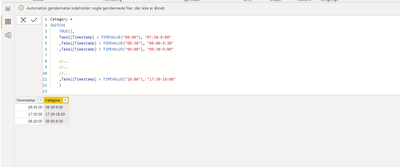
1. Adjust the formulas to AM PM format

NickolajJessen_1-1654247888593.png

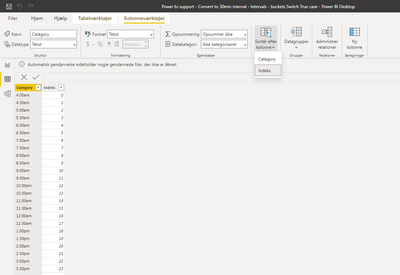
2. Create a table in power query with you categories and add index (make sure to filter cate category by the index)

NickolajJessen_2-1654247974011.png

3. Create relationship between the two tables
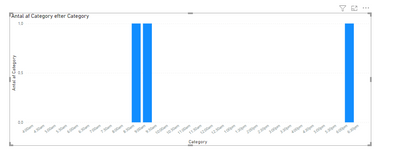
4. Voila

NickolajJessen_3-1654248003169.png


View solution in original post

5 REPLIES 5
NickolajJessen
Solution Sage
Solution Sage

Here you go 🙂

NickolajJessen_1-1654244619748.png


Thanks for this solution. will use this if I cannot make it to this format below: (not sure how to aggregate to this model tho)

PowerBI.jpg

You can make it easily:
1. Adjust the formulas to AM PM format

NickolajJessen_1-1654247888593.png

2. Create a table in power query with you categories and add index (make sure to filter cate category by the index)

NickolajJessen_2-1654247974011.png

3. Create relationship between the two tables
4. Voila

NickolajJessen_3-1654248003169.png


I have a doubt in this. When we say this

Table[Timestamp]<TIMEVALUE("08:00"), "8;00am"
Table[Timestamp]<TIMEVALUE("08:30"), "8;30am"

If I had a 06:30 in the Timestamp column. what will it be considered? 8 or 8;30am?  

That's a great questions!
it returns the first value that is TRUE

Table[Timestamp]<TIMEVALUE("08:00"), "8;00am" // This is true // AND THIS IS FIRST
Table[Timestamp]<TIMEVALUE("08:30"), "8;30am" // This also true, but is never evaluated, beause the first the first was true


Helpful resources

Announcements
November Power BI Update Carousel

Power BI Monthly Update - November 2025

Check out the November 2025 Power BI update to learn about new features.

Fabric Data Days Carousel

Fabric Data Days

Advance your Data & AI career with 50 days of live learning, contests, hands-on challenges, study groups & certifications and more!

FabCon Atlanta 2026 carousel

FabCon Atlanta 2026

Join us at FabCon Atlanta, March 16-20, for the ultimate Fabric, Power BI, AI and SQL community-led event. Save $200 with code FABCOMM.

Top Solution Authors
Top Kudoed Authors