cancel
Showing results for 
Search instead for 
Did you mean: 

A new Data Days event is coming soon! This time we’re going bigger than ever. Fabric, Power BI, SQL, AI and more. Don't miss out.

Reply
siva3012
Helper II
Helper II

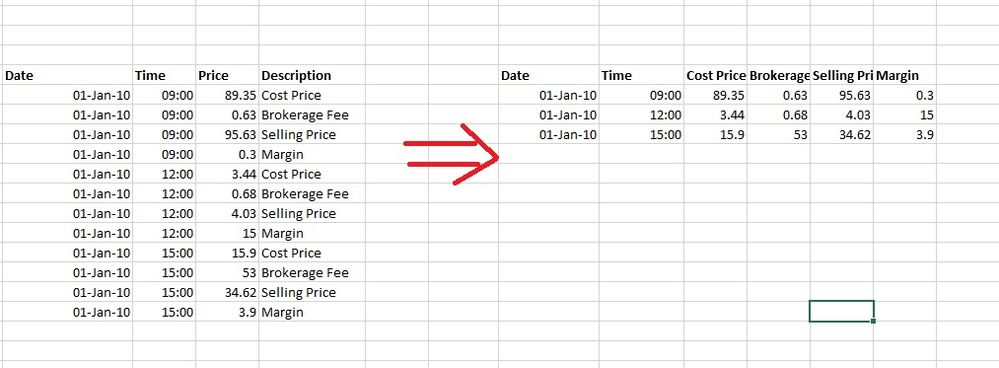
Convert columns data into columns title

I need to convert the data in the left side table as shown in the dig into right side table. How it can be converted ?  Output.jpg


1 ACCEPTED SOLUTION
dilumd
Impactful Individual

Hi,


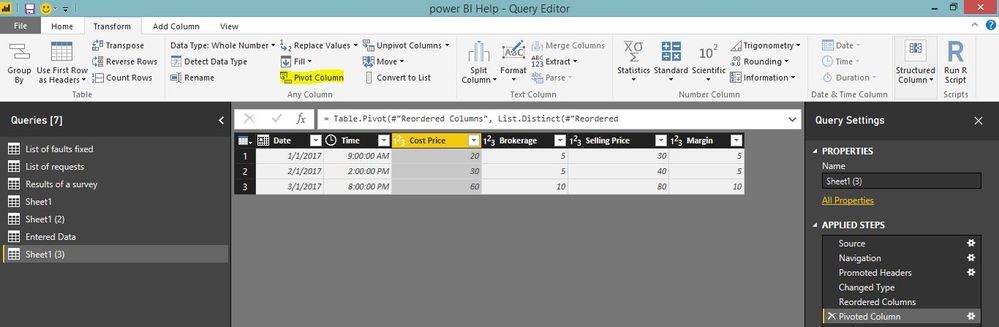
you can actually do this with pivot option in the power query. please see below. Code also attached!qa.JPG


let
    Source = Excel.Workbook(File.Contents("C:\Users\Dilumd\OneDrive - \help file.xlsx"), null, true),
    Sheet1_Sheet = Source{[Item="Sheet1",Kind="Sheet"]}[Data],
    #"Promoted Headers" = Table.PromoteHeaders(Sheet1_Sheet, [PromoteAllScalars=true]),
    #"Changed Type" = Table.TransformColumnTypes(#"Promoted Headers",{{"Date", type date}, {"Time", type time}, {"Price", Int64.Type}, {"Description", type text}}),
    #"Reordered Columns" = Table.ReorderColumns(#"Changed Type",{"Date", "Time", "Description", "Price"}),
    #"Pivoted Column" = Table.Pivot(#"Reordered Columns", List.Distinct(#"Reordered Columns"[Description]), "Description", "Price")
in
    #"Pivoted Column"

View solution in original post

3 REPLIES 3
dilumd
Impactful Individual

Hi,


you can actually do this with pivot option in the power query. please see below. Code also attached!qa.JPG


let
    Source = Excel.Workbook(File.Contents("C:\Users\Dilumd\OneDrive - \help file.xlsx"), null, true),
    Sheet1_Sheet = Source{[Item="Sheet1",Kind="Sheet"]}[Data],
    #"Promoted Headers" = Table.PromoteHeaders(Sheet1_Sheet, [PromoteAllScalars=true]),
    #"Changed Type" = Table.TransformColumnTypes(#"Promoted Headers",{{"Date", type date}, {"Time", type time}, {"Price", Int64.Type}, {"Description", type text}}),
    #"Reordered Columns" = Table.ReorderColumns(#"Changed Type",{"Date", "Time", "Description", "Price"}),
    #"Pivoted Column" = Table.Pivot(#"Reordered Columns", List.Distinct(#"Reordered Columns"[Description]), "Description", "Price")
in
    #"Pivoted Column"

That works like a champ!


Follow on LinkedIn
@ me in replies or I'll lose your thread!!!
Instead of a Kudo, please vote for this idea
Become an expert!: Enterprise DNA
External Tools: MSHGQM
YouTube Channel!: Microsoft Hates Greg
Latest book!:
DAX For Humans

DAX is easy, CALCULATE makes DAX hard...
Greg_Deckler
Community Champion
Community Champion

I'm going to invoke @ImkeF for that one.


Follow on LinkedIn
@ me in replies or I'll lose your thread!!!
Instead of a Kudo, please vote for this idea
Become an expert!: Enterprise DNA
External Tools: MSHGQM
YouTube Channel!: Microsoft Hates Greg
Latest book!:
DAX For Humans

DAX is easy, CALCULATE makes DAX hard...

Helpful resources

Announcements
May Power BI Update Carousel

Power BI Monthly Update - May 2026

Check out the May 2026 Power BI update to learn about new features.

Fabric SQL PBI Data Days

Data Days 2026 coming soon!

Sign up to receive a private message when registration opens and key events begin.

New to Fabric survey Carousel

New to Fabric Survey

If you have recently started exploring Fabric, we'd love to hear how it's going. Your feedback can help with product improvements.

Power BI DataViz World Championships carousel

Power BI DataViz World Championships - June 2026

A new Power BI DataViz World Championship is coming this June! Don't miss out on submitting your entry.