Join us at FabCon Atlanta from March 16 - 20, 2026, for the ultimate Fabric, Power BI, AI and SQL community-led event. Save $200 with code FABCOMM.
Register now!The Power BI Data Visualization World Championships is back! Get ahead of the game and start preparing now! Learn more
Hello,
I have a column which represents seconds, but I need to now create a metric showing the average in days, hours, minutes and seconds. In the below example, this average of my column is 213955 seconds, which should equal to 2 Days 11 Hours 25 Minutes 55 Seconds. I'm not sure how to get this to show in a Power BI metric. The final output could either be one metric for a card, or separate cards to show the days, hours, minutes, seconds.
Would someone be able to assist with this? Thank you in advance
sample file - pbix file
Solved! Go to Solution.
@redwings00
Use the following measure to get the desired result:
New Time =
var vSeconds=AVERAGE(Sheet1[Seconds])
var vMinutes=int( vSeconds/60)
var vRemainingSeconds=MOD(vSeconds, 60)
var vHours=INT(vMinutes/60)
var vRemainingMinutes=MOD(vMinutes,60)
var vDays=INT(vHours/24)
var vRemainingHours=MOD(vHours,24)
return
vDays&" Days & "&
vRemainingHours&" Hours & "&
vRemainingMinutes&" Minutes & "&
ROUND(vRemainingSeconds,0)& " Seconds"
________________________
If my answer was helpful, please consider Accept it as the solution to help the other members find it
Click on the Thumbs-Up icon if you like this reply 🙂
⭕ Subscribe and learn Power BI from these videos
⚪ Website ⚪ LinkedIn ⚪ PBI User Group
@redwings00
Use the following measure to get the desired result:
New Time =
var vSeconds=AVERAGE(Sheet1[Seconds])
var vMinutes=int( vSeconds/60)
var vRemainingSeconds=MOD(vSeconds, 60)
var vHours=INT(vMinutes/60)
var vRemainingMinutes=MOD(vMinutes,60)
var vDays=INT(vHours/24)
var vRemainingHours=MOD(vHours,24)
return
vDays&" Days & "&
vRemainingHours&" Hours & "&
vRemainingMinutes&" Minutes & "&
ROUND(vRemainingSeconds,0)& " Seconds"
________________________
If my answer was helpful, please consider Accept it as the solution to help the other members find it
Click on the Thumbs-Up icon if you like this reply 🙂
⭕ Subscribe and learn Power BI from these videos
⚪ Website ⚪ LinkedIn ⚪ PBI User Group
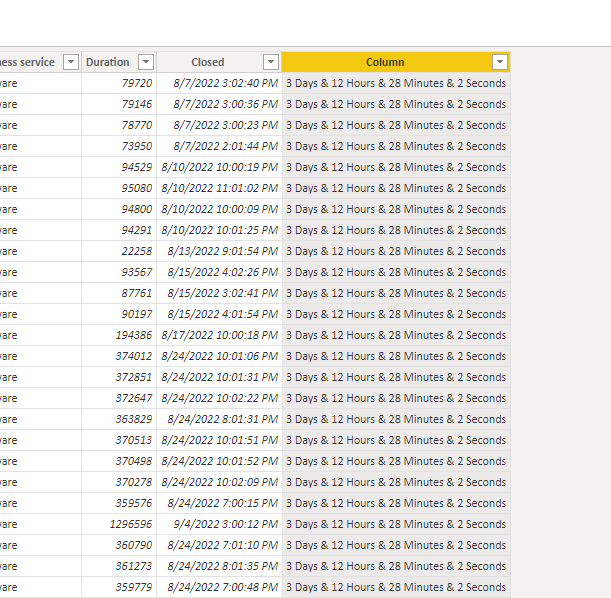
hello Good day, apply the code that comments, and I do not mark error, but in the whole column I add the same result, did not make the calculation for each row
The Power BI Data Visualization World Championships is back! Get ahead of the game and start preparing now!
| User | Count |
|---|---|
| 40 | |
| 38 | |
| 36 | |
| 29 | |
| 28 |
| User | Count |
|---|---|
| 127 | |
| 88 | |
| 78 | |
| 66 | |
| 64 |