Join us at FabCon Atlanta from March 16 - 20, 2026, for the ultimate Fabric, Power BI, AI and SQL community-led event. Save $200 with code FABCOMM.
Register now!The Power BI Data Visualization World Championships is back! Get ahead of the game and start preparing now! Learn more
Hello,
I have a column which represents seconds, but I need to now create a metric showing the average in days, hours, minutes and seconds. In the below example, this average of my column is 213955 seconds, which should equal to 2 Days 11 Hours 25 Minutes 55 Seconds. I'm not sure how to get this to show in a Power BI metric. The final output could either be one metric for a card, or separate cards to show the days, hours, minutes, seconds.
Would someone be able to assist with this? Thank you in advance
sample file - pbix file
Solved! Go to Solution.
@redwings00
Use the following measure to get the desired result:
New Time =
var vSeconds=AVERAGE(Sheet1[Seconds])
var vMinutes=int( vSeconds/60)
var vRemainingSeconds=MOD(vSeconds, 60)
var vHours=INT(vMinutes/60)
var vRemainingMinutes=MOD(vMinutes,60)
var vDays=INT(vHours/24)
var vRemainingHours=MOD(vHours,24)
return
vDays&" Days & "&
vRemainingHours&" Hours & "&
vRemainingMinutes&" Minutes & "&
ROUND(vRemainingSeconds,0)& " Seconds"
________________________
If my answer was helpful, please consider Accept it as the solution to help the other members find it
Click on the Thumbs-Up icon if you like this reply 🙂
⭕ Subscribe and learn Power BI from these videos
⚪ Website ⚪ LinkedIn ⚪ PBI User Group
@redwings00
Use the following measure to get the desired result:
New Time =
var vSeconds=AVERAGE(Sheet1[Seconds])
var vMinutes=int( vSeconds/60)
var vRemainingSeconds=MOD(vSeconds, 60)
var vHours=INT(vMinutes/60)
var vRemainingMinutes=MOD(vMinutes,60)
var vDays=INT(vHours/24)
var vRemainingHours=MOD(vHours,24)
return
vDays&" Days & "&
vRemainingHours&" Hours & "&
vRemainingMinutes&" Minutes & "&
ROUND(vRemainingSeconds,0)& " Seconds"
________________________
If my answer was helpful, please consider Accept it as the solution to help the other members find it
Click on the Thumbs-Up icon if you like this reply 🙂
⭕ Subscribe and learn Power BI from these videos
⚪ Website ⚪ LinkedIn ⚪ PBI User Group
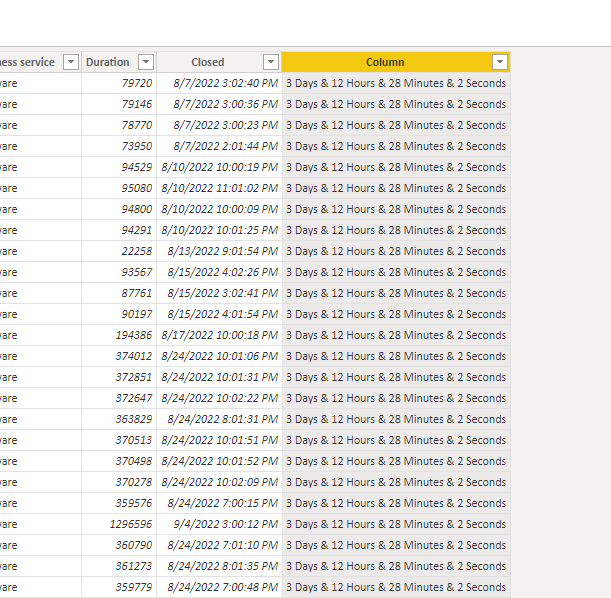
hello Good day, apply the code that comments, and I do not mark error, but in the whole column I add the same result, did not make the calculation for each row
The Power BI Data Visualization World Championships is back! Get ahead of the game and start preparing now!
Check out the November 2025 Power BI update to learn about new features.
| User | Count |
|---|---|
| 59 | |
| 43 | |
| 42 | |
| 23 | |
| 17 |
| User | Count |
|---|---|
| 190 | |
| 122 | |
| 96 | |
| 66 | |
| 47 |