This is best Fabric, Power BI, SQL and AI community event. How do we know? The last event sold out! Save €200 with code FABCMTY200.
Register nowA new Data Days event is coming soon! This time we’re going bigger than ever. Fabric, Power BI, SQL, AI and more. Don't miss out.
Hi All,
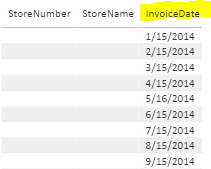
I need "Invoicedate" to be displayed in columns.
How to achieve this?
Should be displayed like this,
Regards,
Manivannan M
Solved! Go to Solution.
usually it is the other direction! - go to query editor - you'll see a section in the ribbon for transform, pivot, etc - there are also a bunch of good tutorial videos around showiing examples....
check out at YouTube for Enterprise DNA New Zealand has a video named Advanced Transformations
Hi @Manivannan,
I think pivot column feature will be suitable for your requirement, you can refer to below article to know more about this.
The New Pivot Column option in Power Query
Regards,
Xiaoxin Sheng
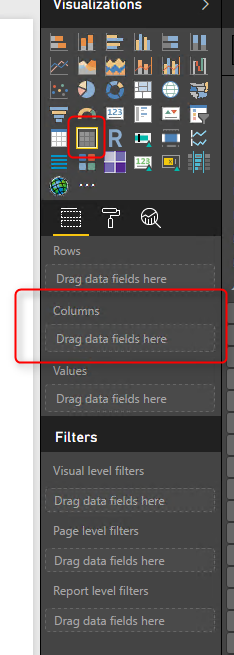
If you don't want to change your dataset structure, this can be easily done in Matrix table visual. Just drag the Invoice Date into the Columns as circled in the pic.
Cheers
Myra Ma
If you don't want to change your dataset structure, this can be easily done in Matrix table visual. Just drag the Invoice Date into the Columns as circled in the pic.
Cheers
Myra Ma
@MyraMainput really is preferable - - you should typically not de-normalize your data set.....
Hi @Manivannan,
I think pivot column feature will be suitable for your requirement, you can refer to below article to know more about this.
The New Pivot Column option in Power Query
Regards,
Xiaoxin Sheng
usually it is the other direction! - go to query editor - you'll see a section in the ribbon for transform, pivot, etc - there are also a bunch of good tutorial videos around showiing examples....
check out at YouTube for Enterprise DNA New Zealand has a video named Advanced Transformations
Sign up to receive a private message when registration opens and key events begin.
If you have recently started exploring Fabric, we'd love to hear how it's going. Your feedback can help with product improvements.
| User | Count |
|---|---|
| 33 | |
| 26 | |
| 21 | |
| 20 | |
| 15 |
| User | Count |
|---|---|
| 63 | |
| 43 | |
| 28 | |
| 24 | |
| 22 |