This time we’re going bigger than ever. Fabric, Power BI, SQL, AI and more. We're covering it all. You won't want to miss it.
Learn moreDid you hear? There's a new SQL AI Developer certification (DP-800). Start preparing now and be one of the first to get certified. Register now
Hello,
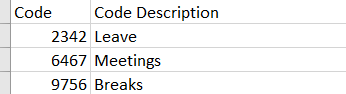
I need to convert data from one of my columns to new columns. I have two tables A and B. Table A is a measure table which has Total hours, billable hours, non billable hours measures. table B looks similar to the table in the screenshot below. Both These table are part of Power BI Dataset so I am not able to edit them into power query.
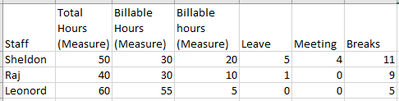
I want my end result as below table. Staff name field is from different table from the same PBI dataset. Total hours, Billable hours and Non Billable hours fields are measures from the measures table
Is this something possible to do?
Thank you very much in advance for your help.
Solved! Go to Solution.
Hi,
I was able to figure out a way to solve the issue I was having. I used the below formula to create new measures.
Hi,
I was able to figure out a way to solve the issue I was having. I used the below formula to create new measures.
@vchauhan011 , to me this seem like a hybrid table
if you are looking for a Hybrid display with Matrix Column and measure
https://community.powerbi.com/t5/Community-Blog/Creating-a-custom-or-hybrid-matrix-in-PowerBI/ba-p/1...
https://community.powerbi.com/t5/Quick-Measures-Gallery/The-New-Hotness-Custom-Matrix-Hierarchy/m-p/...
vote for Hybrid Table
https://ideas.powerbi.com/ideas/idea/?ideaid=9bc32b23-1eb1-4e74-8b34-349887b37ebc
Check out the April 2026 Power BI update to learn about new features.
Sign up to receive a private message when registration opens and key events begin.
If you have recently started exploring Fabric, we'd love to hear how it's going. Your feedback can help with product improvements.
| User | Count |
|---|---|
| 34 | |
| 31 | |
| 25 | |
| 20 | |
| 16 |
| User | Count |
|---|---|
| 60 | |
| 48 | |
| 29 | |
| 23 | |
| 23 |