Get certified for free when you join Fabric Data Days 2026 and dive into Fabric, Power BI, SQL, AI, and other essential data skills.
Join nowJuly 7 - July 17 | Round 2 of the Power BI Dataviz World Championships. Don't miss your chance! Learn more
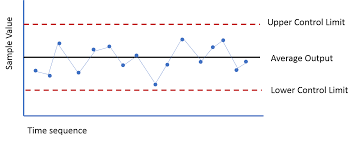
I need a control chart for the follwing requirement
Observed value1,
Observed value2,
Observed value3,
Observed value4,
Observed value5,
Observed value6,
Min Value,
Max Value,
Standard value
Please help on this
Solved! Go to Solution.
Hey @Anonymous
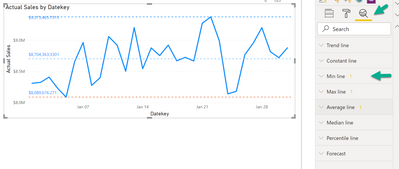
I guess you can achieve what you are looking for by using the Anylytics pane of the line chart:
Please be aware that all the Min/Max/... require a measure that is used inside the chart.
But maybe it's an idea set the color of the line to "white", if you have to use a different value for the upper and lower control limit.
I hope this what you are looking for, at least it will create some ideas.
Regards,
Tom
Hey @Anonymous
I guess you can achieve what you are looking for by using the Anylytics pane of the line chart:
Please be aware that all the Min/Max/... require a measure that is used inside the chart.
But maybe it's an idea set the color of the line to "white", if you have to use a different value for the upper and lower control limit.
I hope this what you are looking for, at least it will create some ideas.
Regards,
Tom
Instead of showing data points vertically, How I can show it horizontally?
Please help
Thanks for your quick help.
Join us in Barcelona for FabCon and SQLCon, the Fabric, Power BI, SQL, and AI community event. Save €200 with code FABCMTY200.
Join Fabric Data Days 2026: 60 days of free live/on-demand sessions, challenges, study groups, and certification opportunities.
| User | Count |
|---|---|
| 22 | |
| 22 | |
| 18 | |
| 17 | |
| 13 |
| User | Count |
|---|---|
| 61 | |
| 52 | |
| 47 | |
| 41 | |
| 38 |