Don't miss your chance to take the Fabric Data Engineer (DP-700) exam on us!
Learn moreWe've captured the moments from FabCon & SQLCon that everyone is talking about, and we are bringing them to the community, live and on-demand. Starts on April 14th. Register now
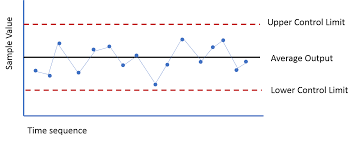
I need a control chart for the follwing requirement
Observed value1,
Observed value2,
Observed value3,
Observed value4,
Observed value5,
Observed value6,
Min Value,
Max Value,
Standard value
Please help on this
Solved! Go to Solution.
Hey @Anonymous
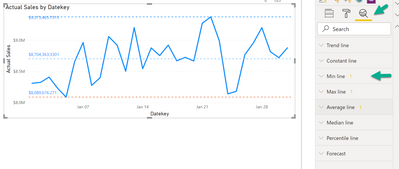
I guess you can achieve what you are looking for by using the Anylytics pane of the line chart:
Please be aware that all the Min/Max/... require a measure that is used inside the chart.
But maybe it's an idea set the color of the line to "white", if you have to use a different value for the upper and lower control limit.
I hope this what you are looking for, at least it will create some ideas.
Regards,
Tom
Hey @Anonymous
I guess you can achieve what you are looking for by using the Anylytics pane of the line chart:
Please be aware that all the Min/Max/... require a measure that is used inside the chart.
But maybe it's an idea set the color of the line to "white", if you have to use a different value for the upper and lower control limit.
I hope this what you are looking for, at least it will create some ideas.
Regards,
Tom
Instead of showing data points vertically, How I can show it horizontally?
Please help
Thanks for your quick help.
If you have recently started exploring Fabric, we'd love to hear how it's going. Your feedback can help with product improvements.
A new Power BI DataViz World Championship is coming this June! Don't miss out on submitting your entry.
Share feedback directly with Fabric product managers, participate in targeted research studies and influence the Fabric roadmap.
| User | Count |
|---|---|
| 55 | |
| 34 | |
| 31 | |
| 19 | |
| 17 |
| User | Count |
|---|---|
| 74 | |
| 71 | |
| 38 | |
| 35 | |
| 25 |