Get certified for free when you join Fabric Data Days 2026 and dive into Fabric, Power BI, SQL, AI, and other essential data skills.
Join nowJuly 7 - July 17 | Round 2 of the Power BI Dataviz World Championships. Don't miss your chance! Learn more
Hi,
I am using Direct Query mode in my power bi report.
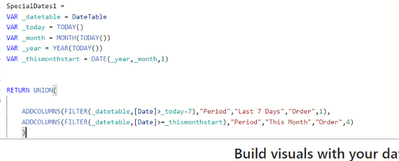
I have created date table in power bi like below :
I am also using special dates (e.g. Last 7 days, Last Month). So I have created that power bi table like below :
I gave relationship to both the above tables using Date.
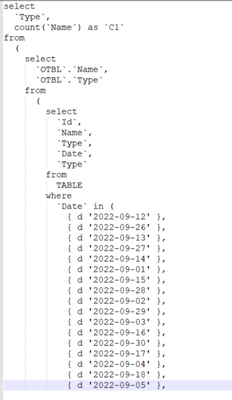
Question : When I use date slicer to filter my report, SQL query automatically generated and it uses Where Dates IN (dt1,dt2) query. Due to large date range, IN operator works slow. Please see below screenshot :
Is there any way I can control this query or change my implementation of report so that query should be where Dates Between 'dt1' and 'dt2'. So that it improves overall result time.
Change your implementation. Maintain your dates table in SQL (table or view), and - ideally- change it to import mode with daily refresh. There is really no need to recompute that table for every query,
Join us in Barcelona for FabCon and SQLCon, the Fabric, Power BI, SQL, and AI community event. Save €200 with code FABCMTY200.
Join Fabric Data Days 2026: 60 days of free live/on-demand sessions, challenges, study groups, and certification opportunities.
| User | Count |
|---|---|
| 22 | |
| 22 | |
| 18 | |
| 17 | |
| 13 |
| User | Count |
|---|---|
| 61 | |
| 52 | |
| 47 | |
| 41 | |
| 38 |