cancel
Showing results for 
Search instead for 
Did you mean: 

The Power BI Data Visualization World Championships is back! Get ahead of the game and start preparing now! Learn more

Reply
mibu
Microsoft Employee
Microsoft Employee

Contoso Dataset

Hey Team,


I downloaded:

Contoso BI Demo Dataset for Retail Industry from Microsoft Download Center here

The download contains two files as follows:

Contoso_Retail.abf

ContosoRetailDW.bak


After extracting the two files from the download...  the instructions say the following:

To restore and process the Contoso BI Demo dataset:
1. Open SQL Server Management Studio, and select Database Engine.  DID THIS
2. Enter the Server name and click Restore Database….  WHAT IS THE SERVER NAME??
3. Restore ContosoRetailDW.bak file to ContosoRetailDW database.
5. Connect to Analysis Services in SQL Server Management Studio and restore ContosoRetail.abf backup file to Contoso_Retail OLAP database.
6. Verify Data Sources of Contoso_Retail is connecting to ContosoRetailDW,
7. Click Process.


My question is:  What is the Server name from Step 2 above?


Thank you!!

mibu

2 REPLIES 2
amitchandak
Super User
Super User

@mibu , As far as I understand, you need to have your own database.

say Azure SQL, then that will be url

or local SQL server then you will url like localhost or localhost \sqlexpress


You can create new database


In case you want to install express edition

SQL - https://www.youtube.com/watch?v=ThCZYuYAbnY&list=PLPaNVDMhUXGblXMYDB1P46cBhwPXRVgiD

Share with Power BI Enthusiasts: Full Power BI Video (20 Hours) YouTube
Microsoft Fabric Series 60+ Videos YouTube
Microsoft Fabric Hindi End to End YouTube
mibu
Microsoft Employee
Microsoft Employee

Hi Amit!

Thanks for the guidance and your awesome part 1 SQL video on YouTube here

From what I learned, I was able to successfully restore ContosoRetailDW.bak
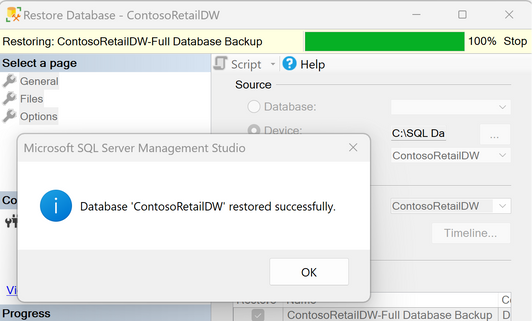
23092201  Screenshot 2023-09-22 145602.png

So, awesome...  halfway there.


Then...  I try and perform Step 5 from above:  Connect to Analysis Services in SQL Server Management Studio and restore ContosoRetail.abf backup file to Contoso_Retail OLAP database as follows:
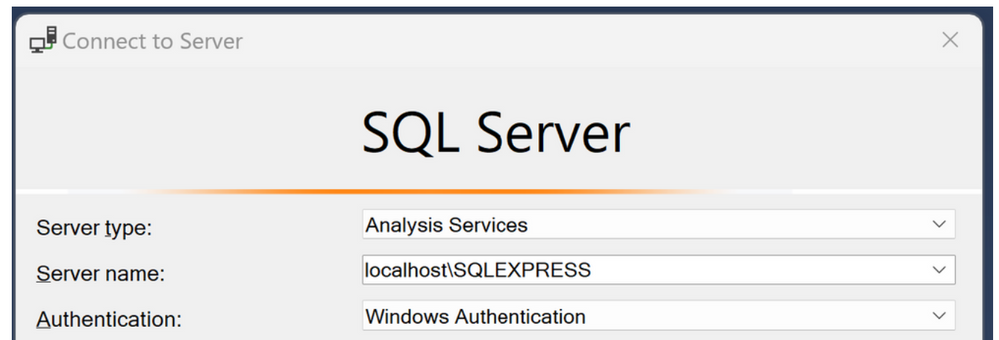
23092204  Screenshot 2023-09-22 175143.png

But then I get the following error message:

TITLE: Connect to Server
------------------------------

Cannot connect to localhost\SQLEXPRESS.

------------------------------
ADDITIONAL INFORMATION:

A connection cannot be made to redirector. Ensure that 'SQL Browser' service is running. (Microsoft.AnalysisServices.AdomdClient)


I confirmed 'SQL Server Browser' service is running...

In fact, all SQL Services are running...  except for SQL Server Agent (SQLEXPRESS)...

I start it...  but then it automatically stops...  I can't get it to stay Running.

Going Start...  typing run...  typing  services.msc   and checking all SQL
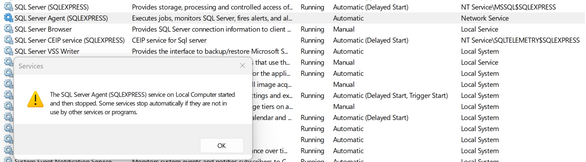
23092203  Screenshot 2023-09-22 174302.png


------------------------------

No connection could be made because the target machine actively refused it #.#.#.#:# (System)  (Numbers masked for security purposes.)

------------------------------
BUTTONS:

OK
------------------------------

@amitchandak  Thoughts on how to work though this Analysis Services issue and complete Step 5,6,7?


Thanks!


Best,

mibu

Helpful resources

Announcements
Power BI DataViz World Championships

Power BI Dataviz World Championships

The Power BI Data Visualization World Championships is back! Get ahead of the game and start preparing now!

December 2025 Power BI Update Carousel

Power BI Monthly Update - December 2025

Check out the December 2025 Power BI Holiday Recap!

FabCon Atlanta 2026 carousel

FabCon Atlanta 2026

Join us at FabCon Atlanta, March 16-20, for the ultimate Fabric, Power BI, AI and SQL community-led event. Save $200 with code FABCOMM.