cancel
Showing results for 
Search instead for 
Did you mean: 

A new Data Days event is coming soon! This time we’re going bigger than ever. Fabric, Power BI, SQL, AI and more. Don't miss out.

Reply
dilumd
Impactful Individual

Continuous Attendance

Hi Everyone,


I have below table with employee attendance data from which I need to identify whether there is any employee who has reported to work continuously for 7 days or more. Pls help, may data look like this. Thank you inadvance !


EMP NoDate
19/17/2018
19/18/2018
19/19/2018
19/20/2018
19/21/2018
19/22/2018
19/23/2018
19/25/2018
19/26/2018
19/27/2018
19/28/2018
19/29/2018
19/30/2018
29/17/2018
29/19/2018
29/20/2018
29/21/2018
29/22/2018
29/23/2018
29/24/2018
29/25/2018
29/27/2018
29/28/2018
29/29/2018
29/30/2018
39/17/2018
39/19/2018
39/20/2018
39/21/2018
39/22/2018
39/24/2018
39/25/2018
39/27/2018
39/28/2018
39/29/2018
39/30/2018
49/17/2018
49/18/2018
49/19/2018
49/20/2018
49/21/2018
49/22/2018
49/23/2018
49/24/2018
49/25/2018
49/26/2018
49/27/2018
49/28/2018
49/29/2018
49/30/2018
1 ACCEPTED SOLUTION
Zubair_Muhammad
Community Champion
Community Champion

@dilumd


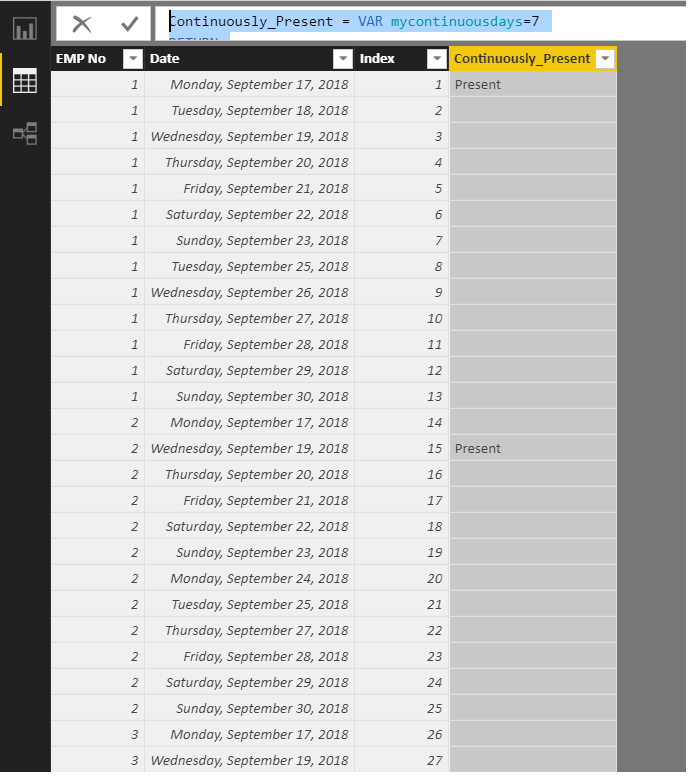
Try this calculated column.

 It will identify the first day when consecutive 7 days start for each employee

You can then use it as VISUAL filter


Continuously_Present =
VAR mycontinuousdays = 7
RETURN
    IF (
        [Date] + mycontinuousdays
            - 1
            = CALCULATE (
                MIN ( [Date] ),
                FILTER (
                    Table1,
                    [EMP No] = EARLIER ( [EMP No] )
                        && [Index]
                            = EARLIER ( [Index] ) + mycontinuousdays
                                - 1
                )
            ),
        "Present"
    )

 cp.png

View solution in original post

3 REPLIES 3
jrajesh61
Frequent Visitor

Hi, I'm trying to solve similar problem to find the employee count who consectively worked more than 6 days. I'm using power Pivot to solve the same but I'm getting below error. My data looks similar some what similar

jrajesh61_2-1726068613651.png


Zubair_Muhammad
Community Champion
Community Champion

@dilumd


Try this calculated column.

 It will identify the first day when consecutive 7 days start for each employee

You can then use it as VISUAL filter


Continuously_Present =
VAR mycontinuousdays = 7
RETURN
    IF (
        [Date] + mycontinuousdays
            - 1
            = CALCULATE (
                MIN ( [Date] ),
                FILTER (
                    Table1,
                    [EMP No] = EARLIER ( [EMP No] )
                        && [Index]
                            = EARLIER ( [Index] ) + mycontinuousdays
                                - 1
                )
            ),
        "Present"
    )

 cp.png

Thank a lot @Zubair_Muhammad


Helpful resources

Announcements
May Power BI Update Carousel

Power BI Monthly Update - May 2026

Check out the May 2026 Power BI update to learn about new features.

Fabric SQL PBI Data Days

Data Days 2026 coming soon!

Sign up to receive a private message when registration opens and key events begin.

New to Fabric survey Carousel

New to Fabric Survey

If you have recently started exploring Fabric, we'd love to hear how it's going. Your feedback can help with product improvements.

Power BI DataViz World Championships carousel

Power BI DataViz World Championships - June 2026

A new Power BI DataViz World Championship is coming this June! Don't miss out on submitting your entry.