Share feedback directly with Fabric product managers, participate in targeted research studies and influence the Fabric roadmap.
Sign up nowGet Fabric certified for FREE! Don't miss your chance! Learn more
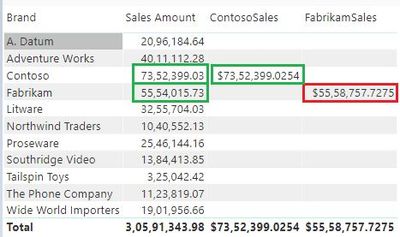
In the below image, you can see that there are different results for the Fabrikam brand.
The following are the dax measures.
Fabrikam Sales= sumx(
filter(Sales,
Related(Product[Brand])="Fabrikam"
),[Sales Amount)
Contosa Sales= sumx(
filter(Sales,
Related(Product[Brand])="Contoso"
),[Sales Amount)
I know that the above DAX measures are not the correct approach. but i want to understand the context transitions issues in the above measures. Datalink Path shared.
I wanted to know why Fabrikam Sales measure value is not matching with the Fabrikam Sales Amount Value. My doubt is that if there are context transitions issues in Fabrikam Sales then the same is applicable for Contoso brand. How ContosaSales Measure is successful. Why it did not show the difference in values. I want to know the row value of fabrikam Sales that have resulted into difference of values.
This is required for understanding purposes.
Solved! Go to Solution.
So far, I localize a diffrenece here
https://drive.google.com/file/d/10R7pTMTVhI3DVZuc7e6mV7QrAWq_-G-I/view?usp=sharing
Data link Path shared
there is no access to your data sample, please, check access policy
Sorry my mistake. Please check the below link.
https://drive.google.com/file/d/10R7pTMTVhI3DVZuc7e6mV7QrAWq_-G-I/view?usp=sharing
So far, I localize a diffrenece here
from the first sight I see two options here
1. a complex measure like
Sales by Brand = calculate([Sales Amount],
ALLEXCEPT(Sales, 'Product'[Brand]))
2. a fabrikam Measure
FabrikamSales =
IF(
SELECTEDVALUE('Product'[Brand])="Fabrikam",
calculate([Sales Amount], 'Product'[Brand]="Fabrikam"),
BLANK()
)
Thank you very much.
If you love stickers, then you will definitely want to check out our Community Sticker Challenge!
Check out the January 2026 Power BI update to learn about new features.
| User | Count |
|---|---|
| 64 | |
| 63 | |
| 48 | |
| 21 | |
| 18 |
| User | Count |
|---|---|
| 118 | |
| 117 | |
| 38 | |
| 36 | |
| 27 |