cancel
Showing results for 
Search instead for 
Did you mean: 

July 28 - August 9 | Final Round of the Power BI Dataviz World Championships. This is your chance. Learn more

Reply
Nikki
Helper II
Helper II

Contains Formula

Hi there I have a series of custom columns example:


Concept (result is either pass fail or query)

Initiative (result is either pass fail or query)

Project (result is either pass fail or query)

Brief (result is either pass fail or query)


I need to then write a formula that tells me the following:


Overall Result = if any result of the 4 comes back a fail - its fail, if any result comes back a query - its query else Pass.


can you please help me? what is the best option for this formula?

thanks

🙂

1 ACCEPTED SOLUTION
Anonymous
Not applicable

Hi @Nikki ,


Create a Calculated Column


Status =
SWITCH (
    TRUE (),
    'Table'[Concept] = "Fail"
        || 'Table'[Initiative] = "Fail"
        || 'Table'[Project] = "Fail"
        || 'Table'[Brief] = "Fail", "Fail",
    'Table'[Concept] = "Query"
        || 'Table'[Initiative] = "Query"
        || 'Table'[Project] = "Query"
        || 'Table'[Brief] = "Query", "Query",
    "Pass"
)


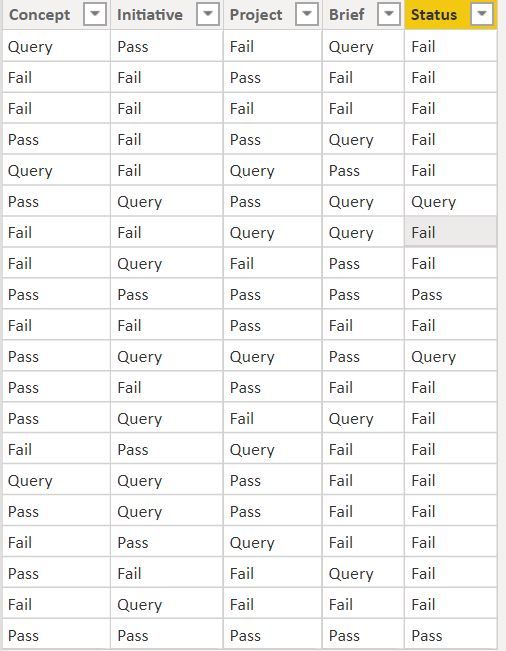
1.jpg


Regards,

Harsh Nathani


Appreciate with a Kudos!! (Click the Thumbs Up Button)

Did I answer your question? Mark my post as a solution!

View solution in original post

5 REPLIES 5
Anonymous
Not applicable

Hi @Nikki ,


Create a Calculated Column


Status =
SWITCH (
    TRUE (),
    'Table'[Concept] = "Fail"
        || 'Table'[Initiative] = "Fail"
        || 'Table'[Project] = "Fail"
        || 'Table'[Brief] = "Fail", "Fail",
    'Table'[Concept] = "Query"
        || 'Table'[Initiative] = "Query"
        || 'Table'[Project] = "Query"
        || 'Table'[Brief] = "Query", "Query",
    "Pass"
)


1.jpg


Regards,

Harsh Nathani


Appreciate with a Kudos!! (Click the Thumbs Up Button)

Did I answer your question? Mark my post as a solution!

Hi Again


my formula worked:


Concept Stage Status =
SWITCH (
TRUE (),
'Projects'[Concept Status] = "Fail"
    || 'Projects'[P20 Status] = "Fail"
|| 'Projects'[Pact Status] = "Fail"
|| 'Projects'[SPOE Status] = "Fail"
    || 'Projects'[Seed Funding Artefact Status] = "Fail",
     "Fail",
'Projects'[Concept Status] = "Query"
|| 'Projects'[P20 Status] = "Query"
    || 'Projects'[Pact Status] = "Query"
    || 'Projects'[Seed Funding Artefact Status] = "Query"
|| 'Projects'[SPOE Status] = "Query", "Query",
"Pass"
)
 
but now i have another challenge. I need to only show a result (pass, query or fail) only if the project is in the concept stage. or it has already been thru that stage.
 
I have another table that flags the stage  which is concept, evaluate, design, build , close
 
i reapted the above formula for each stage result. but if i am in evaluate i shoudl see a result for concept and evaluate but not for design build close.
 
i have another table that keeps track of what stage the project is in called projectstage (it has either in progress or completed. for each 5 stages)
 
what is best way to achieve this ?

You could use RELATED or LOOKUPVALUE to bring the value from other tables virtually for the duration of the calculation and check if it matches a condition.
AntrikshSharma
Community Champion
Community Champion

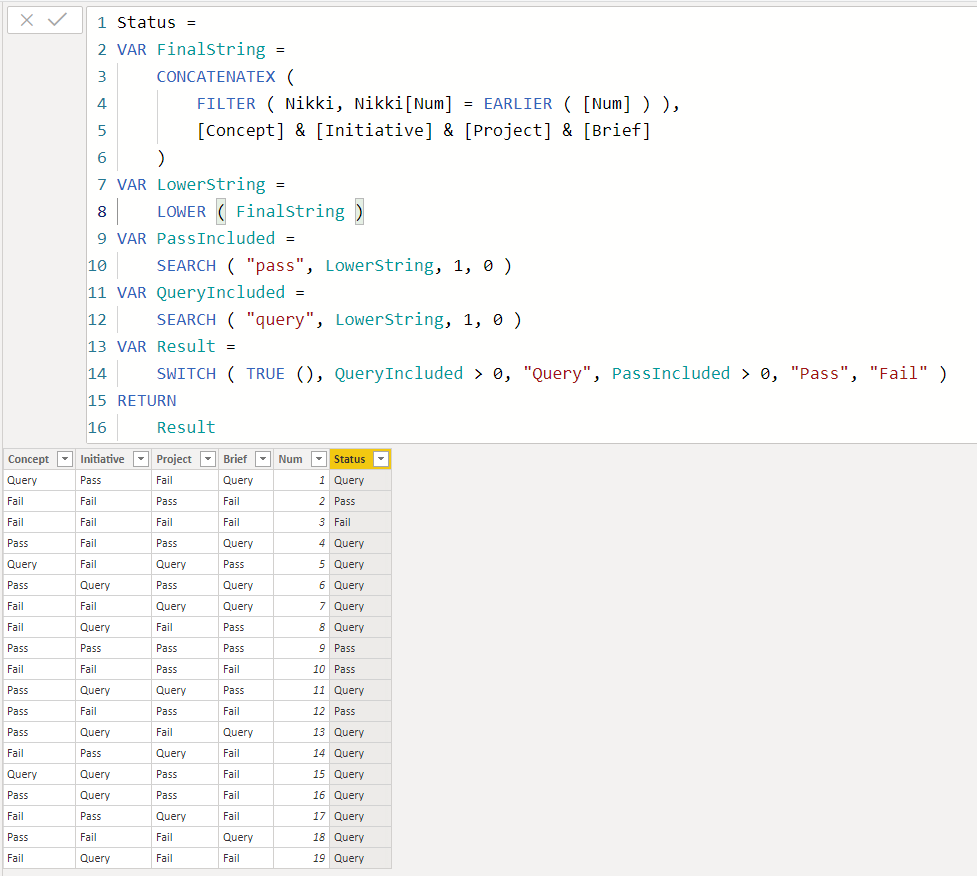
Maybe try something like this:

Status =
VAR FinalString =
    CONCATENATEX (
        FILTER ( Nikki, Nikki[Num] = EARLIER ( [Num] ) ),
        [Concept] & [Initiative] & [Project] & [Brief]
    )
VAR LowerString =
    LOWER ( FinalString )
VAR PassIncluded =
    SEARCH ( "pass", LowerString, 1, 0 )
VAR QueryIncluded =
    SEARCH ( "query", LowerString, 1, 0 )
VAR Result =
    SWITCH ( TRUE (), QueryIncluded > 0, "Query", PassIncluded > 0, "Pass", "Fail" )
RETURN
    Result

Nikki.PNG

thanks so much !!

Helpful resources

Announcements
FabCon and SQLCon Barcelona 2026

FabCon & SQLCon – Barcelona 2026

Join us in Barcelona for FabCon and SQLCon, the Fabric, Power BI, SQL, and AI community event. Save €200 with code FABCMTY200.

Fabric Community Sticker Design Challenge Barcelona Carousel

Fabric Community Sticker Challenge - Barcelona 2026

If you love stickers, then you will definitely want to check out our community sticker challenge, Barcelona edition!

July Power BI Update Carousel

Power BI Monthly Update - July 2026

Check out the July 2026 Power BI update to learn about new features.

Power BI DataViz World Championships carousel

Power BI DataViz World Championships - June 2026

A new Power BI DataViz World Championship is coming this June! Don't miss out on submitting your entry.