cancel
Showing results for 
Search instead for 
Did you mean: 

The Power BI Data Visualization World Championships is back! Get ahead of the game and start preparing now! Learn more

Reply
Anonymous
Not applicable

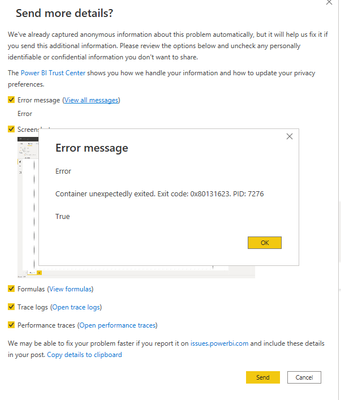
Container unexpectedly exited. Exit code: 0x80131623

I can't connect to source data which is an excel file on my company's Sharepoint.

Everytime I try to enter the link I got the "Something went wrong" message. Then I click Report the issue button I got this:


SirRosher_0-1635331478416.png

Is there any way I can fix that? It has to be a way to get data directly from file on Sharepoint...

2 REPLIES 2
V-lianl-msft
Community Support
Community Support

Hi @Anonymous ,


Unfortunately, I have never encountered such a situation.

When ensuring that the address of the data source and the credential is correct,please try to go to Options -> Global -> Data Load and click Clear Cache.


Best Regards,
Liang
If this post helps, then please consider Accept it as the solution to help the other members find it more quickly.

amitchandak
Super User
Super User

@Anonymous , have taken the excel URL as suggested in this document ?

https://docs.microsoft.com/en-us/power-bi/connect-data/desktop-use-onedrive-business-links

Share with Power BI Enthusiasts: Full Power BI Video (20 Hours) YouTube
Microsoft Fabric Series 60+ Videos YouTube
Microsoft Fabric Hindi End to End YouTube

Helpful resources

Announcements
Power BI DataViz World Championships

Power BI Dataviz World Championships

The Power BI Data Visualization World Championships is back! Get ahead of the game and start preparing now!

December 2025 Power BI Update Carousel

Power BI Monthly Update - December 2025

Check out the December 2025 Power BI Holiday Recap!

FabCon Atlanta 2026 carousel

FabCon Atlanta 2026

Join us at FabCon Atlanta, March 16-20, for the ultimate Fabric, Power BI, AI and SQL community-led event. Save $200 with code FABCOMM.