cancel
Showing results for 
Search instead for 
Did you mean: 

The Power BI Data Visualization World Championships is back! Get ahead of the game and start preparing now! Learn more

Reply
Arul
Super User
Super User

RANKX changes while applying RLS

Hi All,


I have a requiremnt to calculate the rank based on all the data in the report while applying the RLS as well. But, I'm not able to achieve excpected result. Could anyone help me on this?


Thanks,

-Arul


Did I answer your question? Mark my post as a solution!

Proud to be a Super User!


LinkedIn


1 ACCEPTED SOLUTION
Gaurav_Lakhotia
Helper III
Helper III

Hi @Arul, see RLS will filter out the data from the model. There is no way to skip filtering while using RLS. You can create a separate/reference table & do not create any relationship within the model.

View solution in original post

5 REPLIES 5
Anonymous
Not applicable

HI @Arul,

Did the above suggestions help with your scenario? if that is the case, you can consider Kudo or accept the helpful suggestions to help others who faced similar requirements.

If these also don't help, please share more detailed information to help us clarify your scenario to test.

How to Get Your Question Answered Quickly 

Regards,

Xiaoxin Sheng

Gaurav_Lakhotia
Helper III
Helper III

Hi @Arul, see RLS will filter out the data from the model. There is no way to skip filtering while using RLS. You can create a separate/reference table & do not create any relationship within the model.

Hi @Gaurav_Lakhotia ,


Do we have any official document for this to refer?


Thanks,

-Arul


Did I answer your question? Mark my post as a solution!

Proud to be a Super User!


LinkedIn


Hi @Arul,

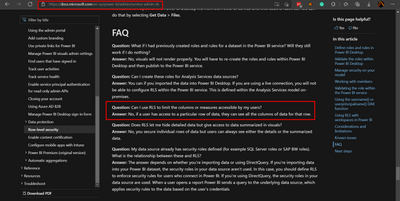
Here is a similar answer mentioned in the FAQ.

Gaurav_Lakhotia_0-1635330993883.png


If the user has access to the data, then only he can access all of it or vice versa. You can only see filtered data. There is no way to manipulate RLS filtering. You have to create a separate table.


If this post helps, please consider accepting it as the solution to help the other members find it more quickly.

Appreciate your Kudos

Gaurav_Lakhotia_0-1635339221826.png


Let me check.


Did I answer your question? Mark my post as a solution!

Proud to be a Super User!


LinkedIn


Helpful resources

Announcements
Power BI DataViz World Championships

Power BI Dataviz World Championships

The Power BI Data Visualization World Championships is back! Get ahead of the game and start preparing now!

December 2025 Power BI Update Carousel

Power BI Monthly Update - December 2025

Check out the December 2025 Power BI Holiday Recap!

FabCon Atlanta 2026 carousel

FabCon Atlanta 2026

Join us at FabCon Atlanta, March 16-20, for the ultimate Fabric, Power BI, AI and SQL community-led event. Save $200 with code FABCOMM.