cancel
Showing results for 
Search instead for 
Did you mean: 

Get Fabric Certified for FREE during Fabric Data Days. Don't miss your chance! Request now

Reply
wynhodgkiss
Advocate II
Advocate II

Constant lines on dual axis charts

Hi,

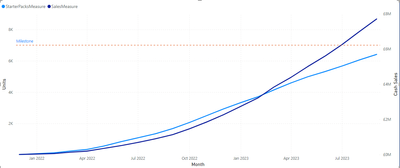
I have a dual axis chart:

1.png

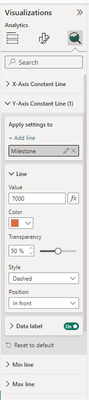
and I'm able to add a constant line against the Y axis but not the secondary Y axis, am I missing something?

2.png

1 ACCEPTED SOLUTION
Ritaf1983
Super User
Super User

Hi @wynhodgkiss 
You don't miss anything.
We don't have it as a functionality of a constant,
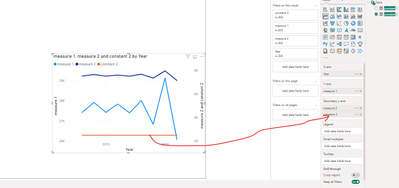
But you can create another measure for a second constant and put it on the second Y-axis directly 

Ritaf1983_0-1701363501476.png

PBIX is attached

If this post helps, then please consider Accepting it as the solution to help the other

members find it more quickly

Regards,
Rita Fainshtein | Microsoft MVP
https://www.linkedin.com/in/rita-fainshtein/
Blog : https://www.madeiradata.com/profile/ritaf/profile

View solution in original post

3 REPLIES 3
wynhodgkiss
Advocate II
Advocate II

I know, I just prefer the format of the constant line. It doesn't add an entry to the legend and you have more control over the format of the label etc

Any idea if there is an existing idea to vote for to have this added? If not, I'll start one myself

@wynhodgkiss 
I didn't find any idea about the issue, you can suggest here :

https://ideas.fabric.microsoft.com/

According to the legend, you can switch it off and use series labels instead

Ritaf1983_0-1701365681160.png

or generate the legend according to your needs manually like in my suggestion in the linked post :

https://community.fabric.microsoft.com/t5/Desktop/Can-t-change-column-legend-to-gradient-for-line-an...


From the perspective of efficient data visualization, using a graph with 2 y-axes is not considered a best practice. Introducing constant lines further complicates the interpretation for the graph's reader. I recommend creating two separate graphs and arranging them vertically, one below the other.

like in the picture :
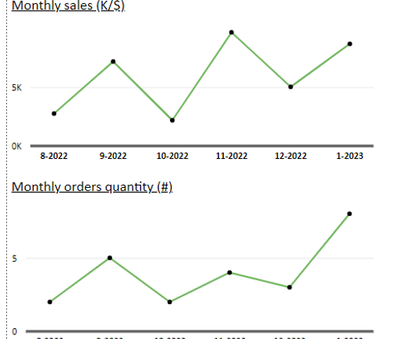
Ritaf1983_1-1701366344758.png

more information about the troubles of 2 axes graphs is in the link:

https://blog.datawrapper.de/dualaxis/


If this post helps, then please consider Accepting it as the solution to help the other

members find it more quickly

Regards,
Rita Fainshtein | Microsoft MVP
https://www.linkedin.com/in/rita-fainshtein/
Blog : https://www.madeiradata.com/profile/ritaf/profile
Ritaf1983
Super User
Super User

Hi @wynhodgkiss 
You don't miss anything.
We don't have it as a functionality of a constant,
But you can create another measure for a second constant and put it on the second Y-axis directly 

Ritaf1983_0-1701363501476.png

PBIX is attached

If this post helps, then please consider Accepting it as the solution to help the other

members find it more quickly

Regards,
Rita Fainshtein | Microsoft MVP
https://www.linkedin.com/in/rita-fainshtein/
Blog : https://www.madeiradata.com/profile/ritaf/profile

Helpful resources

Announcements
November Power BI Update Carousel

Power BI Monthly Update - November 2025

Check out the November 2025 Power BI update to learn about new features.

Fabric Data Days Carousel

Fabric Data Days

Advance your Data & AI career with 50 days of live learning, contests, hands-on challenges, study groups & certifications and more!

FabCon Atlanta 2026 carousel

FabCon Atlanta 2026

Join us at FabCon Atlanta, March 16-20, for the ultimate Fabric, Power BI, AI and SQL community-led event. Save $200 with code FABCOMM.

Top Solution Authors
Top Kudoed Authors