Hi,
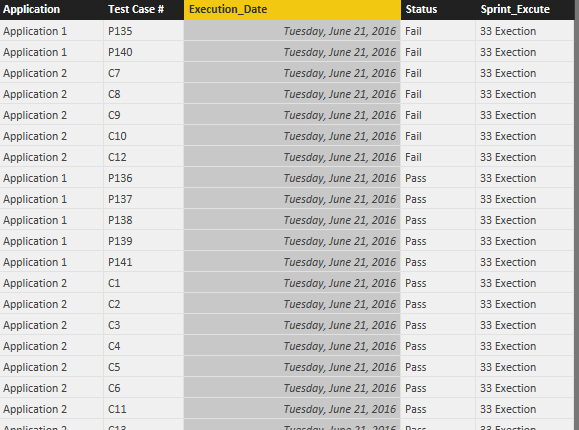
I am using an excel based testing metrics to track the day of testing (Sprint _execution_ Date) and status for the test cases executed on that day(Sprint_status). These sprints repeat as and when test cases are executed and corresponding status are populated by testers. Also, we have multiple applications.
I want to use Power BI to create the visualizations to interpret :
1. Days testcases were executed for all applications, how many were executed, how many passed and how many failed.
2. Using a slicer, if I select individual application , date of execution, status of execution and total executed are displayed.
3. If all applications are selected, same data is shown as consolidated for all apps.
The number of sprints will increase as and when testing is conducted.
Below is the snapshot of the data:
| Application | Test Case # | _Sprint_33_Execution_Date | Sprint 33 Status | _Sprint_34_Execution_Date | Sprint 34 Status | _Sprint_35_Execution_Date | Sprint 35 Status |
| Application 1 | P135 | 6/21/2016 | Fail | 6/22/2016 | Fail | 6/23/2016 | Fail |
| Application 1 | P136 | 6/21/2016 | Pass | 6/22/2016 | Pass | 6/23/2016 | Pass |
| Application 1 | P137 | 6/21/2016 | Pass | 6/22/2016 | Pass | 6/23/2016 | Pass |
| Application 1 | P138 | 6/21/2016 | Pass | 6/22/2016 | Pass | 6/23/2016 | Pass |
| Application 1 | P139 | 6/21/2016 | Pass | 6/22/2016 | Pass | 6/23/2016 | Pass |
| Application 1 | P140 | 6/21/2016 | Fail | 6/22/2016 | Fail | 6/23/2016 | Fail |
| Application 1 | P141 | 6/21/2016 | Pass | 6/22/2016 | Pass | 6/23/2016 | Pass |
| Application 1 | P142 | | | | | | |
| Application 1 | P143 | | | | | | |
| Application 2 | C1 | 6/21/2016 | Pass | 6/22/2016 | Pass | 6/23/2016 | Pass |
| Application 2 | C2 | 6/21/2016 | Pass | 6/22/2016 | Pass | 6/23/2016 | Pass |
| Application 2 | C3 | 6/21/2016 | Pass | 6/22/2016 | Pass | 6/23/2016 | Pass |
| Application 2 | C4 | 6/21/2016 | Pass | 6/22/2016 | Pass | 6/23/2016 | Pass |
| Application 2 | C5 | 6/21/2016 | Pass | 6/22/2016 | Pass | 6/23/2016 | Pass |
| Application 2 | C6 | 6/21/2016 | Pass | 6/22/2016 | Pass | 6/23/2016 | Pass |
| Application 2 | C7 | 6/21/2016 | Fail | 6/22/2016 | Fail | 6/23/2016 | Pass |
| Application 2 | C8 | 6/21/2016 | Fail | 6/22/2016 | Fail | 6/23/2016 | Pass |
| Application 2 | C9 | 6/21/2016 | Fail | 6/22/2016 | Pass | 6/23/2016 | Pass |
| Application 2 | C10 | 6/21/2016 | Fail | 6/22/2016 | Pass | 6/23/2016 | Pass |
| Application 2 | C11 | 6/21/2016 | Pass | 6/22/2016 | Pass | 6/23/2016 | Pass |
| Application 2 | C12 | 6/21/2016 | Fail | 6/22/2016 | Pass | 6/23/2016 | Pass |
| Application 2 | C13 | 6/21/2016 | Pass | 6/22/2016 | Pass | 6/23/2016 | Pass |
| Application 2 | C14 | 6/21/2016 | Pass | 6/22/2016 | Pass | 6/23/2016 | Pass |
| Application 2 | C15 | 6/21/2016 | Pass | 6/22/2016 | Pass | 6/23/2016 | Pass |
| Application 2 | C16 | 6/21/2016 | Pass | 6/22/2016 | Pass | 6/23/2016 | Pass |
| Application 2 | C17 | 6/21/2016 | Pass | 6/22/2016 | Pass | 6/23/2016 | Pass |
| Application 2 | C18 | 6/21/2016 | Pass | 6/22/2016 | Pass | 6/23/2016 | Pass |