Get Fabric or SQL Certified for Free.
Get certified for free when you join Fabric Data Days 2026 and dive into Fabric, Power BI, SQL, AI, and other essential data skills.
Join now- Power BI forums
- Get Help with Power BI
- Desktop
- Service
- Report Server
- Power Query
- Mobile Apps
- Developer
- DAX Commands and Tips
- Custom Visuals Development Discussion
- Health and Life Sciences
- Power BI Spanish forums
- Translated Spanish Desktop
- Training and Consulting
- Instructor Led Training
- Dashboard in a Day for Women, by Women
- Galleries
- Data Stories Gallery
- Themes Gallery
- Contests Gallery
- QuickViz Gallery
- Quick Measures Gallery
- Visual Calculations Gallery
- Fabric Apps Gallery
- Notebook Gallery
- Translytical Task Flow Gallery
- TMDL Gallery
- R Script Showcase
- Webinars and Video Gallery
- Ideas
- Custom Visuals Ideas (read-only)
- Issues
- Issues
- Events
- Upcoming Events
July 28 - August 9 | Final Round of the Power BI Dataviz World Championships. This is your chance. Learn more
- Power BI forums
- Forums
- Get Help with Power BI
- Desktop
- Re: Connection PowerBI with Python Script for Asso...
- Subscribe to RSS Feed
- Mark Topic as New
- Mark Topic as Read
- Float this Topic for Current User
- Bookmark
- Subscribe
- Printer Friendly Page

- Mark as New
- Bookmark
- Subscribe
- Mute
- Subscribe to RSS Feed
- Permalink
- Report Inappropriate Content
Connection PowerBI with Python Script for Association Rules
Hello,
I have a dataframe in PowerBI and I want to conduct Market Basket Analysis(Association Rules) on it, with a Python Script and then present the results through PowerBI.
However, some of the input variables should be defined from the user (e.g. Customer Type, Time Period etc). These input parameters, would be the ones that would initialize the python script that would run in the background on the fly.
The results woud be then presented in PowerBI, with a table,graph etc.
Sounds like this is something possible?
Solved! Go to Solution.


- Mark as New
- Bookmark
- Subscribe
- Mute
- Subscribe to RSS Feed
- Permalink
- Report Inappropriate Content
the input variables should be defined from the user (e.g. Customer Type, Time Period etc) :
this info needs to be in the dataset. In other words, you can create slicers in Power BI for user input, such as Customer Type, Time Period. These slicers can be linked to your data so that it's filtered based on the user's choice.
Proud to be a Power BI Super User !
Microsoft Community : https://docs.microsoft.com/en-us/users/AmiraBedhiafi
Linkedin : https://www.linkedin.com/in/amira-bedhiafi/
StackOverflow : https://stackoverflow.com/users/9517769/amira-bedhiafi
C-Sharp Corner : https://www.c-sharpcorner.com/members/amira-bedhiafi
Power BI Community :https://community.powerbi.com/t5/user/viewprofilepage/user-id/332696
- Mark as New
- Bookmark
- Subscribe
- Mute
- Subscribe to RSS Feed
- Permalink
- Report Inappropriate Content
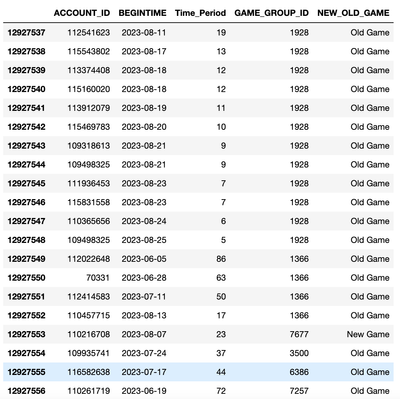
It wouldn't let me share either a .pbix file or upload a .csv file, so I copied and pasted the information that is included in the dataframe.
| ACCOUNT_ID | BEGINTIME | Time_Period | GAME_GROUP_ID | NEW_OLD_GAME |
| 112541623 | 11/8/23 | 19 | 1928 | Old Game |
| 115543802 | 17/8/23 | 13 | 1928 | Old Game |
| 113374408 | 18/8/23 | 12 | 1928 | Old Game |
| 115160020 | 18/8/23 | 12 | 1928 | Old Game |
| 113912079 | 19/8/23 | 11 | 1928 | Old Game |
| 115469783 | 20/8/23 | 10 | 1928 | Old Game |
| 109318613 | 21/8/23 | 9 | 1928 | Old Game |
| 109498325 | 21/8/23 | 9 | 1928 | Old Game |
| 111936453 | 23/8/23 | 7 | 1928 | Old Game |
| 115831558 | 23/8/23 | 7 | 1928 | Old Game |
| 110365656 | 24/8/23 | 6 | 1928 | Old Game |
| 109498325 | 25/8/23 | 5 | 1928 | Old Game |
| 112022648 | 5/6/23 | 86 | 1366 | Old Game |
| 70331 | 28/6/23 | 63 | 1366 | Old Game |
| 112414583 | 11/7/23 | 50 | 1366 | Old Game |
| 110457715 | 13/8/23 | 17 | 1366 | Old Game |
| 110216708 | 7/8/23 | 23 | 7677 | New Game |
| 109935741 | 24/7/23 | 37 | 3500 | Old Game |
| 116582638 | 17/7/23 | 44 | 6386 | Old Game |
| 110261719 | 19/6/23 | 72 | 7257 | Old Game |
- Mark as New
- Bookmark
- Subscribe
- Mute
- Subscribe to RSS Feed
- Permalink
- Report Inappropriate Content
the input variables should be defined from the user (e.g. Customer Type, Time Period etc) :
this info needs to be in the dataset. In other words, you can create slicers in Power BI for user input, such as Customer Type, Time Period. These slicers can be linked to your data so that it's filtered based on the user's choice.
Proud to be a Power BI Super User !
Microsoft Community : https://docs.microsoft.com/en-us/users/AmiraBedhiafi
Linkedin : https://www.linkedin.com/in/amira-bedhiafi/
StackOverflow : https://stackoverflow.com/users/9517769/amira-bedhiafi
C-Sharp Corner : https://www.c-sharpcorner.com/members/amira-bedhiafi
Power BI Community :https://community.powerbi.com/t5/user/viewprofilepage/user-id/332696
- Mark as New
- Bookmark
- Subscribe
- Mute
- Subscribe to RSS Feed
- Permalink
- Report Inappropriate Content
Ok. Let's stay for example at the time period that exists in the dataframe.
I have a slicer in powerbi from which user can make a selection.
The question is, how I can return this value as a parameter to the python script and make the script run with this variable?
- Mark as New
- Bookmark
- Subscribe
- Mute
- Subscribe to RSS Feed
- Permalink
- Report Inappropriate Content
Check this : https://learn.microsoft.com/en-us/power-bi/connect-data/desktop-python-in-query-editor
Proud to be a Power BI Super User !
Microsoft Community : https://docs.microsoft.com/en-us/users/AmiraBedhiafi
Linkedin : https://www.linkedin.com/in/amira-bedhiafi/
StackOverflow : https://stackoverflow.com/users/9517769/amira-bedhiafi
C-Sharp Corner : https://www.c-sharpcorner.com/members/amira-bedhiafi
Power BI Community :https://community.powerbi.com/t5/user/viewprofilepage/user-id/332696
- Mark as New
- Bookmark
- Subscribe
- Mute
- Subscribe to RSS Feed
- Permalink
- Report Inappropriate Content
The input dataframe is similar to below.
What I want is to run the market basket analysis with/without New Games because in many cases they skew my results. Or also to be able to include/exclude low value customers.
These parameters should be inserted as input from the user, passed as parameter to python script in the background in order to run the market basket analysis algorithm and then return the results.
- Mark as New
- Bookmark
- Subscribe
- Mute
- Subscribe to RSS Feed
- Permalink
- Report Inappropriate Content
Can you please provide your dataframe as text not a picture ? or a model in a pbix file ?
Proud to be a Power BI Super User !
Microsoft Community : https://docs.microsoft.com/en-us/users/AmiraBedhiafi
Linkedin : https://www.linkedin.com/in/amira-bedhiafi/
StackOverflow : https://stackoverflow.com/users/9517769/amira-bedhiafi
C-Sharp Corner : https://www.c-sharpcorner.com/members/amira-bedhiafi
Power BI Community :https://community.powerbi.com/t5/user/viewprofilepage/user-id/332696
- Mark as New
- Bookmark
- Subscribe
- Mute
- Subscribe to RSS Feed
- Permalink
- Report Inappropriate Content
Can you please share your pbix ? or datafarame?
Proud to be a Power BI Super User !
Microsoft Community : https://docs.microsoft.com/en-us/users/AmiraBedhiafi
Linkedin : https://www.linkedin.com/in/amira-bedhiafi/
StackOverflow : https://stackoverflow.com/users/9517769/amira-bedhiafi
C-Sharp Corner : https://www.c-sharpcorner.com/members/amira-bedhiafi
Power BI Community :https://community.powerbi.com/t5/user/viewprofilepage/user-id/332696

Helpful resources

FabCon & SQLCon – Barcelona 2026
Join us in Barcelona for FabCon and SQLCon, the Fabric, Power BI, SQL, and AI community event. Save €200 with code FABCMTY200.

Fabric Community Sticker Challenge - Barcelona 2026
If you love stickers, then you will definitely want to check out our community sticker challenge, Barcelona edition!

Power BI Monthly Update - July 2026
Check out the July 2026 Power BI update to learn about new features.

Power BI DataViz World Championships - June 2026
A new Power BI DataViz World Championship is coming this June! Don't miss out on submitting your entry.

| User | Count |
|---|---|
| 30 | |
| 28 | |
| 25 | |
| 24 | |
| 16 |


| User | Count |
|---|---|
| 48 | |
| 32 | |
| 17 | |
| 16 | |
| 16 |


