Get Fabric or SQL Certified for Free.
Get certified for free when you join Fabric Data Days 2026 and dive into Fabric, Power BI, SQL, AI, and other essential data skills.
Join now- Power BI forums
- Get Help with Power BI
- Desktop
- Service
- Report Server
- Power Query
- Mobile Apps
- Developer
- DAX Commands and Tips
- Custom Visuals Development Discussion
- Health and Life Sciences
- Power BI Spanish forums
- Translated Spanish Desktop
- Training and Consulting
- Instructor Led Training
- Dashboard in a Day for Women, by Women
- Galleries
- Data Stories Gallery
- Themes Gallery
- Contests Gallery
- QuickViz Gallery
- Quick Measures Gallery
- Visual Calculations Gallery
- Notebook Gallery
- Translytical Task Flow Gallery
- TMDL Gallery
- R Script Showcase
- Webinars and Video Gallery
- Ideas
- Custom Visuals Ideas (read-only)
- Issues
- Issues
- Events
- Upcoming Events
Data Days is here! Join us now for 60+ days of learning, challenges, and connection. Learn more
- Power BI forums
- Forums
- Get Help with Power BI
- Desktop
- Re: Connect To Oracle Database
- Subscribe to RSS Feed
- Mark Topic as New
- Mark Topic as Read
- Float this Topic for Current User
- Bookmark
- Subscribe
- Printer Friendly Page


- Mark as New
- Bookmark
- Subscribe
- Mute
- Subscribe to RSS Feed
- Permalink
- Report Inappropriate Content
Connect To Oracle Database
I need a connection solution for Oracle. This shouldn't be this difficult. I am trying to connec to an Oracle server and get the following:
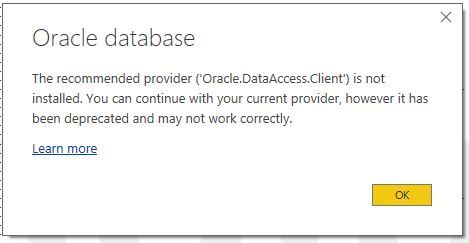
However, the Oracle client is installed. I try to connect:
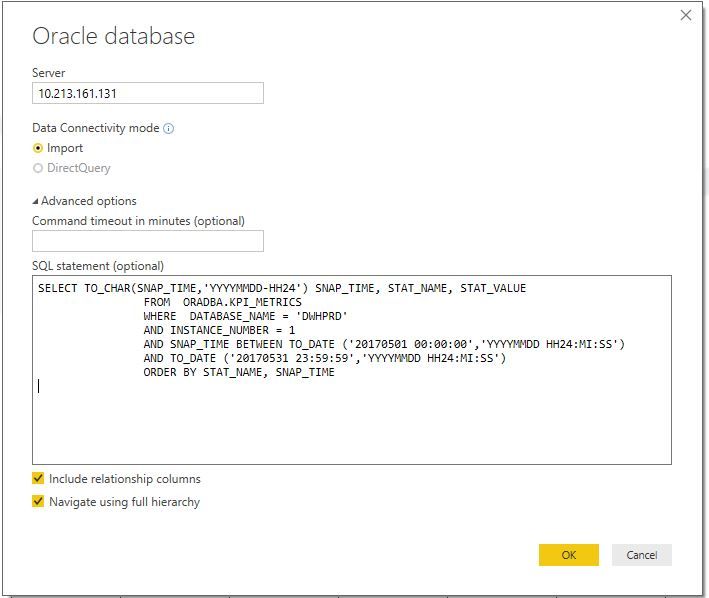
When I connect I get the following error:
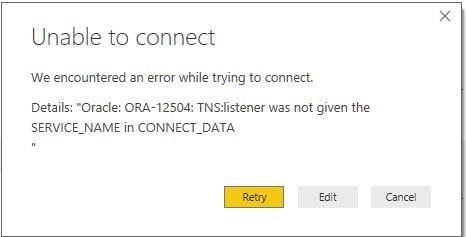
Solved! Go to Solution.
- Mark as New
- Bookmark
- Subscribe
- Mute
- Subscribe to RSS Feed
- Permalink
- Report Inappropriate Content
Figured it out. After finding the path for the .ora file I entered the information in the file. Then in PowerBI I added the connection name from the .ora file to the connection string


- Mark as New
- Bookmark
- Subscribe
- Mute
- Subscribe to RSS Feed
- Permalink
- Report Inappropriate Content
where would I find the Oracle DB ip address?
I get access denied when I try to query it in sql developer.
I had the old DB admin ping it as xx.xx.x.x a few months ago before turnover and turmoil turned everything into a mess where it's not even clear if there is a DB admin anymore.
Now the error is:
Details: "Oracle: ORA-12170: TNS:Connect timeout occurred"
tnsnames.ora file is now:
du1p.company.com =
(DESCRIPTION =
(ADDRESS = (PROTOCOL = TCP)(HOST = ipaddress)(PORT = 1521))
(CONNECT_DATA =
(SERVER = DEDICATED)
(SERVICE_NAME = du1p.company.com)))
When Power BI asks for a "server", I tried typing in:
(1) the ip address
(2) du1p.company.com
(3) du1p
In each case, the error was:
Details: "Oracle: ORA-12170: TNS:Connect timeout occurred"
- Mark as New
- Bookmark
- Subscribe
- Mute
- Subscribe to RSS Feed
- Permalink
- Report Inappropriate Content
If it means anything, I can log onto the server from SQL Developer ONLY on a virtual machine.
I tried to install a local copy of SQL Developer and even imported the connection from the vm version, and i get the following error:
"An error was encountered performing the requested operation:
IO Error: The Network Adapter could not establish the connection
Vendor code 17002"
If the issue is (1) an ip mismatch issue between my PC and the data base IP, how would I go about resolving it? (first, I need help finding what the oracle ip is) or (2) a firewall issue, how would i fix the firewall issue?
- Mark as New
- Bookmark
- Subscribe
- Mute
- Subscribe to RSS Feed
- Permalink
- Report Inappropriate Content
You would have to troubleshoot this outside of PowerBI
- Mark as New
- Bookmark
- Subscribe
- Mute
- Subscribe to RSS Feed
- Permalink
- Report Inappropriate Content
starting with what?
- Mark as New
- Bookmark
- Subscribe
- Mute
- Subscribe to RSS Feed
- Permalink
- Report Inappropriate Content
Not sure. You would have to troubleshoot the Oracle side of things

- Mark as New
- Bookmark
- Subscribe
- Mute
- Subscribe to RSS Feed
- Permalink
- Report Inappropriate Content
I have the same error Details: "Oracle: ORA-12504: TNS:listener was not given the SERVICE_NAME in CONNECT_DATA"
and i couldn't Fix it . I am New to power BI . Can you please tell me how to fix it


- Mark as New
- Bookmark
- Subscribe
- Mute
- Subscribe to RSS Feed
- Permalink
- Report Inappropriate Content
How about this thread?
Follow on LinkedIn
@ me in replies or I'll lose your thread!!!
Instead of a Kudo, please vote for this idea
Become an expert!: Enterprise DNA
External Tools: MSHGQM
YouTube Channel!: Microsoft Hates Greg
Latest book!: DAX For Humans
DAX is easy, CALCULATE makes DAX hard...

Helpful resources

Fabric Data Days 2026
Don't miss out on Data Days, June 15 through August 7. Learn Fabric, Power BI, SQL, AI and more.

Power BI Monthly Update - May 2026
Check out the May 2026 Power BI update to learn about new features.

Power BI DataViz World Championships - June 2026
A new Power BI DataViz World Championship is coming this June! Don't miss out on submitting your entry.

| User | Count |
|---|---|
| 23 | |
| 23 | |
| 20 | |
| 18 | |
| 14 |


| User | Count |
|---|---|
| 58 | |
| 51 | |
| 41 | |
| 30 | |
| 24 |


