cancel
Showing results for 
Search instead for 
Did you mean: 

Next up in the FabCon + SQLCon recap series: The roadmap for Microsoft SQL and Maximizing Developer experiences in Fabric. All sessions are available on-demand after the live show. Register now

Reply
power-bi-noob
Helper I
Helper I

Conditionally transform percentage to integer

I have some mixed data entered in a table column (some are percentages, some are integers). I'd like to transform some of the data permanently from percentage to integer only if the id number in another column matches. I want to do this as one of the applied data queries for this table, since the original data source will still show percentages for older data entries. We made the change in the original source (I don't have access to the database for this system, I can only export), so I'm stuck with those percentages.


Here's some JavaScript to show what I'm hoping to accomplish with a transform query in PowerBI:


var myId = 12345;
var myNum = "80%";
if (myId == 12345 && myNum.includes("%")) {
myNum = parseInt(myNum);
}


7 REPLIES 7
v-jingzhang
Community Support
Community Support

Hi @power-bi-noob 


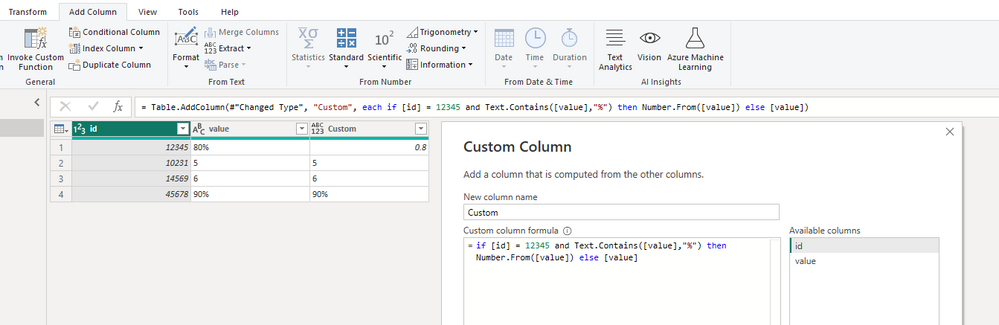
In Power Query Editor, add a custom column with 

if [id] = 12345 and Text.Contains([value],"%") then Number.From([value]) else [value]

vjingzhang_0-1672884325205.png

Then change this new column to Text data type. In Text data type, it can remain percentages and integers in the same column. If you change it to other data types (e.g. Number), values in a column will be converted into the same format. 


Best Regards,
Community Support Team _ Jing
If this post helps, please Accept it as Solution to help other members find it. Highly appreciate your Kudos!


Here is my complete formula:

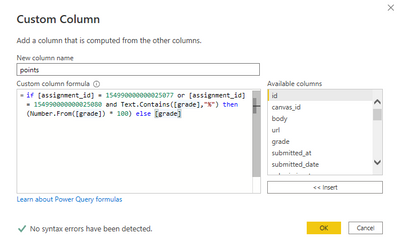
if [myId] = 77 or [myId] = 80 and Text.Contains([myNum],"%") then (Number.From([myNum]) * 100) else [myNum])

Hi @power-bi-noob 


Can you show some sample data and expected result in table format? Or show a screenshot of the current table in Power Query Editor without sensitive data? Without seeing the data it's difficult to tell where the problem is. 


Best Regards,

Jing

Hi @v-jingzhang ,

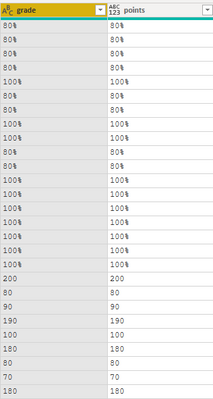
Here's my query editor window with the query, followed by the results. Thanks!

powerbinoob_0-1673281875185.png

powerbinoob_1-1673281892389.png


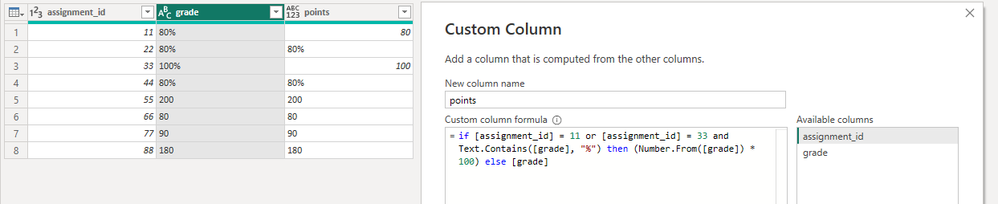
Hi @power-bi-noob 


I don't have problem with your formula. Below is my result. Can you show the [assignment_id] column along with the [grade] column? Do the top rows which have "%" in grade you show have the two ids you write in the if condition? 

vjingzhang_0-1673425265806.png


BR,

Jing

Hi @v-jingzhang , I also created a separate table with a toy example and it seemed to work fine. It just doesn't work with my production data for some odd reason.

I am still getting a % in the column when I apply the formula.

If I change it to a whole number, then 100% shows up as 1, and so does 80% (rounding up). So I added then (Number.From([grade]) * 100), but still get 1 for each.


Helpful resources

Announcements
New to Fabric survey Carousel

New to Fabric Survey

If you have recently started exploring Fabric, we'd love to hear how it's going. Your feedback can help with product improvements.

Power BI DataViz World Championships carousel

Power BI DataViz World Championships - June 2026

A new Power BI DataViz World Championship is coming this June! Don't miss out on submitting your entry.

Join our Fabric User Panel

Join our Fabric User Panel

Share feedback directly with Fabric product managers, participate in targeted research studies and influence the Fabric roadmap.

March Power BI Update Carousel

Power BI Community Update - March 2026

Check out the March 2026 Power BI update to learn about new features.