Join us at FabCon Atlanta from March 16 - 20, 2026, for the ultimate Fabric, Power BI, AI and SQL community-led event. Save $200 with code FABCOMM.
Register now!The Power BI Data Visualization World Championships is back! Get ahead of the game and start preparing now! Learn more
Howdy,
I have needed to change the colour of the field value in a CARD, which I know cannot be done at the moment. I downloaded the vizualisation 'Advance Card' which enables this to be done. Had it working and published, on the browser works perfectly. As I change filters, it changes from red to green as expected.
Now, when I download the PBIX file, and I select the field in Power BI Desktop, the highlighted vizualisation is the Card. I have the Advance Card installed and can see it on the list, but the field when selected highlights the Card icon. Also, when I look at Visual / Callout Value for the card under Color it just has the dropdown option for colour, and is defaulted to red (as default filter sets it to red). When I change the filter in Desktop, the colour changes to green as expected. Change again, goes back to red.
The minute I click on the color dropdown box, when I change the filter it now does not change.....
Can someone explain what I am doing wrong?? Is ADvance Card the only 'easy' way to change the colour of a value??
Thanks
Nick
Solved! Go to Solution.
You can achieve this with the native Card visual by using the measure below (use color codes or names):
Color Format =
VAR vAmount = [Amount]
VAR vResult =
SWITCH (
TRUE,
vAmount > 0, "Green",
vAmount = 0, "Yellow",
vAmount < 0, "Red"
)
RETURN
vResult
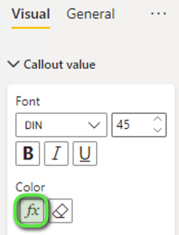
In the Card formatting options, set conditional formatting:
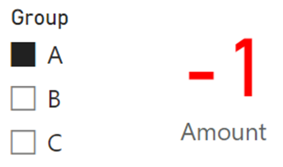
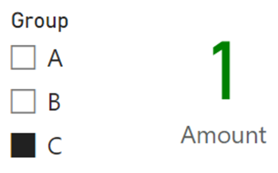
Result:
---
---
Proud to be a Super User!
You can achieve this with the native Card visual by using the measure below (use color codes or names):
Color Format =
VAR vAmount = [Amount]
VAR vResult =
SWITCH (
TRUE,
vAmount > 0, "Green",
vAmount = 0, "Yellow",
vAmount < 0, "Red"
)
RETURN
vResult
In the Card formatting options, set conditional formatting:
Result:
---
---
Proud to be a Super User!
The Power BI Data Visualization World Championships is back! Get ahead of the game and start preparing now!
| User | Count |
|---|---|
| 39 | |
| 38 | |
| 38 | |
| 28 | |
| 27 |
| User | Count |
|---|---|
| 124 | |
| 88 | |
| 73 | |
| 66 | |
| 65 |