Join us at FabCon Atlanta from March 16 - 20, 2026, for the ultimate Fabric, Power BI, AI and SQL community-led event. Save $200 with code FABCOMM.
Register now!Get Fabric certified for FREE! Don't miss your chance! Learn more
Hi,
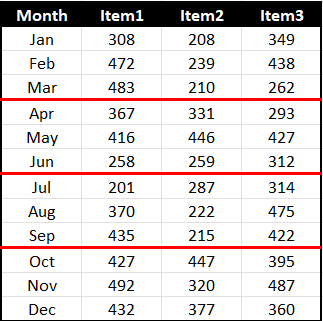
I have a matrix visual with Months (Jan-Dec) as rows. I need to reformat the horizontal line after each quarter like you see in "Red" below. Any help is appreciated.
Solved! Go to Solution.
@rastewu , I doubt there is an option for that. Log an idea -https://ideas.powerbi.com/ideas/
Or add Qtr on row (Expand- Should have both Qtr and month visible) and Switch off stepped layout, that will give a different look
Hi @rastewu ,
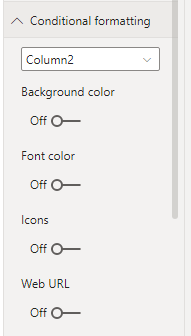
The conditional formatting is not supported to format the horizontal line currently.
Do you consider to format the background color for different quarters?
If so you could create a measure to mark month as 1-12 and then manage the conditional formatting through this measure.
Best Regards,
Jay
Hi @rastewu ,
The conditional formatting is not supported to format the horizontal line currently.
Do you consider to format the background color for different quarters?
If so you could create a measure to mark month as 1-12 and then manage the conditional formatting through this measure.
Best Regards,
Jay
@rastewu , I doubt there is an option for that. Log an idea -https://ideas.powerbi.com/ideas/
Or add Qtr on row (Expand- Should have both Qtr and month visible) and Switch off stepped layout, that will give a different look
Share feedback directly with Fabric product managers, participate in targeted research studies and influence the Fabric roadmap.
Check out the January 2026 Power BI update to learn about new features.
| User | Count |
|---|---|
| 68 | |
| 59 | |
| 44 | |
| 20 | |
| 15 |
| User | Count |
|---|---|
| 104 | |
| 102 | |
| 37 | |
| 26 | |
| 25 |