Don't miss your chance to take the Fabric Data Engineer (DP-600) exam for FREE! Find out how by attending the DP-600 session on April 23rd (pacific time), live or on-demand.
Learn moreNext up in the FabCon + SQLCon recap series: The roadmap for Microsoft SQL and Maximizing Developer experiences in Fabric. All sessions are available on-demand after the live show. Register now
Hey Guys,
Pretty stumped on this one after spending a day watching videos, can't quite find anything to solve what feels like an easy issue, maybe I am completely out thinking myself.
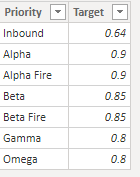
My example data is below. I'd prefer to use the target table as the conditions if possible.
What I need is this:
If "service level" for alpha is > 90, green font, else red font.
If "service level" for beta is > 85, green font, else red font.
...
...
and so on
I haven't found anything on measures using specific data values, just the column as a whole which lumps these all together and won't work. Help
Solved! Go to Solution.
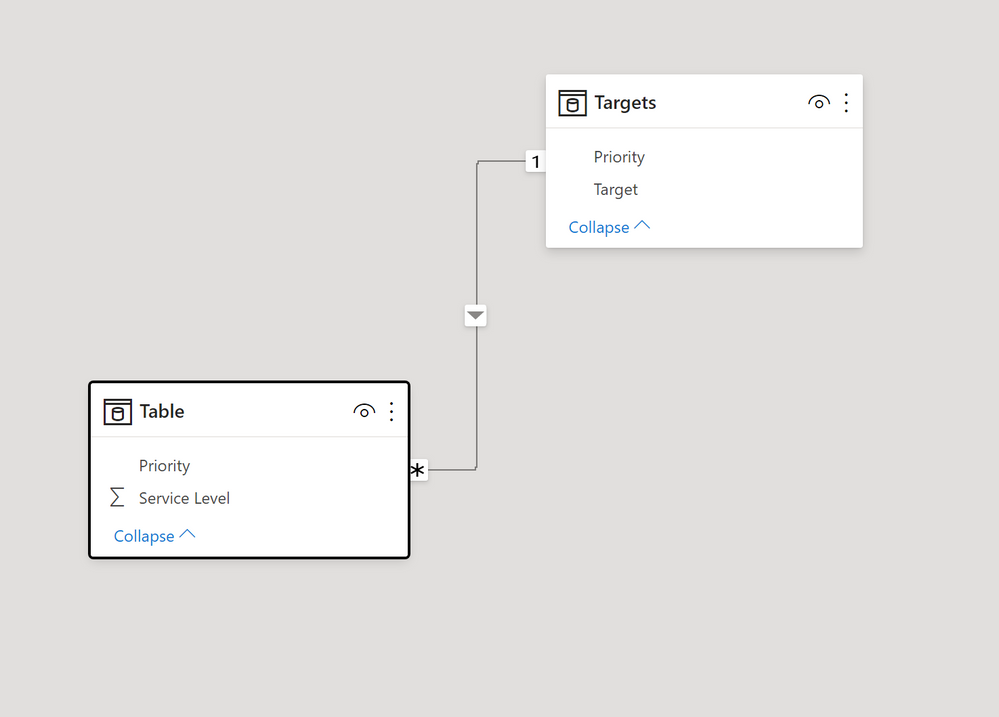
Assuming you have a table with the priority field and values to calculate the [Service level] measure & a target table as shown, with this model:
and this measure to use for field in the conditional formatting options:
Condit Format = IF([Service Level] > SELECTEDVALUE(Targets[Target]), "Green", "red")
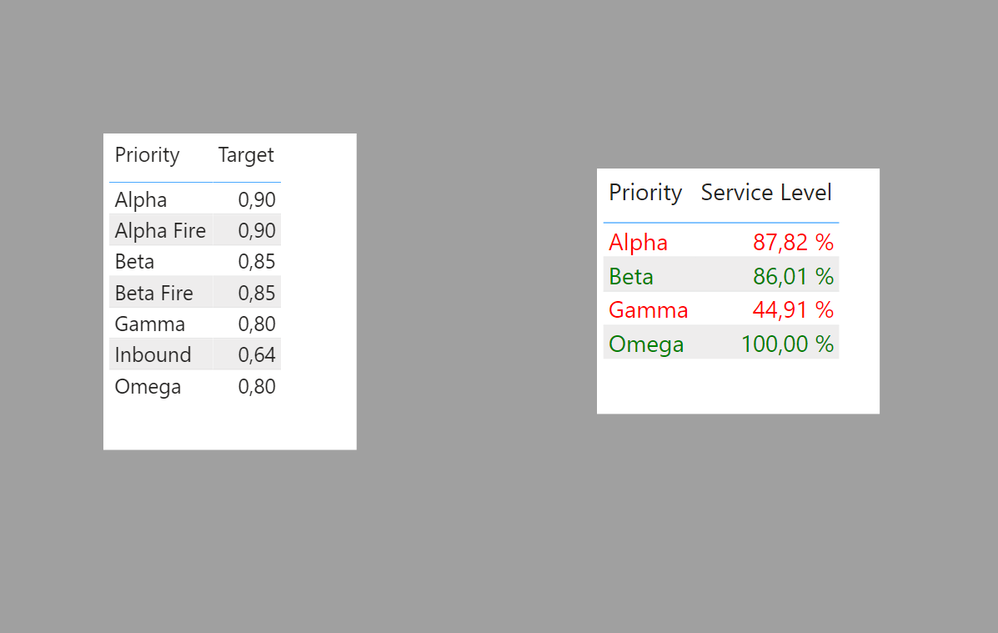
Add the priority field from the target table to the visual & the [Service Level] measure, and the apply the conditional formatting using the measure above to get:
I've attached a sample PBIX file
Proud to be a Super User!
Paul on Linkedin.
Assuming you have a table with the priority field and values to calculate the [Service level] measure & a target table as shown, with this model:
and this measure to use for field in the conditional formatting options:
Condit Format = IF([Service Level] > SELECTEDVALUE(Targets[Target]), "Green", "red")
Add the priority field from the target table to the visual & the [Service Level] measure, and the apply the conditional formatting using the measure above to get:
I've attached a sample PBIX file
Proud to be a Super User!
Paul on Linkedin.
Thank you so much! This works beautifully. I really appreciate it
If you have recently started exploring Fabric, we'd love to hear how it's going. Your feedback can help with product improvements.
A new Power BI DataViz World Championship is coming this June! Don't miss out on submitting your entry.
Experience the highlights from FabCon & SQLCon, available live and on-demand starting April 14th.
| User | Count |
|---|---|
| 47 | |
| 43 | |
| 40 | |
| 20 | |
| 15 |
| User | Count |
|---|---|
| 70 | |
| 67 | |
| 32 | |
| 27 | |
| 25 |