This time we’re going bigger than ever. Fabric, Power BI, SQL, AI and more. We're covering it all. You won't want to miss it.
Learn moreDid you hear? There's a new SQL AI Developer certification (DP-800). Start preparing now and be one of the first to get certified. Register now
Hi There
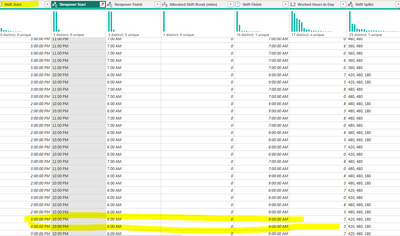
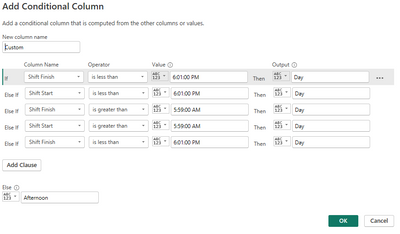
I have created a Conditional Column however I am still getting the outcome Day where the Shift starts after 3 but ends on the next day (it usually has data in the sleepover column.
How can I get the 3 pm to 11 pm component to be Afternoon
But the 7 am to 9 am component to be day.
Kind regards
Solved! Go to Solution.
Hi @Babycakes
You can put the following code to advanced editor
let
Source = Table.FromRows(Json.Document(Binary.Decompress(Binary.FromText("i45WMrYyMAAihQBfJR0lSyjH0VcpNhYA", BinaryEncoding.Base64), Compression.Deflate)), let _t = ((type nullable text) meta [Serialized.Text = true]) in type table [#"Shift Start" = _t, #"Shift Finish" = _t]),
#"Changed Type" = Table.TransformColumnTypes(Source,{{"Shift Start", type time}, {"Shift Finish", type time}}),
#"Added Custom" = Table.AddColumn(#"Changed Type", "Custom", each DateTime.From(Text.From([Shift Start]))),
#"Added Custom1" = Table.AddColumn(#"Added Custom", "Custom.1", each DateTime.From(Text.From([Shift Finish]))+#duration(1,0,0,0)),
#"Changed Type1" = Table.TransformColumnTypes(#"Added Custom1",{{"Custom", type datetime}, {"Custom.1", type datetime}}),
#"Added Custom2" = Table.AddColumn(#"Changed Type1", "Custom.2", each List.DateTimes([Custom],Duration.Hours([Custom.1]-[Custom])+1,#duration(0, 1, 0, 0))),
#"Expanded Custom.2" = Table.ExpandListColumn(#"Added Custom2", "Custom.2"),
#"Added Custom3" = Table.AddColumn(#"Expanded Custom.2", "Custom.3", each List.Max(
(Table.SelectRows(#"Expanded Custom.2",(x)=>x[Custom.2]>=[Custom] and x[Custom.2]<DateTime.FromText("00:00:00")+#duration(1,0,0,0))[Custom.2]))),
#"Added Custom4" = Table.AddColumn(#"Added Custom3", "Custom.4", each if [Custom.2]=[Custom.3] then 1 else if [Custom.2]=[Custom.1] then 2 else null),
#"Filtered Rows" = Table.SelectRows(#"Added Custom4", each ([Custom.4] <> null)),
#"Added Custom5" = Table.AddColumn(#"Filtered Rows", "Custom.5", each if [Custom.1]<>[Custom.2] then [Custom] else DateTime.FromText("7:00:00 AM")+#duration(1,0,0,0)),
#"Removed Columns" = Table.RemoveColumns(#"Added Custom5",{"Custom", "Custom.1", "Custom.3", "Custom.4"}),
#"Reordered Columns" = Table.ReorderColumns(#"Removed Columns",{"Shift Start", "Shift Finish", "Custom.5", "Custom.2"}),
#"Added Custom6" = Table.AddColumn(#"Reordered Columns", "Custom", each if [Custom.5]>=DateTime.FromText("15:00:00") and [Custom.2]<=DateTime.FromText("23:00:00") then "Afternoon" else "Day")
in
#"Added Custom6"
Best Regards!
Yolo Zhu
If this post helps, then please consider Accept it as the solution to help the other members find it more quickly.
Hi @Babycakes
You can put the following code to advanced editor
let
Source = Table.FromRows(Json.Document(Binary.Decompress(Binary.FromText("i45WMrYyMAAihQBfJR0lSyjH0VcpNhYA", BinaryEncoding.Base64), Compression.Deflate)), let _t = ((type nullable text) meta [Serialized.Text = true]) in type table [#"Shift Start" = _t, #"Shift Finish" = _t]),
#"Changed Type" = Table.TransformColumnTypes(Source,{{"Shift Start", type time}, {"Shift Finish", type time}}),
#"Added Custom" = Table.AddColumn(#"Changed Type", "Custom", each DateTime.From(Text.From([Shift Start]))),
#"Added Custom1" = Table.AddColumn(#"Added Custom", "Custom.1", each DateTime.From(Text.From([Shift Finish]))+#duration(1,0,0,0)),
#"Changed Type1" = Table.TransformColumnTypes(#"Added Custom1",{{"Custom", type datetime}, {"Custom.1", type datetime}}),
#"Added Custom2" = Table.AddColumn(#"Changed Type1", "Custom.2", each List.DateTimes([Custom],Duration.Hours([Custom.1]-[Custom])+1,#duration(0, 1, 0, 0))),
#"Expanded Custom.2" = Table.ExpandListColumn(#"Added Custom2", "Custom.2"),
#"Added Custom3" = Table.AddColumn(#"Expanded Custom.2", "Custom.3", each List.Max(
(Table.SelectRows(#"Expanded Custom.2",(x)=>x[Custom.2]>=[Custom] and x[Custom.2]<DateTime.FromText("00:00:00")+#duration(1,0,0,0))[Custom.2]))),
#"Added Custom4" = Table.AddColumn(#"Added Custom3", "Custom.4", each if [Custom.2]=[Custom.3] then 1 else if [Custom.2]=[Custom.1] then 2 else null),
#"Filtered Rows" = Table.SelectRows(#"Added Custom4", each ([Custom.4] <> null)),
#"Added Custom5" = Table.AddColumn(#"Filtered Rows", "Custom.5", each if [Custom.1]<>[Custom.2] then [Custom] else DateTime.FromText("7:00:00 AM")+#duration(1,0,0,0)),
#"Removed Columns" = Table.RemoveColumns(#"Added Custom5",{"Custom", "Custom.1", "Custom.3", "Custom.4"}),
#"Reordered Columns" = Table.ReorderColumns(#"Removed Columns",{"Shift Start", "Shift Finish", "Custom.5", "Custom.2"}),
#"Added Custom6" = Table.AddColumn(#"Reordered Columns", "Custom", each if [Custom.5]>=DateTime.FromText("15:00:00") and [Custom.2]<=DateTime.FromText("23:00:00") then "Afternoon" else "Day")
in
#"Added Custom6"
Best Regards!
Yolo Zhu
If this post helps, then please consider Accept it as the solution to help the other members find it more quickly.
Check out the April 2026 Power BI update to learn about new features.
Sign up to receive a private message when registration opens and key events begin.
If you have recently started exploring Fabric, we'd love to hear how it's going. Your feedback can help with product improvements.
| User | Count |
|---|---|
| 35 | |
| 32 | |
| 25 | |
| 23 | |
| 16 |
| User | Count |
|---|---|
| 65 | |
| 50 | |
| 30 | |
| 25 | |
| 24 |