Don't miss your chance to take the Fabric Data Engineer (DP-600) exam for FREE! Find out how by attending the DP-600 session on April 23rd (pacific time), live or on-demand.
Learn moreJoin the FabCon + SQLCon recap series. Up next: Power BI, Real-Time Intelligence, IQ and AI, and Data Factory take center stage. All sessions are available on-demand after the live show. Register now
Hi everyone,
I am trying to find the option to select the transparency level while using conditional formatting in a table. I am sure I have used it before and now I cannot find it.
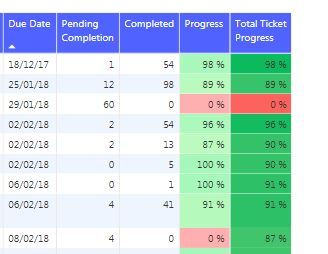
In the picture below you can see my table. The column "Progress" was there before and I just added the column "Total Ticket Progress". I have use the same colors for both columns, the only difference is the transparency level, that I am sure to have used before in the first column but I cannot find for the second.
Does anyone know if they have removed the option or if it's just playing hide and seek with me?
Thanks!
I don't think this exists in power BI. One is able to change color levels which can make the viewer think their is an opacity layer, but Opacity layers are an anticipated improvement.
Hi!
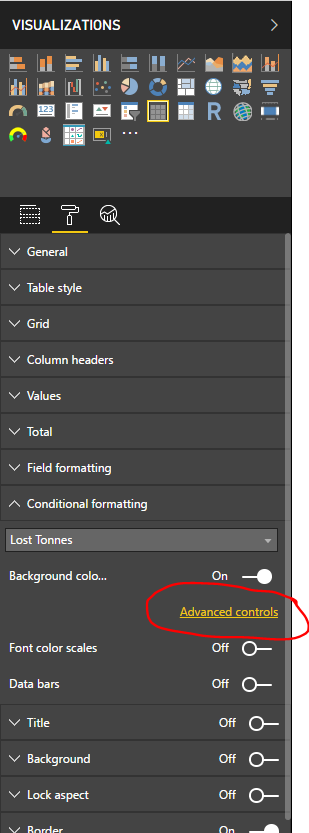
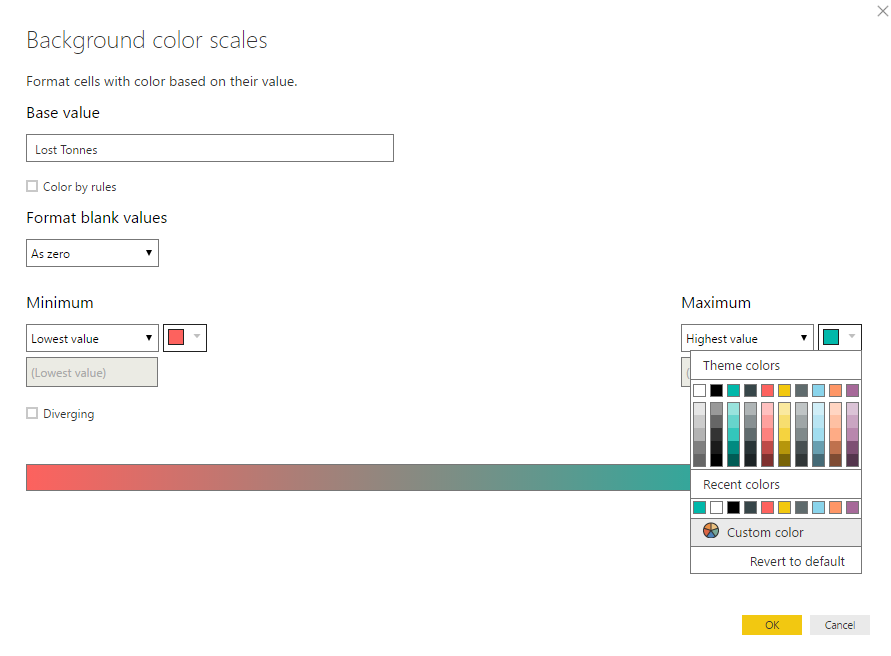
I think you've just chosen a lighter colour when making your 'Progress' column. See the pictures below to see how to change colours:
Hi @Anonymous,
No. I checked that and I just copy paste the exact color from one formating to the other.
I just realised something else. I cant change the color formatting in the older column. When I select the column for the conditional formatting, I can see that the Background color scales is "On". I can access to Advanced controls and change the values, but the changes are not taking effect in the table. This makes me think again that they have change this functionality.
Check out the April 2026 Power BI update to learn about new features.
If you have recently started exploring Fabric, we'd love to hear how it's going. Your feedback can help with product improvements.
A new Power BI DataViz World Championship is coming this June! Don't miss out on submitting your entry.
| User | Count |
|---|---|
| 48 | |
| 40 | |
| 38 | |
| 20 | |
| 16 |
| User | Count |
|---|---|
| 68 | |
| 66 | |
| 29 | |
| 26 | |
| 25 |