Join us at FabCon Atlanta from March 16 - 20, 2026, for the ultimate Fabric, Power BI, AI and SQL community-led event. Save $200 with code FABCOMM.
Register now!The Power BI Data Visualization World Championships is back! Get ahead of the game and start preparing now! Learn more
Hi Everyone,
I am new to PowerBI. I need some help here and would be grateful for your ideas and suggestions.
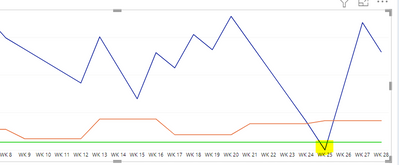
I have a line chart which has three lines ( i.e Stock1, stock2 and stock3 ) which are basically columns
I want to apply conditional formatting to stock1 line only. So when stock1 line value hits 0 , that part of line should turn red in colour or any kind of indicator or hightlight the part. I have attached an image for reference . Please provide your ideas
The highlighted part of the line should turn red or any indicators to highlight it. So whenever the value is zero while filtering it , it should turn red in that part.
@Pragati11
@Barthel @bolfri
HI @Anonymous ,
I recently delivered a session at a user group where I used a similar scenario for conditional formatting. The link to the recording can be found here:
https://www.youtube.com/watch?v=-lqIz_s1bJI
The first usecase in the recording is the one which can help you with your scenario.
@Anonymous , Conditional formatting is not supported on the line visual. The workaround is to do it on the bar and convert it to a line to get a colored marker. But conditional formatting is not supported for multiple measures/values or legend in the visual
The Power BI Data Visualization World Championships is back! Get ahead of the game and start preparing now!
| User | Count |
|---|---|
| 63 | |
| 55 | |
| 42 | |
| 41 | |
| 23 |
| User | Count |
|---|---|
| 171 | |
| 136 | |
| 119 | |
| 79 | |
| 54 |