Get certified for free when you join Fabric Data Days 2026 and dive into Fabric, Power BI, SQL, AI, and other essential data skills.
Join nowTry your skills in the Power BI Dataviz World Championship! Round one ends June 26. Join now
Hi,
I have a table below. Can I use the conditional formatting to perform the function:
If Label = I, always Date2 - Date1, if Date2 & Date1 are null then use Date4-Date3.
How to do this?
| Label | Date1 | Date2 | Date3 | Date4 | |
| I | 1/11/2022 | 2/11/2022 | |||
| G | 5/11/2022 | 6/11/2022 | |||
| I | 1/11/2022 | 3/11/2022 | |||
| G | 1/11/2022 | 3/11/2022 | |||
Solved! Go to Solution.
Hi @JustNewbie ,
Please create a new column:
Column =
SWITCH (
TRUE (),
'Table'[Label] = "I"
&& (
'Table'[Date1] <> BLANK ()
&& 'Table'[Date2] <> BLANK ()
), DATEDIFF ( 'Table'[Date1], 'Table'[Date2], DAY ),
'Table'[Label] = "I"
&& (
'Table'[Date1] = BLANK ()
&& 'Table'[Date2] = BLANK ()
), DATEDIFF ( 'Table'[Date3], 'Table'[Date4], DAY )
)
You will get a column like this and I think this is the result you want:
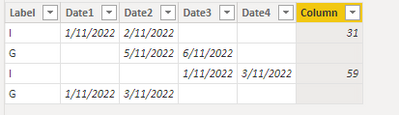
If you have another question, please open another thread. In a post, we'd better only address one issue. This will cpntribute to the efficiency of problem solving.
Best regards,
Yadong Fang
If this post helps, then please consider Accept it as the solution to help the other members find it more quickly.
@JustNewbie , Not sure what is the role of conditional formatting here
if([Label] = "I" ,
Switch( True(),
isblank([Date1]) && isblank([Date2]) , [Date2] =[Date1],
[Date4] =[Date3],
blank()), blank())
@amitchandak thank you.
I have another condition.. If either Column A or Column B is blank then give me blank, else give me Column B date subtract Column A date in networkdays...
Thank u..
Hi @JustNewbie ,
Please create a new column:
Column =
SWITCH (
TRUE (),
'Table'[Label] = "I"
&& (
'Table'[Date1] <> BLANK ()
&& 'Table'[Date2] <> BLANK ()
), DATEDIFF ( 'Table'[Date1], 'Table'[Date2], DAY ),
'Table'[Label] = "I"
&& (
'Table'[Date1] = BLANK ()
&& 'Table'[Date2] = BLANK ()
), DATEDIFF ( 'Table'[Date3], 'Table'[Date4], DAY )
)
You will get a column like this and I think this is the result you want:
If you have another question, please open another thread. In a post, we'd better only address one issue. This will cpntribute to the efficiency of problem solving.
Best regards,
Yadong Fang
If this post helps, then please consider Accept it as the solution to help the other members find it more quickly.
Don't miss out on Data Days, June 15 through August 7. Learn Fabric, Power BI, SQL, AI and more.
Check out the May 2026 Power BI update to learn about new features.
| User | Count |
|---|---|
| 24 | |
| 22 | |
| 21 | |
| 20 | |
| 12 |
| User | Count |
|---|---|
| 68 | |
| 56 | |
| 42 | |
| 39 | |
| 30 |