Join us at FabCon Atlanta from March 16 - 20, 2026, for the ultimate Fabric, Power BI, AI and SQL community-led event. Save $200 with code FABCOMM.
Register now!The Power BI Data Visualization World Championships is back! Get ahead of the game and start preparing now! Learn more
I have created a DAX logic for getting values based on few logic to measure a metric, where my final result appears both in amounts and percentage and later I bring it this over to a card visual like 'Value above $XXX,XX & YY%' and it appears in black font, is there a way I can format in conditionally so that when it is negative I can make it appear in red and if it is positive it appears in green.
Solved! Go to Solution.
Hi,
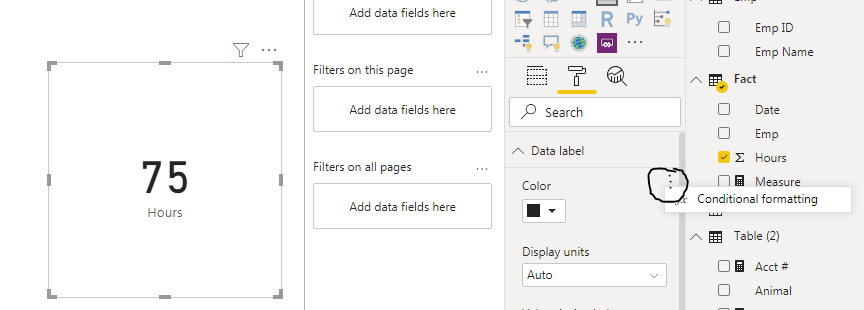
You can set Card visual->Format->Data Label->conditional formatting.
I create a simple sample to show.
Create a color measure to check:
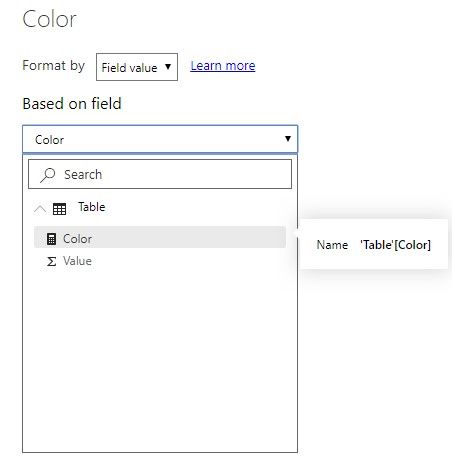
Color = IF(SUM('Table'[Value])>20,"#FF0000","#00FF00")Apply this measure to the Card visual:
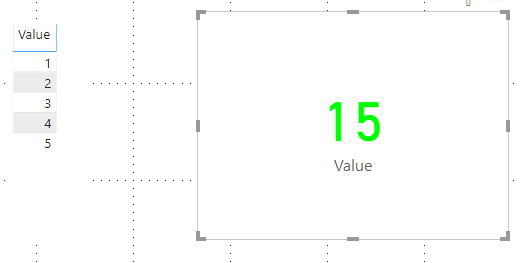
And it shows:
Hope this helps.
Best Regards,
Giotto Zhi
Hi,
You can set Card visual->Format->Data Label->conditional formatting.
I create a simple sample to show.
Create a color measure to check:
Color = IF(SUM('Table'[Value])>20,"#FF0000","#00FF00")Apply this measure to the Card visual:
And it shows:
Hope this helps.
Best Regards,
Giotto Zhi
The Power BI Data Visualization World Championships is back! Get ahead of the game and start preparing now!
| User | Count |
|---|---|
| 64 | |
| 47 | |
| 41 | |
| 36 | |
| 23 |
| User | Count |
|---|---|
| 185 | |
| 123 | |
| 106 | |
| 78 | |
| 52 |