Join us in Barcelona for FabCon and SQLCon, September 28 - October 1, 2026.
This is best Fabric, Power BI, SQL and AI community event. How do we know? The last event sold out! Save €200 with code FABCMTY200.
Register now- Power BI forums
- Get Help with Power BI
- Desktop
- Service
- Report Server
- Power Query
- Mobile Apps
- Developer
- DAX Commands and Tips
- Custom Visuals Development Discussion
- Health and Life Sciences
- Power BI Spanish forums
- Translated Spanish Desktop
- Training and Consulting
- Instructor Led Training
- Dashboard in a Day for Women, by Women
- Galleries
- Data Stories Gallery
- Themes Gallery
- Contests Gallery
- QuickViz Gallery
- Quick Measures Gallery
- Visual Calculations Gallery
- Fabric Apps Gallery
- Notebook Gallery
- Translytical Task Flow Gallery
- TMDL Gallery
- R Script Showcase
- Webinars and Video Gallery
- Ideas
- Custom Visuals Ideas (read-only)
- Issues
- Issues
- Events
- Upcoming Events
July 28 - August 9 | Final Round of the Power BI Dataviz World Championships. This is your chance. Learn more
- Power BI forums
- Forums
- Get Help with Power BI
- Desktop
- Re: Conditional formatting based on another cell
- Subscribe to RSS Feed
- Mark Topic as New
- Mark Topic as Read
- Float this Topic for Current User
- Bookmark
- Subscribe
- Printer Friendly Page


- Mark as New
- Bookmark
- Subscribe
- Mute
- Subscribe to RSS Feed
- Permalink
- Report Inappropriate Content
Conditional formatting based on another cell
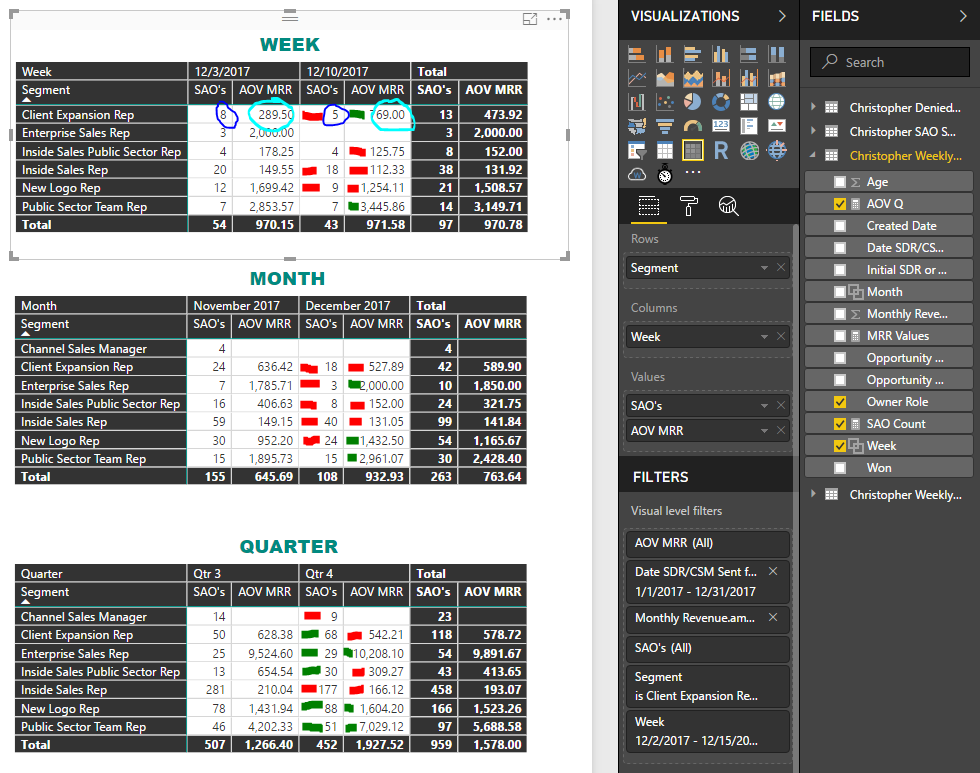
I have these 3 Matrix and I need to format the Current (Week/Month/Quarter) SAO values(Dark Blue) and AOV MRR(Light Blue) values based on the previous Week/Month/Quarter. Green if Greater and Red if Less.
EX: Week 12/10 SAO's for Client Expantion Rep is 5 and Week 12/3 for Client Expantion Rep is 8 so I need the 12/10 value of 5 to be red.
Solved! Go to Solution.


- Mark as New
- Bookmark
- Subscribe
- Mute
- Subscribe to RSS Feed
- Permalink
- Report Inappropriate Content
Hi @hello789567
such art of formatting is with second transparent table and manipulating with font and background color possible.
One of table (top level) must be have table style as "None".
Look on simple example below:
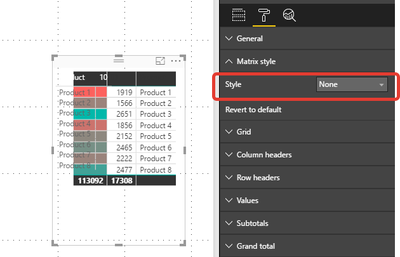
I hope its help. I left extra uneven matrix edges, that you can better see this trick.
And of course you must prepare a values of means you need (as separate measures or calculated columns).
Best regs
- Mark as New
- Bookmark
- Subscribe
- Mute
- Subscribe to RSS Feed
- Permalink
- Report Inappropriate Content
Thank you for your response! Its looking like controllable formatting is a feature that's just not in Power Bi. I had to resort to inserting "Text Boxes" with no text and giving it a transparent background. Considering how much conditional formatting is helpful to reporting you would think it would be better.
- Mark as New
- Bookmark
- Subscribe
- Mute
- Subscribe to RSS Feed
- Permalink
- Report Inappropriate Content
Hi @hello789567
such art of formatting is with second transparent table and manipulating with font and background color possible.
One of table (top level) must be have table style as "None".
Look on simple example below:
I hope its help. I left extra uneven matrix edges, that you can better see this trick.
And of course you must prepare a values of means you need (as separate measures or calculated columns).
Best regs

- Mark as New
- Bookmark
- Subscribe
- Mute
- Subscribe to RSS Feed
- Permalink
- Report Inappropriate Content
Hello, the conditional format of the field is not working on the web, there is some way to be able to report this error of the platform.
I appreciate if you can help me, thanks.
- Mark as New
- Bookmark
- Subscribe
- Mute
- Subscribe to RSS Feed
- Permalink
- Report Inappropriate Content
- Mark as New
- Bookmark
- Subscribe
- Mute
- Subscribe to RSS Feed
- Permalink
- Report Inappropriate Content
Thank you for your response! Its looking like controllable formatting is a feature that's just not in Power Bi. I had to resort to inserting "Text Boxes" with no text and giving it a transparent background. Considering how much conditional formatting is helpful to reporting you would think it would be better.


- Mark as New
- Bookmark
- Subscribe
- Mute
- Subscribe to RSS Feed
- Permalink
- Report Inappropriate Content
Hi @hello789567,
You can create an idea here, and please mark the right/useful reply as answer, so that we can close the thread and more people will benefit from here.
Thanks,
Angelia
- Mark as New
- Bookmark
- Subscribe
- Mute
- Subscribe to RSS Feed
- Permalink
- Report Inappropriate Content
@hello789567 wrote:Thank you for your response!
with pleasure!
perhaps Microsoft makes this feature better and comfortable in the nearest future

Helpful resources

FabCon & SQLCon – Barcelona 2026
Join us in Barcelona for FabCon and SQLCon, the Fabric, Power BI, SQL, and AI community event. Save €200 with code FABCMTY200.

Power BI Monthly Update - July 2026
Check out the July 2026 Power BI update to learn about new features.

Power BI DataViz World Championships - June 2026
A new Power BI DataViz World Championship is coming this June! Don't miss out on submitting your entry.

| User | Count |
|---|---|
| 25 | |
| 23 | |
| 20 | |
| 18 | |
| 14 |


| User | Count |
|---|---|
| 22 | |
| 20 | |
| 20 | |
| 20 | |
| 20 |


