Join us at FabCon Atlanta from March 16 - 20, 2026, for the ultimate Fabric, Power BI, AI and SQL community-led event. Save $200 with code FABCOMM.
Register now!The Power BI Data Visualization World Championships is back! Get ahead of the game and start preparing now! Learn more
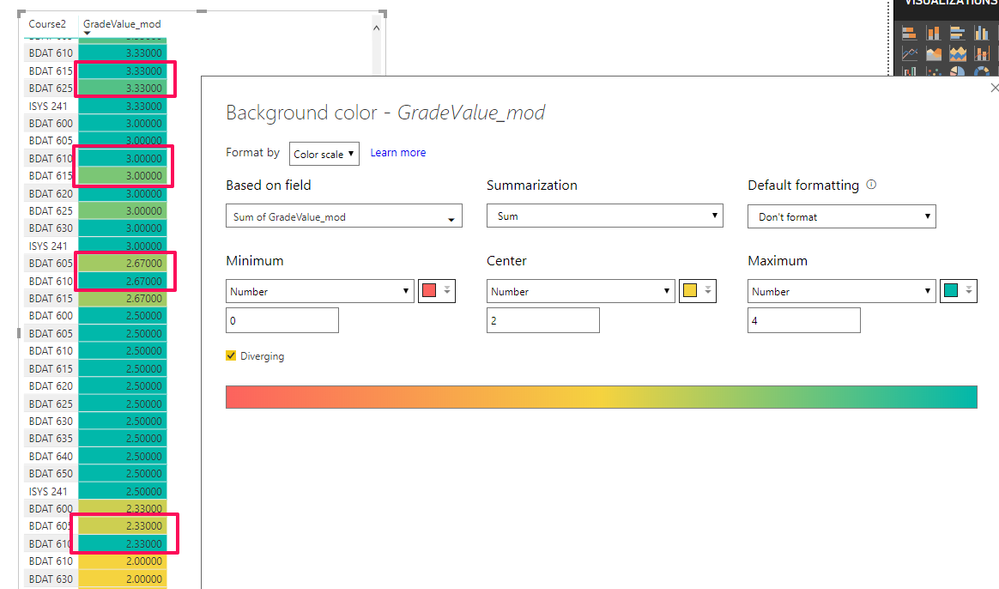
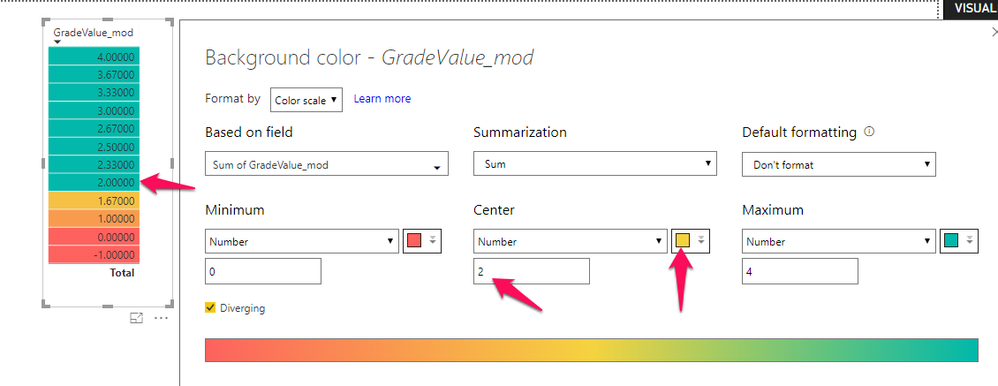
I'm running the July 2018 issue of Power BI and the conditional formatting color settings seem buggy. I've run several different scenarios and the colors Power BI assigns are inconsistent. Here's what I'm finding:
I'm curious to know if others have encountered this.
Thanks,
Jonathan
Hi @Anonymous
You may check if the summarization of values match the summarization in conditional formatting.
Regards,
Cherie
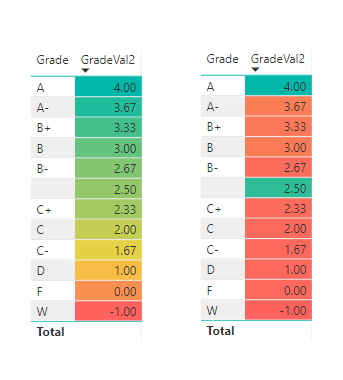
To make this stranger, I'm wondering if the order of operations and the fields selected before/after the conditional formatting makes a difference (which doesn't make much sense). But here's an example where the fields and conditional formatting settings are the exact same, but with a different result (the left one, correct).
Odd.
Jonathan
The Power BI Data Visualization World Championships is back! Get ahead of the game and start preparing now!
| User | Count |
|---|---|
| 38 | |
| 37 | |
| 34 | |
| 31 | |
| 27 |
| User | Count |
|---|---|
| 136 | |
| 99 | |
| 73 | |
| 66 | |
| 65 |