This is best Fabric, Power BI, SQL and AI community event. How do we know? The last event sold out! Save €200 with code FABCMTY200.
Register nowA new Data Days event is coming soon! This time we’re going bigger than ever. Fabric, Power BI, SQL, AI and more. Don't miss out.
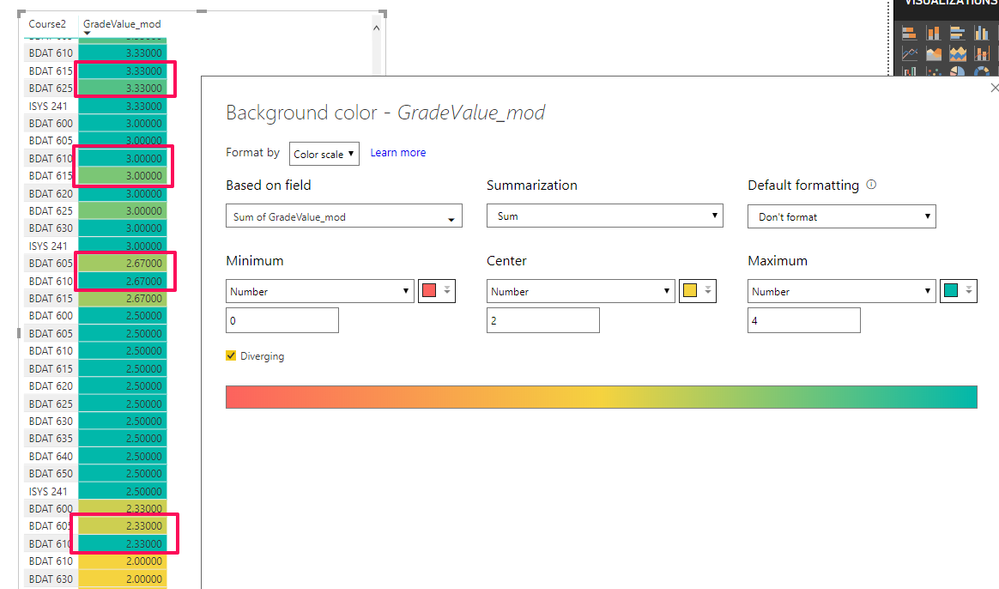
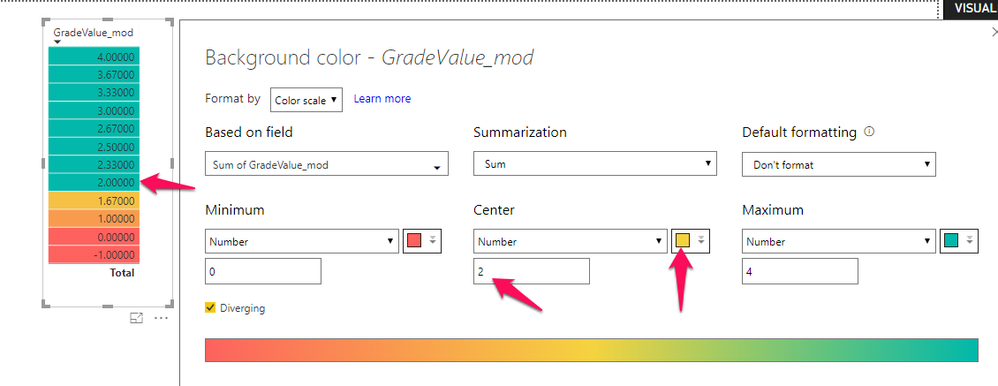
I'm running the July 2018 issue of Power BI and the conditional formatting color settings seem buggy. I've run several different scenarios and the colors Power BI assigns are inconsistent. Here's what I'm finding:
I'm curious to know if others have encountered this.
Thanks,
Jonathan
Hi @Anonymous
You may check if the summarization of values match the summarization in conditional formatting.
Regards,
Cherie
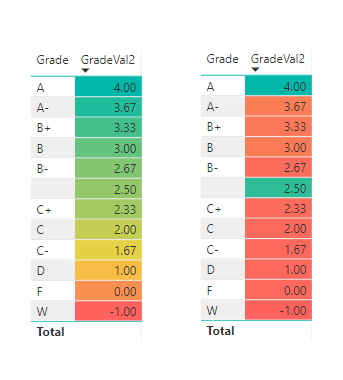
To make this stranger, I'm wondering if the order of operations and the fields selected before/after the conditional formatting makes a difference (which doesn't make much sense). But here's an example where the fields and conditional formatting settings are the exact same, but with a different result (the left one, correct).
Odd.
Jonathan
Check out the May 2026 Power BI update to learn about new features.
Sign up to receive a private message when registration opens and key events begin.
If you have recently started exploring Fabric, we'd love to hear how it's going. Your feedback can help with product improvements.
| User | Count |
|---|---|
| 31 | |
| 26 | |
| 23 | |
| 22 | |
| 13 |
| User | Count |
|---|---|
| 61 | |
| 47 | |
| 27 | |
| 23 | |
| 18 |