Don't miss your chance to take exam DP-600 or DP-700 on us!
Request nowLearn from the best! Meet the four finalists headed to the FINALS of the Power BI Dataviz World Championships! Register now
Hello folks,
I have been struggling on this headcount report for a while..
I want to show the headcount variation versus previous period, which I managed to do with:
BUD_PREV_PERIOD = CALCULATE(sum(Headcount1[BUD]);DATEADD(Headcount1[PERIOD].[Date];-1;MONTH))
and then calculating the difference between Budget and BUD_prev_period.
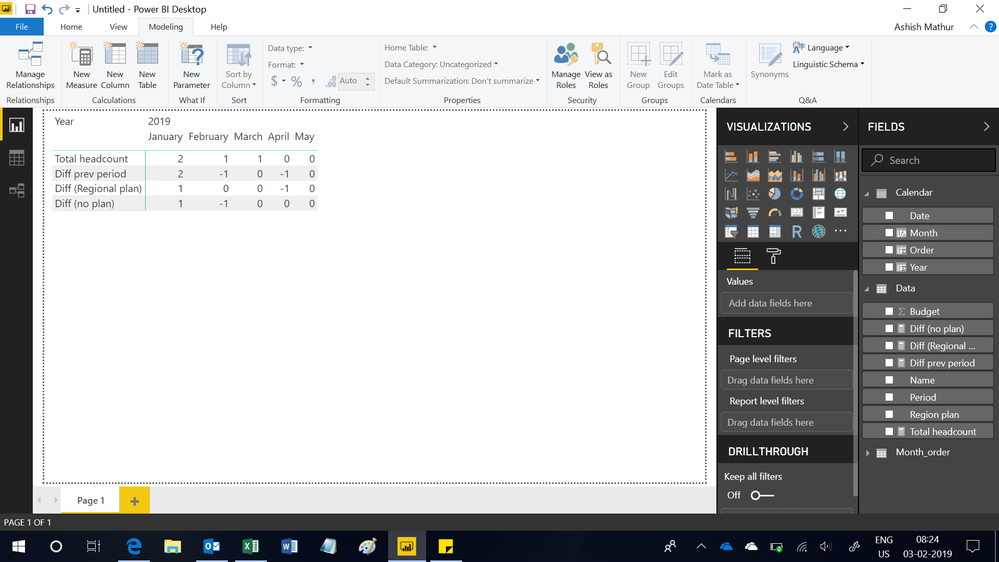
Now I want to split that value into 2 options (measures/columns): is the headcount difference part of a certain regional plan or not (see the -1 below). I thought it would be easy with a SUMX or so but I don't get there...
Diff FOR REGION = SUMX(FILTER(Headcount1;Headcount1[REGIONAL PLAN]="YES");[BUD_diff])
Do you have any ideas? Many thanks!!
| Period | Name | Region plan | Budget | |||||||
| 2019/1 | Person1 | Yes | 1 | Final table | 2019/1 | 2019/2 | 2019/3 | 2019/4 | 2019/5 | |
| 2019/2 | Person1 | Yes | 1 | Total Headcount | 2 | 1 | 1 | 0 | 0 | |
| 2019/3 | Person1 | Yes | 1 | Diff prev period | -1 | 0 | -1 | 0 | ||
| 2019/4 | Person1 | Yes | 0 | Diff (Regional plan) | -1 | |||||
| 2019/5 | Person1 | Yes | 0 | Diff (no plan) | 0 | -1 | 0 | 0 | 0 | |
| 2019/1 | Person2 | No | 1 | |||||||
| 2019/2 | Person2 | No | 0 | |||||||
| 2019/3 | Person2 | No | 0 | |||||||
| 2019/4 | Person2 | No | 0 | |||||||
| 2019/5 | Person2 | No | 0 |
Solved! Go to Solution.
Hi,
I believe this is the result you want. You may download my PBI file from here.
Hope this helps.
Hi,
I believe this is the result you want. You may download my PBI file from here.
Hope this helps.
Share feedback directly with Fabric product managers, participate in targeted research studies and influence the Fabric roadmap.
Check out the February 2026 Power BI update to learn about new features.
| User | Count |
|---|---|
| 50 | |
| 40 | |
| 37 | |
| 14 | |
| 14 |
| User | Count |
|---|---|
| 85 | |
| 69 | |
| 38 | |
| 29 | |
| 27 |