Get certified for free when you join Fabric Data Days 2026 and dive into Fabric, Power BI, SQL, AI, and other essential data skills.
Join nowTry your skills in the Power BI Dataviz World Championship! Round one ends June 26. Join now
Hi all,
I've been working with conditional column where I needed to put some values (please refer to the screen); is there any way I can set the value with range ie. 1-6 rather than 1,2,3,4,5,6?
Thanks,
K3
Solved! Go to Solution.
Hi @k3rz0rg,
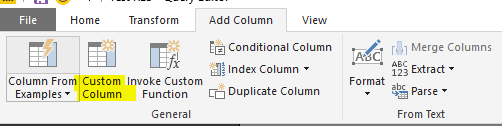
You can add a custom column referring to below M code:
=if [Attribute] >= 1 and [Attribute] <= 6 then "Value1" else if [Attribute] > 6 and [Attribute] <= 10 then "Value2" else "Value3"
Best regards,
Yuliana Gu
Hi @k3rz0rg,
You can add a custom column referring to below M code:
=if [Attribute] >= 1 and [Attribute] <= 6 then "Value1" else if [Attribute] > 6 and [Attribute] <= 10 then "Value2" else "Value3"
Best regards,
Yuliana Gu
Thank you for the input, let me try that! I have a feeling that this might work in my case as well.
Don't miss out on Data Days, June 15 through August 7. Learn Fabric, Power BI, SQL, AI and more.
Check out the May 2026 Power BI update to learn about new features.
| User | Count |
|---|---|
| 24 | |
| 22 | |
| 21 | |
| 20 | |
| 14 |
| User | Count |
|---|---|
| 59 | |
| 53 | |
| 41 | |
| 31 | |
| 31 |