cancel
Showing results for 
Search instead for 
Did you mean: 

The Power BI Data Visualization World Championships is back! Get ahead of the game and start preparing now! Learn more

Reply
Syndicate_Admin
Administrator
Administrator

Conditional column for dates

Hello people!

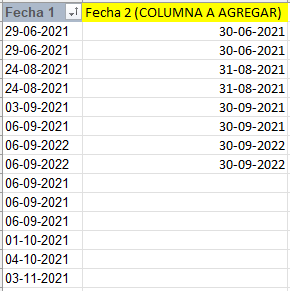
I would like your help with a DAX formula for this situation shown in the image:

laracenac_0-1664289654092.png

I have in column 1 where there are random dates from 2021 to today and counting...
In the second column I gave an example of the expected result where, for example, all dates that are between July 01 and 31, 2022 in column 1, in column 2 must be 31-07-2022.

This should be in one column and not in another table.

Greetings and thanks in advance!

1 ACCEPTED SOLUTION
rsbin
Community Champion
Community Champion

@Syndicate_Admin ,

If I understand your requirement, I believe the ENDOFMONTH function best suits your needs:

Fecha 2 = ENDOFMONTH([Fecha 1])  

Trust this works for you.

Regards,

View solution in original post

1 REPLY 1
rsbin
Community Champion
Community Champion

@Syndicate_Admin ,

If I understand your requirement, I believe the ENDOFMONTH function best suits your needs:

Fecha 2 = ENDOFMONTH([Fecha 1])  

Trust this works for you.

Regards,

Helpful resources

Announcements
Power BI DataViz World Championships

Power BI Dataviz World Championships

The Power BI Data Visualization World Championships is back! Get ahead of the game and start preparing now!

December 2025 Power BI Update Carousel

Power BI Monthly Update - December 2025

Check out the December 2025 Power BI Holiday Recap!

FabCon Atlanta 2026 carousel

FabCon Atlanta 2026

Join us at FabCon Atlanta, March 16-20, for the ultimate Fabric, Power BI, AI and SQL community-led event. Save $200 with code FABCOMM.