cancel
Showing results for 
Search instead for 
Did you mean: 

The Power BI Data Visualization World Championships is back! It's time to submit your entry. Live now!

Reply
Syndicate_Admin
Administrator
Administrator

Conditional column for dates

Hello people!

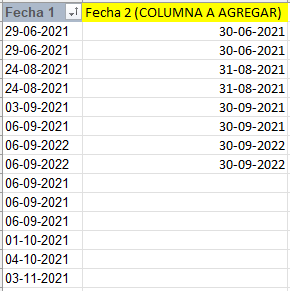
I would like your help with a DAX formula for this situation shown in the image:

laracenac_0-1664289654092.png

I have in column 1 where there are random dates from 2021 to today and counting...
In the second column I gave an example of the expected result where, for example, all dates that are between July 01 and 31, 2022 in column 1, in column 2 must be 31-07-2022.

This should be in one column and not in another table.

Greetings and thanks in advance!

1 ACCEPTED SOLUTION
rsbin
Community Champion
Community Champion

@Syndicate_Admin ,

If I understand your requirement, I believe the ENDOFMONTH function best suits your needs:

Fecha 2 = ENDOFMONTH([Fecha 1])  

Trust this works for you.

Regards,

View solution in original post

1 REPLY 1
rsbin
Community Champion
Community Champion

@Syndicate_Admin ,

If I understand your requirement, I believe the ENDOFMONTH function best suits your needs:

Fecha 2 = ENDOFMONTH([Fecha 1])  

Trust this works for you.

Regards,

Helpful resources

Announcements
December 2025 Power BI Update Carousel

Power BI Monthly Update - December 2025

Check out the December 2025 Power BI Holiday Recap!

FabCon Atlanta 2026 carousel

FabCon Atlanta 2026

Join us at FabCon Atlanta, March 16-20, for the ultimate Fabric, Power BI, AI and SQL community-led event. Save $200 with code FABCOMM.