Don't miss your chance to take the Fabric Data Engineer (DP-600) exam for FREE! Find out how by watching the DP-600 session on-demand now through April 28th.
Learn moreJoin the FabCon + SQLCon recap series. Up next: Power BI, Real-Time Intelligence, IQ and AI, and Data Factory take center stage. All sessions are available on-demand after the live show. Register now
Hi,
I have two columns, where the majority of the data are the same, but there are a few entries in one column that are 0 and the correct amount is in one column and vice versa
My initial thought was to simply add the values into a new column, but that would double up the entries were same values were entered in. Is there a way to have it, so that if the first column is zero, it would show the second column, and vice versa? Maybe some sort of If-Then condition?
Solved! Go to Solution.
Hi There.
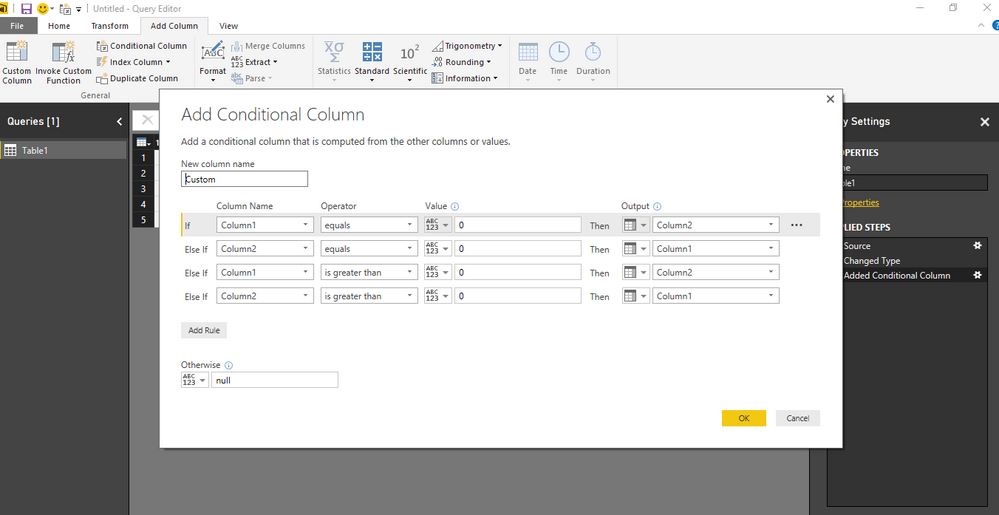
You can create a conditional column in Query Editor as shown in the screenshot.
Conditional Column in Query Editor
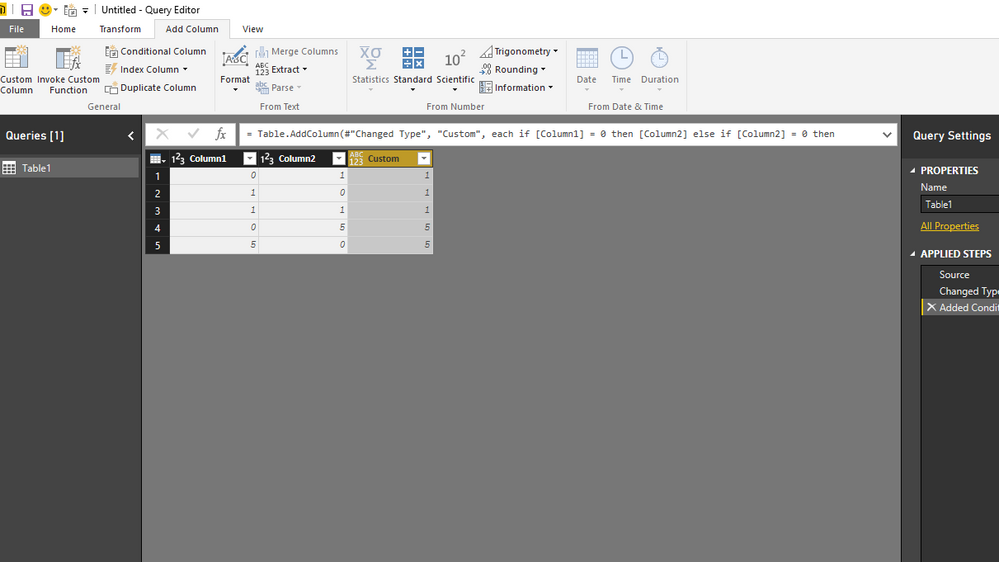
Final output
Hi There.
You can create a conditional column in Query Editor as shown in the screenshot.
Conditional Column in Query Editor
Final output
hi there,
here's the formula for the new column:
= if [Oppty.Line.Grant Total.amount] = 0 then [Bid.GrandTotal]
else if [Bid.GrandTotal] = 0 then [Oppty.Line.Grant Total.amount]
else [Oppty.Line.Grant Total.amount]
hope this helps,
radpir
In the query editor, you could add a new column as you mentioned populated with if-then, then you could remove the two columns as they would at this point no longer be necessary
I don't know of a way to do so without adding a new column, maybe someone else could help, and I could learn something too
Check out the April 2026 Power BI update to learn about new features.
If you have recently started exploring Fabric, we'd love to hear how it's going. Your feedback can help with product improvements.
A new Power BI DataViz World Championship is coming this June! Don't miss out on submitting your entry.
| User | Count |
|---|---|
| 42 | |
| 37 | |
| 35 | |
| 22 | |
| 15 |
| User | Count |
|---|---|
| 67 | |
| 58 | |
| 29 | |
| 27 | |
| 25 |