cancel
Showing results for 
Search instead for 
Did you mean: 

The Power BI Data Visualization World Championships is back! Get ahead of the game and start preparing now! Learn more

Reply
Rsanjuan
Advocate III
Advocate III

Conditional column calculation (If-Then)

Hi,


I have two columns, where the majority of the data are the same, but there are a few entries in one column that are 0 and the correct amount is in one column and vice versa


Comparison


My initial thought was to simply add the values into a new column, but that would double up the entries were same values were entered in.  Is there a way to have it, so that if the first column is zero, it would show the second column, and vice versa?  Maybe some sort of If-Then condition?


1 ACCEPTED SOLUTION
BhaveshPatel
Community Champion
Community Champion

Hi There.


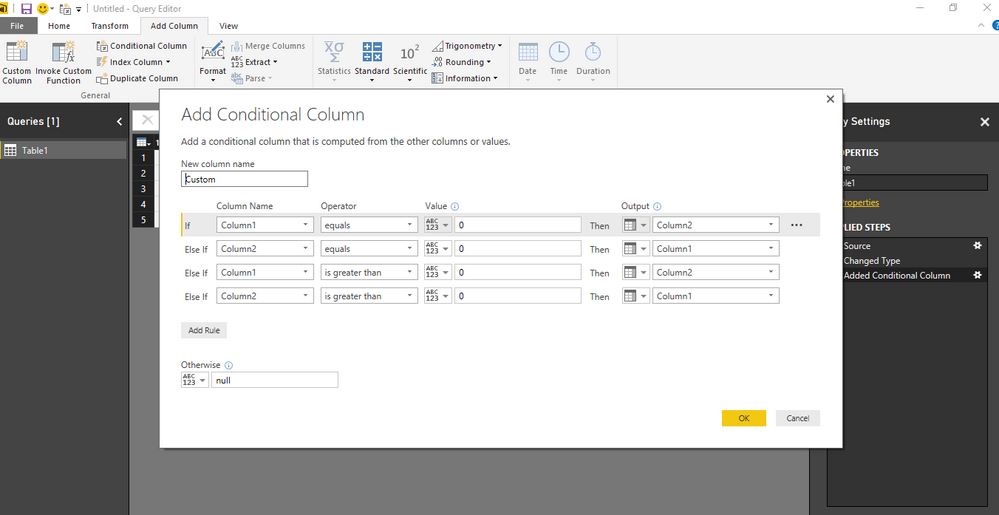
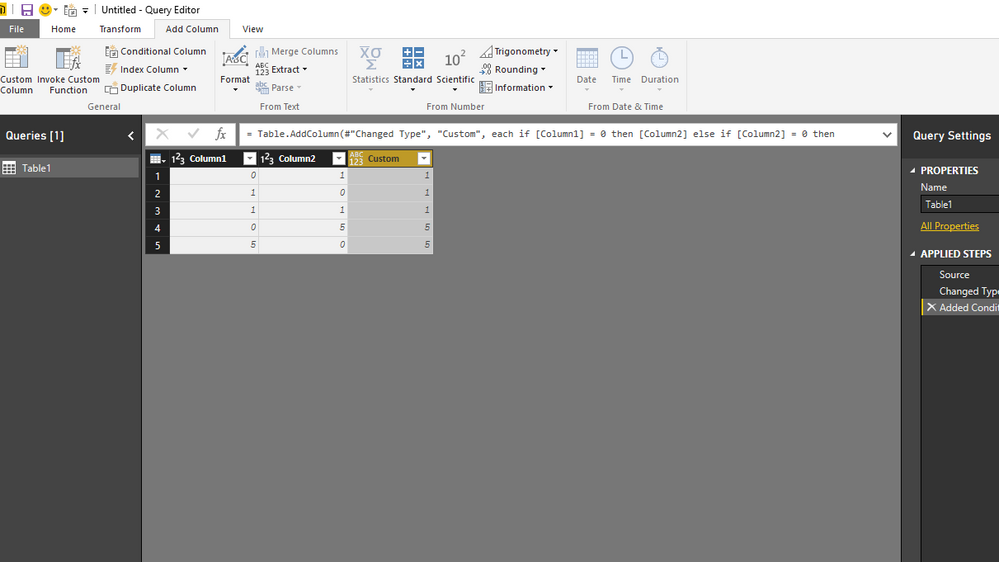
You can create a conditional column in Query Editor as shown in the screenshot.


Conditional Column in Query EditorConditional Column in Query EditorFinal outputFinal output


Thanks & Regards,
Bhavesh

Love the Self Service BI.
Please use the 'Mark as answer' link to mark a post that answers your question. If you find a reply helpful, please remember to give Kudos.

View solution in original post

3 REPLIES 3
BhaveshPatel
Community Champion
Community Champion

Hi There.


You can create a conditional column in Query Editor as shown in the screenshot.


Conditional Column in Query EditorConditional Column in Query EditorFinal outputFinal output


Thanks & Regards,
Bhavesh

Love the Self Service BI.
Please use the 'Mark as answer' link to mark a post that answers your question. If you find a reply helpful, please remember to give Kudos.
radpir
Resolver II
Resolver II

hi there,


here's the formula for the new column:

= if [Oppty.Line.Grant Total.amount] = 0 then [Bid.GrandTotal]

   else if [Bid.GrandTotal] = 0 then [Oppty.Line.Grant Total.amount]

   else [Oppty.Line.Grant Total.amount]


hope this helps,

radpir

blopez11
Super User
Super User

In the query editor, you could add a new column as you mentioned populated with if-then, then you could remove the two columns as they would at this point no longer be necessary

I don't know of a way to do so without adding a new column, maybe someone else could help, and I could learn something too

Helpful resources

Announcements
Power BI DataViz World Championships

Power BI Dataviz World Championships

The Power BI Data Visualization World Championships is back! Get ahead of the game and start preparing now!

December 2025 Power BI Update Carousel

Power BI Monthly Update - December 2025

Check out the December 2025 Power BI Holiday Recap!

FabCon Atlanta 2026 carousel

FabCon Atlanta 2026

Join us at FabCon Atlanta, March 16-20, for the ultimate Fabric, Power BI, AI and SQL community-led event. Save $200 with code FABCOMM.

Top Solution Authors