cancel
Showing results for 
Search instead for 
Did you mean: 

We've captured the moments from FabCon & SQLCon that everyone is talking about, and we are bringing them to the community, live and on-demand. Starts on April 14th. Register now

Reply
kdesai
Frequent Visitor

Conditional coloring using card

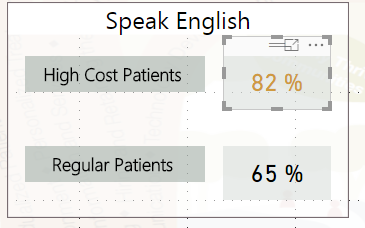
I want to color a card conditionally based on a measure which is a percentage.


I have 2 percentage values for two sets of population say "High Cost" and "Regular"


I want to show the High Cost Card value in Red if its percentage exceeds the Regular percentage else in Yellow.


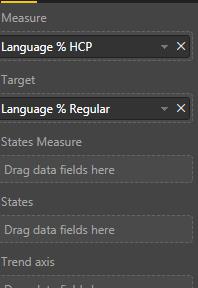
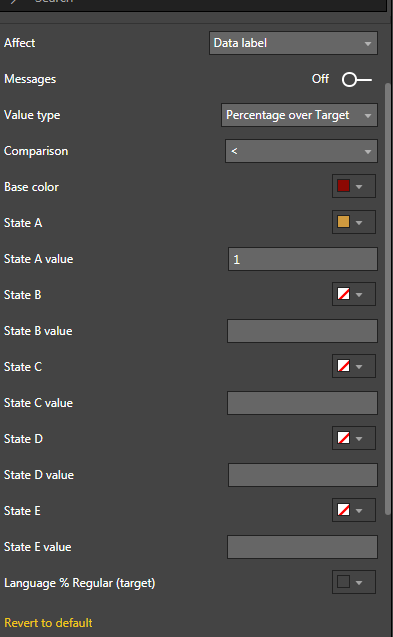
I am unable to do this with "States Card"- Not sure if I am doing Anything wrong.


Let me know if there is any other better way to do this.

Find below screen shots-


d1.PNGd2.PNGd3.PNG


2 REPLIES 2
Anonymous
Not applicable

Hi @kdesai, this is the link to the OKViz documentation: https://okviz.com/blog/states-in-custom-visuals/


I ran into the same issue and apparently, you need to place Language % HCP on "States Measure" and Language % Regular on "States" again. That will change the States panel under Formatting so you don't need to apply static values.


Also to change the background, you should change "Affect" to "Background" instead of "Data label". Mine is not working as this visual seems a bit fiddly, but if I find out the solution will let you know. Hope this helps.

v-yuta-msft
Community Support
Community Support

Hi kdesai,


Please refer to conditional formatting: https://docs.microsoft.com/en-us/power-bi/desktop-conditional-table-formatting.


Regards,

Jimmy Tao

Helpful resources

Announcements
New to Fabric survey Carousel

New to Fabric Survey

If you have recently started exploring Fabric, we'd love to hear how it's going. Your feedback can help with product improvements.

Power BI DataViz World Championships carousel

Power BI DataViz World Championships - June 2026

A new Power BI DataViz World Championship is coming this June! Don't miss out on submitting your entry.

Join our Fabric User Panel

Join our Fabric User Panel

Share feedback directly with Fabric product managers, participate in targeted research studies and influence the Fabric roadmap.

March Power BI Update Carousel

Power BI Community Update - March 2026

Check out the March 2026 Power BI update to learn about new features.