Get certified for free when you join Fabric Data Days 2026 and dive into Fabric, Power BI, SQL, AI, and other essential data skills.
Join nowTry your skills in the Power BI Dataviz World Championship! Round one ends June 26. Join now
Solved! Go to Solution.
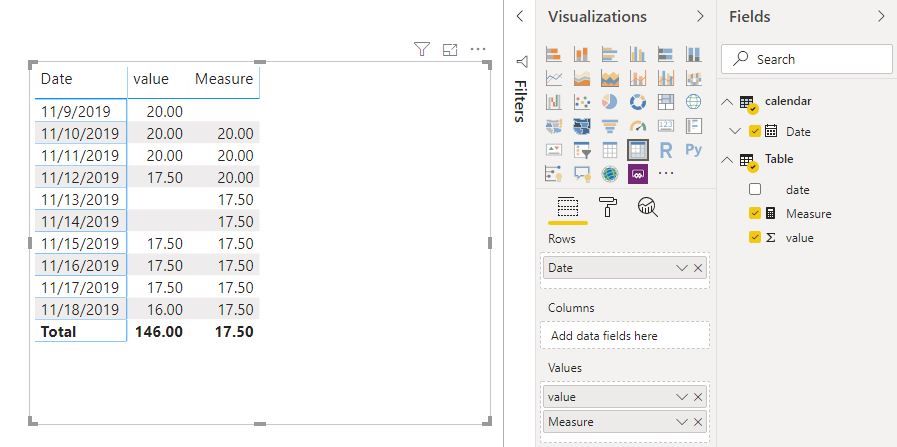
Hi @guibenassi
Create a measure
Measure = CALCULATE(FIRSTNONBLANK('Table'[value],0),FILTER(ALLSELECTED('calendar'),'calendar'[Date]<MAX('calendar'[Date])))
Best Regards
Maggie
Community Support Team _ Maggie Li
If this post helps, then please consider Accept it as the solution to help the other members find it more quickly.
Hi @guibenassi
Create a measure
Measure = CALCULATE(FIRSTNONBLANK('Table'[value],0),FILTER(ALLSELECTED('calendar'),'calendar'[Date]<MAX('calendar'[Date])))
Best Regards
Maggie
Community Support Team _ Maggie Li
If this post helps, then please consider Accept it as the solution to help the other members find it more quickly.
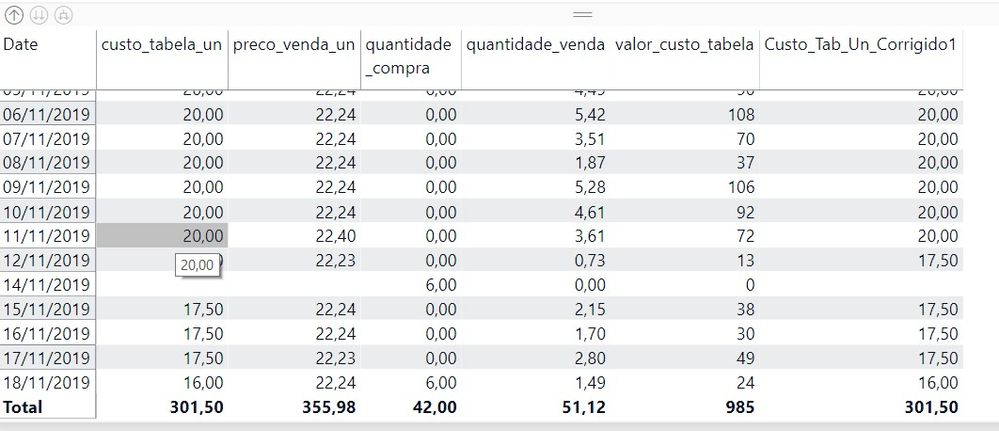
Thanks for the measure. I did just a few improvement to works best.
I include the = in the MAX calendar date and insert an IF for the first value provided.
Above the complete new measure.
Thanks a lot for the solution
Hi @Anonymous ,
Could you please share the sample data and your expected output for my better understanding.
Best Regards,
@Anonymous
Don't miss out on Data Days, June 15 through August 7. Learn Fabric, Power BI, SQL, AI and more.
Check out the May 2026 Power BI update to learn about new features.
| User | Count |
|---|---|
| 24 | |
| 22 | |
| 21 | |
| 20 | |
| 14 |
| User | Count |
|---|---|
| 59 | |
| 53 | |
| 41 | |
| 31 | |
| 31 |