Join us at FabCon Atlanta from March 16 - 20, 2026, for the ultimate Fabric, Power BI, AI and SQL community-led event. Save $200 with code FABCOMM.
Register now!The Power BI Data Visualization World Championships is back! It's time to submit your entry. Live now!
Solved! Go to Solution.
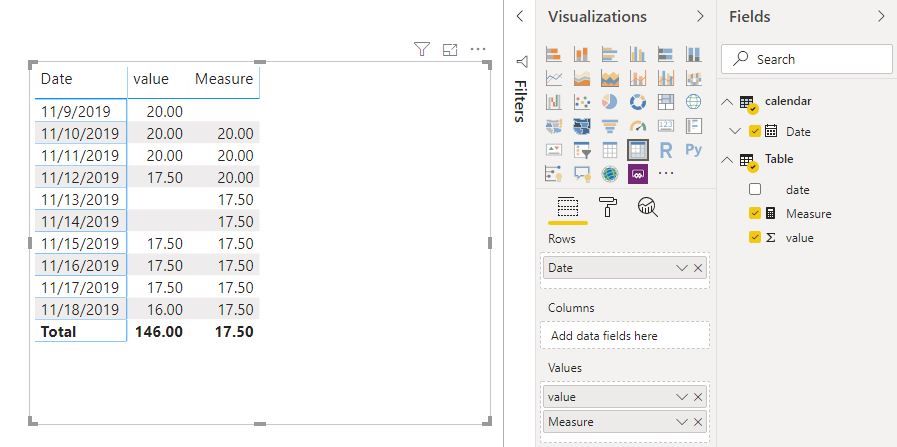
Hi @guibenassi
Create a measure
Measure = CALCULATE(FIRSTNONBLANK('Table'[value],0),FILTER(ALLSELECTED('calendar'),'calendar'[Date]<MAX('calendar'[Date])))
Best Regards
Maggie
Community Support Team _ Maggie Li
If this post helps, then please consider Accept it as the solution to help the other members find it more quickly.
Hi @guibenassi
Create a measure
Measure = CALCULATE(FIRSTNONBLANK('Table'[value],0),FILTER(ALLSELECTED('calendar'),'calendar'[Date]<MAX('calendar'[Date])))
Best Regards
Maggie
Community Support Team _ Maggie Li
If this post helps, then please consider Accept it as the solution to help the other members find it more quickly.
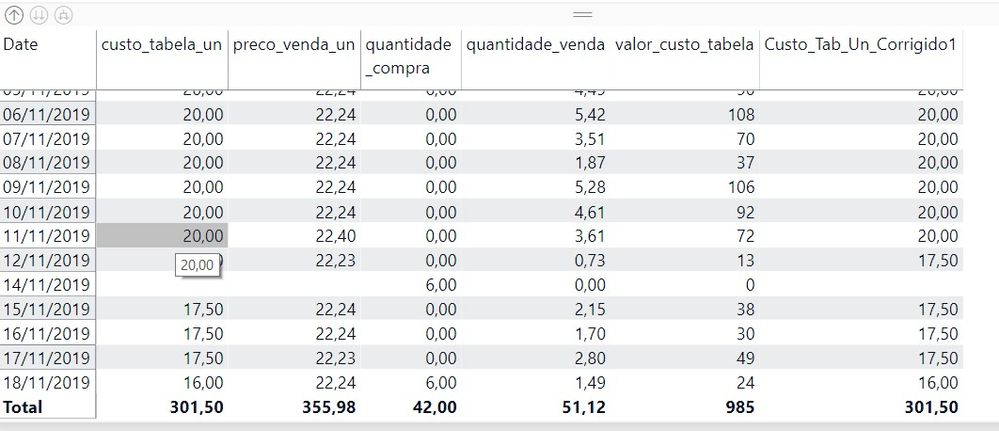
Thanks for the measure. I did just a few improvement to works best.
I include the = in the MAX calendar date and insert an IF for the first value provided.
Above the complete new measure.
Thanks a lot for the solution
Hi @Anonymous ,
Could you please share the sample data and your expected output for my better understanding.
Best Regards,
@Anonymous
The Power BI Data Visualization World Championships is back! It's time to submit your entry.
| User | Count |
|---|---|
| 131 | |
| 118 | |
| 58 | |
| 45 | |
| 43 |