Join us in Barcelona for FabCon and SQLCon, September 28 - October 1, 2026.
This is best Fabric, Power BI, SQL and AI community event. How do we know? The last event sold out! Save €200 with code FABCMTY200.
Register now- Power BI forums
- Get Help with Power BI
- Desktop
- Service
- Report Server
- Power Query
- Mobile Apps
- Developer
- DAX Commands and Tips
- Custom Visuals Development Discussion
- Health and Life Sciences
- Power BI Spanish forums
- Translated Spanish Desktop
- Training and Consulting
- Instructor Led Training
- Dashboard in a Day for Women, by Women
- Galleries
- Data Stories Gallery
- Themes Gallery
- Contests Gallery
- QuickViz Gallery
- Quick Measures Gallery
- Visual Calculations Gallery
- Fabric Apps Gallery
- Notebook Gallery
- Translytical Task Flow Gallery
- TMDL Gallery
- R Script Showcase
- Webinars and Video Gallery
- Ideas
- Custom Visuals Ideas (read-only)
- Issues
- Issues
- Events
- Upcoming Events
The Fabric community is now in read-only for platform upgrade. Learn more
- Power BI forums
- Forums
- Get Help with Power BI
- Desktop
- Re: Conditional Statments
- Subscribe to RSS Feed
- Mark Topic as New
- Mark Topic as Read
- Float this Topic for Current User
- Bookmark
- Subscribe
- Printer Friendly Page

- Mark as New
- Bookmark
- Subscribe
- Mute
- Subscribe to RSS Feed
- Permalink
Conditional Statments
Hi All,
I have tried to find solution to this problem for last few days with no success.
I managed to get TodaysDate - 3 days using Today()-3
also I was able to extrct Name of the Day by using FORMAT([TodaysDate - 3 days].[Date], "dddd")
But any attempts then to build in conditional stetments like justfor example
if ( FORMAT([TodaysDate - 3 days].[Date], "dddd") = "Saturday", TODAY()-4)
to display date of the Friday preceding that Saturday failed.
Is this possible to build in such statments ?
Hope someone will be able to help.
I have a column that stores “Last Job Start Time” (type: Date/Time).
I want to find out if compliant or non-compliant based on this date.
I want to find out and display the date:
if “Last Job Start Time” < “Todays Date – 3 days “ = non-compliant
else Compliant.
In addition, we do not take into consideration Saturdays and Sundays so
if “Todays Date - 3 days” = Saturday or Sunday , I want to display date of the preceding Friday
If “Last Job Start Time” < that “date of the preceding Friday” = non-compliant
I have tried :
Column =
IF([Last Job Start Time]<[TodaysDate-3days],"Non-Compliant",
IF(
IF([TodaysDate-3days].[Day]=[Weekday Name]="Saturday",[TodaysDate-3days]=TODAY()-4),
IF(([TodaysDate-3days]=TODAY()-4)<[Last Job Start Time],"Non-Compliant")
||
IF([TodaysDate-3days].[Day]=[Weekday Name]= "Sunday", [TodaysDate-3days]=TODAY()-5),
IF(([TodaysDate-3days]=TODAY()-5)<[Last Job Start Time],"Non-Compliant")
)
Kind Regards,
Agata
Solved! Go to Solution.


- Mark as New
- Bookmark
- Subscribe
- Mute
- Subscribe to RSS Feed
- Permalink
@agatan -
I think I understand your issue, possibly below will aid in your solution.
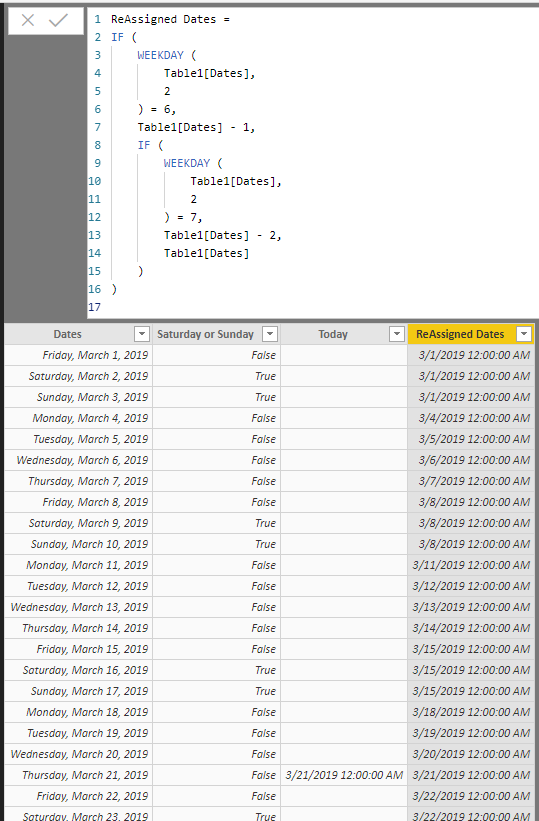
ReAssigned Dates =
IF (
    WEEKDAY (
        Table1[Dates],
        2
    ) = 6,
    Table1[Dates] - 1,
    IF (
        WEEKDAY (
            Table1[Dates],
            2
        ) = 7,
        Table1[Dates] - 2,
        Table1[Dates]
    )
)
Did I answer your question? Mark my post as a solution!
Did my answers help arrive at a solution? Give it a kudos by clicking the Thumbs Up!
Proud to be a Super User!
- Mark as New
- Bookmark
- Subscribe
- Mute
- Subscribe to RSS Feed
- Permalink
Hi,
After your reasurment that the IF statment should work, I want to see what can cause the error.
There was few oter small issues but it is working now.
Big Thank You for your support!
Kind Regards,
Agata
- Mark as New
- Bookmark
- Subscribe
- Mute
- Subscribe to RSS Feed
- Permalink
@agatan -
I think I understand your issue, possibly below will aid in your solution.
ReAssigned Dates =
IF (
    WEEKDAY (
        Table1[Dates],
        2
    ) = 6,
    Table1[Dates] - 1,
    IF (
        WEEKDAY (
            Table1[Dates],
            2
        ) = 7,
        Table1[Dates] - 2,
        Table1[Dates]
    )
)
Did I answer your question? Mark my post as a solution!
Did my answers help arrive at a solution? Give it a kudos by clicking the Thumbs Up!
Proud to be a Super User!
- Mark as New
- Bookmark
- Subscribe
- Mute
- Subscribe to RSS Feed
- Permalink
Hi ,
Thank You for your help.
Thanks to your code I was able to reassign dated (exclude Saturdays and Sundays)! Great help.
But I am still struggling to compare those two dates.
I want to find out if my "LAST JOB START DATE " is earlier then "Reassigned Date " .
How to commpare dates ? Statments like below dont work
IF(Table1[Last Job Start Date] > Table1[ReassignedDate], "Compliant", "Non-Compliant" )
Any suggestions will be highly appriciated 🙂
Kind Regards,
Agata
- Mark as New
- Bookmark
- Subscribe
- Mute
- Subscribe to RSS Feed
- Permalink
@agatan -
Are you getting some sort of error message? An IF ( ) like what you've mentioned should work as a calculated column.
Did I answer your question? Mark my post as a solution!
Did my answers help arrive at a solution? Give it a kudos by clicking the Thumbs Up!
Proud to be a Super User!
- Mark as New
- Bookmark
- Subscribe
- Mute
- Subscribe to RSS Feed
- Permalink
Hi,
After your reasurment that the IF statment should work, I want to see what can cause the error.
There was few oter small issues but it is working now.
Big Thank You for your support!
Kind Regards,
Agata


- Mark as New
- Bookmark
- Subscribe
- Mute
- Subscribe to RSS Feed
- Permalink
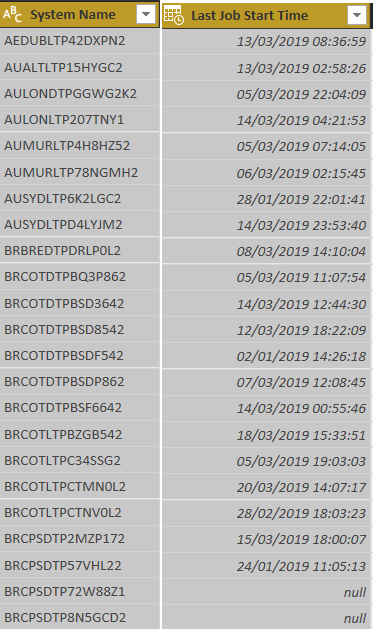
Hi Rokcy09 ,
Please find sample data:
Kind regards,
Agata

Helpful resources

FabCon & SQLCon – Barcelona 2026
Join us in Barcelona for FabCon and SQLCon, the Fabric, Power BI, SQL, and AI community event. Save €200 with code FABCMTY200.

Power BI DataViz World Championships - June 2026
A new Power BI DataViz World Championship is coming this June! Don't miss out on submitting your entry.

| User | Count |
|---|---|
| 23 | |
| 22 | |
| 14 | |
| 14 | |
| 13 |


| User | Count |
|---|---|
| 47 | |
| 36 | |
| 24 | |
| 20 | |
| 20 |


