Learn from the best! Meet the four finalists headed to the FINALS of the Power BI Dataviz World Championships! Register now
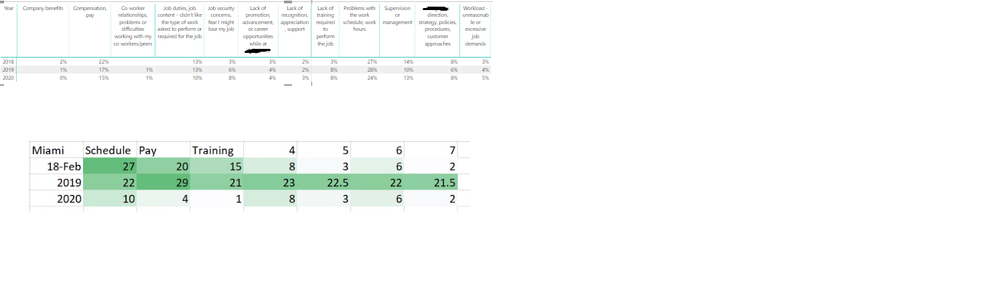
Id like to apply conditional formatting to each row - to achieve something similar to the bottom in green - the column headers would be reasons people are leaving the company , by years
Solved! Go to Solution.
I'm afraid you should apply one measure for each column.
Community Support Team _ Jimmy Tao
If this post helps, then please consider Accept it as the solution to help the other members find it more quickly.
You can write a measure and apply the measure as a rule in conditional formatting.
https://docs.microsoft.com/en-us/power-bi/desktop-conditional-table-formatting
Community Support Team _ Jimmy Tao
If this post helps, then please consider Accept it as the solution to help the other members find it more quickly.
@v-yuta-msft Do you have an example of a meausre I could use for conditional formatting in a row?
I'm afraid you should apply one measure for each column.
Community Support Team _ Jimmy Tao
If this post helps, then please consider Accept it as the solution to help the other members find it more quickly.
| User | Count |
|---|---|
| 57 | |
| 44 | |
| 32 | |
| 16 | |
| 14 |
| User | Count |
|---|---|
| 82 | |
| 67 | |
| 41 | |
| 27 | |
| 25 |