This time we’re going bigger than ever. Fabric, Power BI, SQL, AI and more. We're covering it all. You won't want to miss it.
Learn moreDid you hear? There's a new SQL AI Developer certification (DP-800). Start preparing now and be one of the first to get certified. Register now
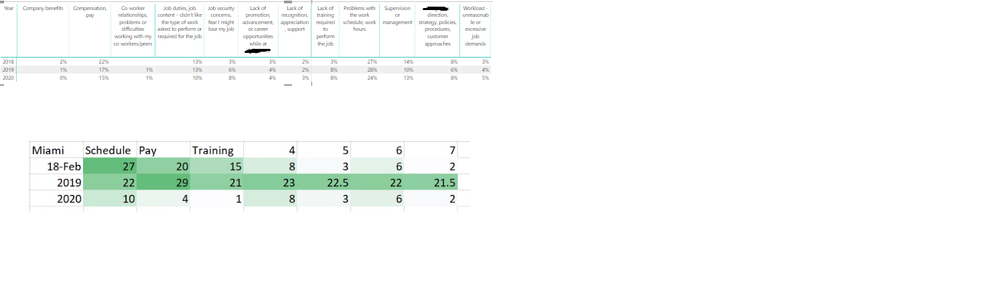
Id like to apply conditional formatting to each row - to achieve something similar to the bottom in green - the column headers would be reasons people are leaving the company , by years
Solved! Go to Solution.
I'm afraid you should apply one measure for each column.
Community Support Team _ Jimmy Tao
If this post helps, then please consider Accept it as the solution to help the other members find it more quickly.
You can write a measure and apply the measure as a rule in conditional formatting.
https://docs.microsoft.com/en-us/power-bi/desktop-conditional-table-formatting
Community Support Team _ Jimmy Tao
If this post helps, then please consider Accept it as the solution to help the other members find it more quickly.
@v-yuta-msft Do you have an example of a meausre I could use for conditional formatting in a row?
I'm afraid you should apply one measure for each column.
Community Support Team _ Jimmy Tao
If this post helps, then please consider Accept it as the solution to help the other members find it more quickly.
Check out the April 2026 Power BI update to learn about new features.
Sign up to receive a private message when registration opens and key events begin.
If you have recently started exploring Fabric, we'd love to hear how it's going. Your feedback can help with product improvements.
| User | Count |
|---|---|
| 34 | |
| 31 | |
| 30 | |
| 21 | |
| 16 |
| User | Count |
|---|---|
| 63 | |
| 53 | |
| 31 | |
| 23 | |
| 23 |