Join us at FabCon Atlanta from March 16 - 20, 2026, for the ultimate Fabric, Power BI, AI and SQL community-led event. Save $200 with code FABCOMM.
Register now!The Power BI Data Visualization World Championships is back! Get ahead of the game and start preparing now! Learn more
Hi all,
I am currently encountering a problem where conditional formatting does not seem to work.
Data source: SSAS 2016 Multidimensional cube
Connection type: Live (direct)
Power BI Desktop (Aug 2018 version)
Basically, I want to make negative values to have red coloured font, and postive values to have green font using table visual.
When I go to Conditional Formatting > Font Color, I choose "Format By" = Rules and set the conditions, but it does not work.
The colour did not change.
Is this a limitation of using SSAS MD Live connection?
Any ideas how I can make the conditional formatting work in this case?
Thanks
HI @Anonymous,
AFAIK, If you use multidimensional data source with live connection mode, it not support to create measure to enable conditional formatting features.
Connect to SSAS Multidimensional Models in Power BI Desktop
Regards,
Xiaoxin Sheng
I dont plan to create a new measure, but using the fields from the cube directly and want to format the font color, but it does not seem to work either.
Limitation or I just dont know how to do it..
Hi @Anonymous,
>>I dont plan to create a new measure, but using the fields from the cube directly and want to format the font color, but it does not seem to work either.
In fact, I can setup conditional formatting on existed fields from SSAS live connection datasource.
Regards,
Xiaoxin Sheng
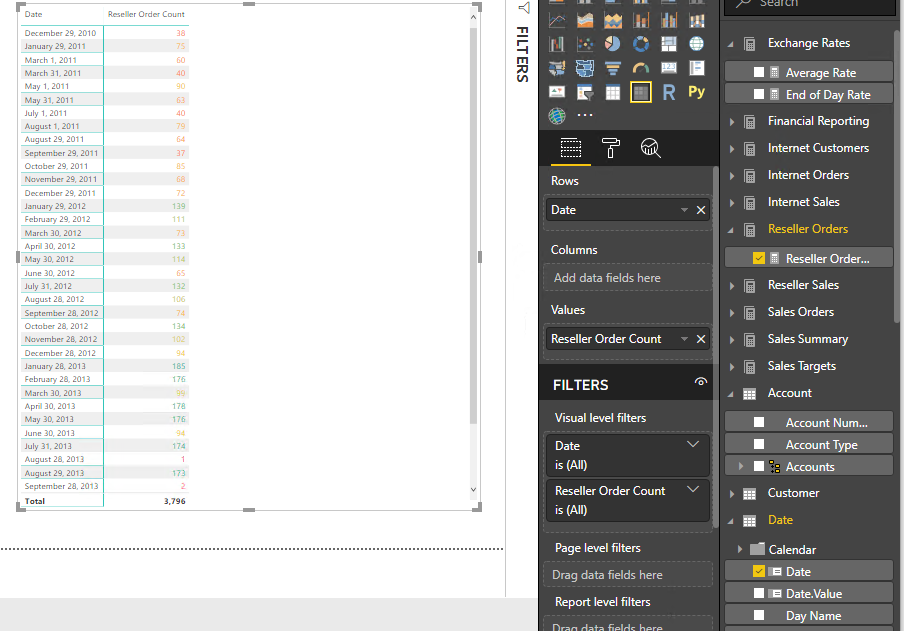
Ah yes, I noticed this - the conditional formatting works for detailed data points only, not including the Total value.
In my case, I just want to show the Total, but the conditional formatting does not work.
Btw, I just want to show the Total as a workaround because Card visual does not have Conditional Formatting at all.
Hi @Anonymous,
AFAIK, current full conditional formatting features only works on table and matrix. Some of charts allow you to setup advanced color control on data color option to achieve similar bar color conditional formatting.
For enable conditional formatting on specific level, I think you need to add condition to check current level and set up result color on specific summarize level, other result replace to normal color.
Regards,
Xiaoxin Sheng
The Power BI Data Visualization World Championships is back! Get ahead of the game and start preparing now!
Check out the November 2025 Power BI update to learn about new features.
| User | Count |
|---|---|
| 68 | |
| 46 | |
| 44 | |
| 29 | |
| 20 |
| User | Count |
|---|---|
| 202 | |
| 130 | |
| 102 | |
| 71 | |
| 55 |