Get Fabric or SQL Certified for Free.
Get certified for free when you join Fabric Data Days 2026 and dive into Fabric, Power BI, SQL, AI, and other essential data skills.
Join now- Power BI forums
- Get Help with Power BI
- Desktop
- Service
- Report Server
- Power Query
- Mobile Apps
- Developer
- DAX Commands and Tips
- Custom Visuals Development Discussion
- Health and Life Sciences
- Power BI Spanish forums
- Translated Spanish Desktop
- Training and Consulting
- Instructor Led Training
- Dashboard in a Day for Women, by Women
- Galleries
- Data Stories Gallery
- Themes Gallery
- Contests Gallery
- QuickViz Gallery
- Quick Measures Gallery
- Visual Calculations Gallery
- Fabric Apps Gallery
- Notebook Gallery
- Translytical Task Flow Gallery
- TMDL Gallery
- R Script Showcase
- Webinars and Video Gallery
- Ideas
- Custom Visuals Ideas (read-only)
- Issues
- Issues
- Events
- Upcoming Events
July 28 - August 9 | Final Round of the Power BI Dataviz World Championships. This is your chance. Learn more
- Power BI forums
- Forums
- Get Help with Power BI
- Desktop
- Re: Conditional Formatting - on live connection
- Subscribe to RSS Feed
- Mark Topic as New
- Mark Topic as Read
- Float this Topic for Current User
- Bookmark
- Subscribe
- Printer Friendly Page

- Mark as New
- Bookmark
- Subscribe
- Mute
- Subscribe to RSS Feed
- Permalink
- Report Inappropriate Content
Conditional Formatting - on live connection
Hi Experts
I cannot get the resuts of the following dax to show the negative numbers as red........
vAOP$ =
VAR SummaryItem = SELECTEDVALUE( 'Templates'[Summary 1] )
    Return

SWITCH(TRUE(),
    SummaryItem = "EMEA", FORMAT([EMEA Revenue vAOP$ 2],"#,##0.0%;(#,##0.0%)"),
    SummaryItem = "Americas", FORMAT([Americas Revenue vAOP$ 2],"#,##0.0%;(#,##0.0%)"),
    SummaryItem = "APAC", FORMAT([APAC Revenue vAOP$ 2],"#,##0.0%;(#,##0.0%)"),
    SummaryItem = "IDIS", FORMAT([ID & IS Revenue vAOP$ 2],"#,##0.0%;(#,##0.0%)"),
    SummaryItem = "Total", FORMAT([$NSvPY4% (NOE @ AOP Rate)],"#,##0.0%;(#,##0.0%)"),
        ISBLANK(SummaryItem),FORMAT(0.0,"$#,##0.0;($#,##0.0)"))
Solved! Go to Solution.
- Mark as New
- Bookmark
- Subscribe
- Mute
- Subscribe to RSS Feed
- Permalink
- Report Inappropriate Content
Hello again,
You have to add this measure:
vAOP$_Color =
SWITCH(TRUE(),
[vAOP$] <0, "#ff0000",
BLANK())
Then you need to do the following steps:
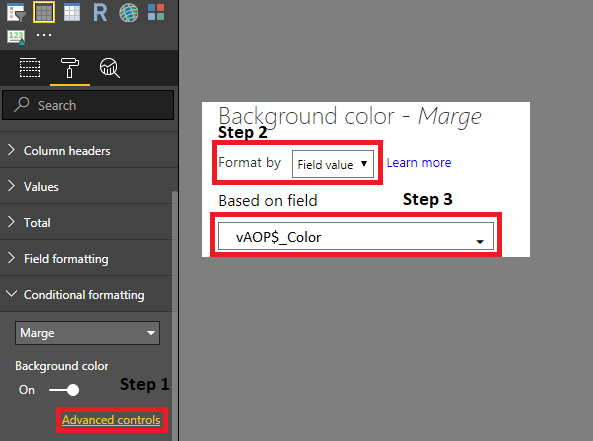
Hope that this works!
Kind Regards,
EDIT: I see that i picked Background color instead of Font color by conditional formatting.
This should be Font color.
- Mark as New
- Bookmark
- Subscribe
- Mute
- Subscribe to RSS Feed
- Permalink
- Report Inappropriate Content
I am also experiencing a similar problem. I am connecting with the PowerBI dataset via Live connection and cant use conditional formatting on the text of any object via dax measure.
- Mark as New
- Bookmark
- Subscribe
- Mute
- Subscribe to RSS Feed
- Permalink
- Report Inappropriate Content
@Anonymous Did you find a asolution for this problem?
- Mark as New
- Bookmark
- Subscribe
- Mute
- Subscribe to RSS Feed
- Permalink
- Report Inappropriate Content
@Anonymous I think I was missing a simple step. After creating a measure, change the datatype of measure to text. Cause by default it was Number and that's why couldn't be used.
I hope that will solve your problem too.
- Mark as New
- Bookmark
- Subscribe
- Mute
- Subscribe to RSS Feed
- Permalink
- Report Inappropriate Content
@Anonymous That did the trick. Thank you!


- Mark as New
- Bookmark
- Subscribe
- Mute
- Subscribe to RSS Feed
- Permalink
- Report Inappropriate Content
Hi @Anonymous,
What is your data source? I tested with live connection to SQL Server DB and SSAS Multidimensional model, conditional formatting option is available in both scenario.
Would you please post a screenshot? And update your Power BI desktop for a test.
Regards,
Yuliana Gu
If this post helps, then please consider Accept it as the solution to help the other members find it more quickly.
- Mark as New
- Bookmark
- Subscribe
- Mute
- Subscribe to RSS Feed
- Permalink
- Report Inappropriate Content
Hello again,
You have to add this measure:
vAOP$_Color =
SWITCH(TRUE(),
[vAOP$] <0, "#ff0000",
BLANK())
Then you need to do the following steps:
Hope that this works!
Kind Regards,
EDIT: I see that i picked Background color instead of Font color by conditional formatting.
This should be Font color.
- Mark as New
- Bookmark
- Subscribe
- Mute
- Subscribe to RSS Feed
- Permalink
- Report Inappropriate Content
Hi Jeltex
my connection into Power Bi is a Live Connection that option os disabled.....
- Mark as New
- Bookmark
- Subscribe
- Mute
- Subscribe to RSS Feed
- Permalink
- Report Inappropriate Content
Is it possible to use conditional formatting on any value or is it disabled at your whole report?
Never used live connections before so I don't really know.
If it is disabled I don't think that it is possible right now.
You might want to create a new idea at this link.
Helpful resources

Fabric Community Sticker Challenge - Barcelona 2026
If you love stickers, then you will definitely want to check out our community sticker challenge, Barcelona edition!

Power BI Monthly Update - July 2026
Check out the July 2026 Power BI update to learn about new features.

Power BI DataViz World Championships - June 2026
A new Power BI DataViz World Championship is coming this June! Don't miss out on submitting your entry.

| User | Count |
|---|---|
| 28 | |
| 28 | |
| 20 | |
| 19 | |
| 19 |


| User | Count |
|---|---|
| 35 | |
| 26 | |
| 19 | |
| 18 | |
| 17 |


