Don't miss your chance to take the Fabric Data Engineer (DP-700) exam on us!
Learn moreWe've captured the moments from FabCon & SQLCon that everyone is talking about, and we are bringing them to the community, live and on-demand. Starts on April 14th. Register now
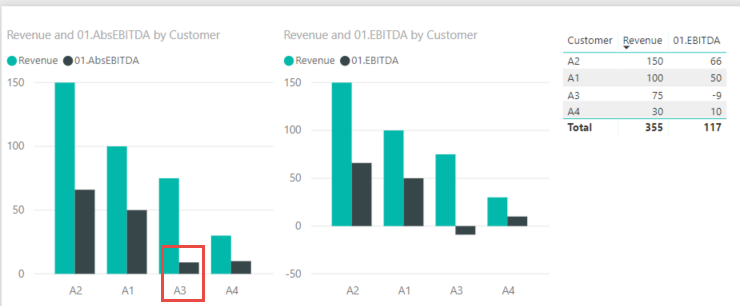
I have a set of Revenue and EBITDA numbers for Customers. EBITDA can be negative sometimes. How can I still show it as positive but with a different color (red) than a positive EBITDA (black)? I was able to show it as positive value by using Absolute function but not sure how to run conditional formatting to make it look red? A3 is the customer with negative data. Here is:
Hi, I saw this question today (I know its too late, but hoping it might help someone)
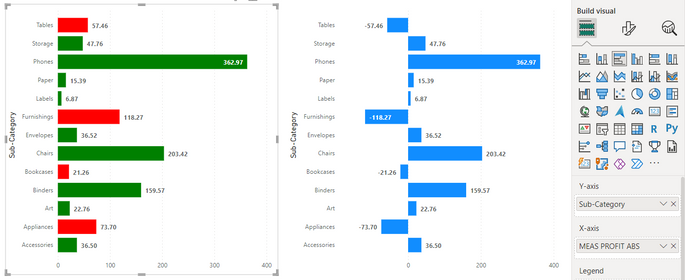
I created 3 measures to solve this
I am sure there might be a more simpler way to solve this. But for now, this is what I could do in 2 mins. Hope it helps.
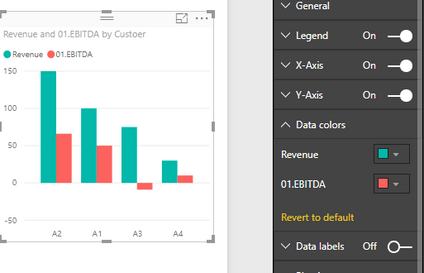
You can do it if you go into Visualizations->Format->Data Colors.
Then if you hover a mouse in the top-right corner you'll see 3 dots. If you click on those, you'll see a CONDITIONAL FORMATTING tab. There you can select different colors for negative and positive bars.
Liking the OP in support of wishing for this functionality.
Hi Sang,
For more details about conditional formatting, please refer to:
https://docs.microsoft.com/en-us/power-bi/desktop-conditional-table-formatting.
Regards,
Jimmy Tao
This won't work for two reasons:
1. I want it on the bar-chart as explained. I do not see conditional formatting option in a bar-chart.
2. I want a different color for the bar-chart if another measure is negative.
Hi Sang,
Based on my test, in clustered column chart you can change color of all values in a column, but I'm afraid changing part of values can't be achieved. You can submit your idea here:https://ideas.powerbi.com.
In addition, although in this thread (posted in 2016):https://community.powerbi.com/t5/Developer/Conditional-formatting-Change-of-chart-color-based-on-the..., color saturation can meet your requirement, in recent PBI version this feature seems to be deprecated.
Regards,
Jimmy Tao
If you have recently started exploring Fabric, we'd love to hear how it's going. Your feedback can help with product improvements.
A new Power BI DataViz World Championship is coming this June! Don't miss out on submitting your entry.
Share feedback directly with Fabric product managers, participate in targeted research studies and influence the Fabric roadmap.
| User | Count |
|---|---|
| 53 | |
| 39 | |
| 35 | |
| 19 | |
| 18 |
| User | Count |
|---|---|
| 73 | |
| 73 | |
| 38 | |
| 35 | |
| 26 |