cancel
Showing results for 
Search instead for 
Did you mean: 

The Power BI Data Visualization World Championships is back! It's time to submit your entry. Live now!

Reply
abgnfirdaus
Helper I
Helper I

Conditional Formatting for Excel

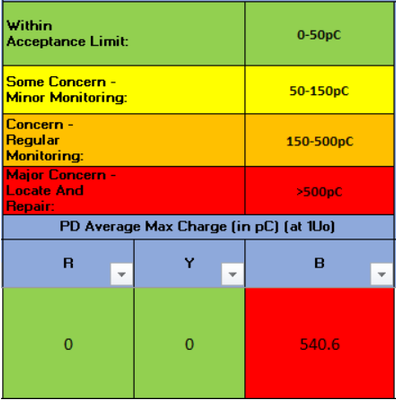
Hello there, sorry for asking topics not relevant to Power BI. The question is for Microsoft Excel. Hope you guys can help me!


abgnfirdaus_3-1644453048716.png

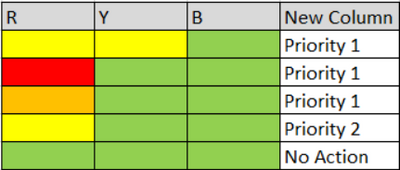
I want to make Conditional Formatting based on colour in columns R, Y and B. I will make new column next to the column B. The new will use to show the result based on the colour in columns R, Y and B. So the new excel should be like this:


abgnfirdaus_4-1644453082514.png


So meaning that:

  • 2 Yellow = Priority 1
  • 1 Red = Priority 1
  • 1 Orange = Priority 1
  • 1 Yellow, 2 Green =  Priority 2
  • All Green = No Action

Hope you guys can guide me. Thank you. 


1 REPLY 1
amitchandak
Super User
Super User

@abgnfirdaus , Please post it on excel forum


refer

https://www.excel-easy.com/data-analysis/conditional-formatting.html

https://www.youtube.com/watch?v=XHT4paRaY4g

Share with Power BI Enthusiasts: Full Power BI Video (20 Hours) YouTube
Microsoft Fabric Series 60+ Videos YouTube
Microsoft Fabric Hindi End to End YouTube

Helpful resources

Announcements
FabCon Atlanta 2026 carousel

FabCon Atlanta 2026

Join us at FabCon Atlanta, March 16-20, for the ultimate Fabric, Power BI, AI and SQL community-led event. Save $200 with code FABCOMM.