Join us at FabCon Atlanta from March 16 - 20, 2026, for the ultimate Fabric, Power BI, AI and SQL community-led event. Save $200 with code FABCOMM.
Register now!The Power BI Data Visualization World Championships is back! It's time to submit your entry. Live now!
Hello All:
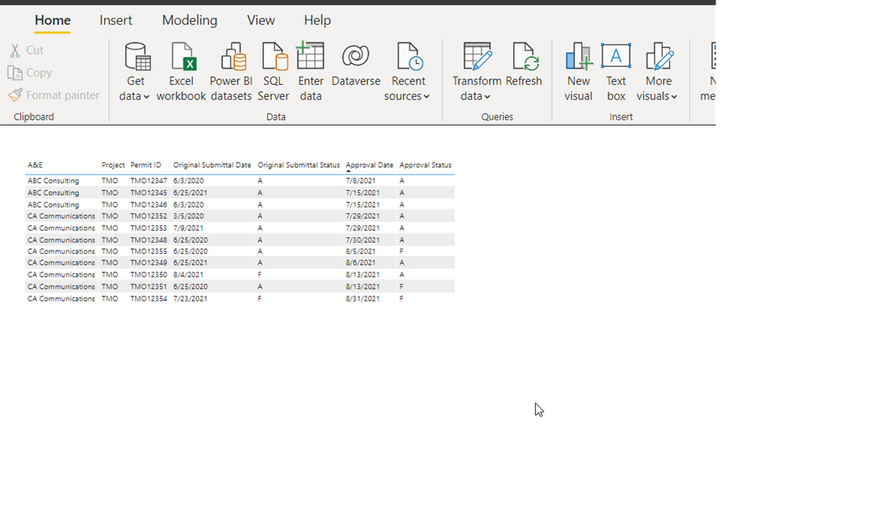
I have a table with permits, and need to find a way to apply conditional format to two columns with dates: Original Submittal Date and Approval Date, based on today's date, with two conditions.
IF Original Submittal Date is before TODAY and the Original Submittal Status is F, then the cell should color Red (past due),
ELSE IF Original Submittal Date is TODAY or Within 7 days of TODAY and the Original Submittal Status is F, then the cell should color Yellow (coming due), else no color.
Same rules for Approval Date, the cells should have the same colors if they are past due, or coming due.
Please help, I did read other posts on this topic but wasn't able to use the solutions offered.
Solved! Go to Solution.
@amitchandak I could not create a measure as you typed using the IF function, the measure could not reference a column in a table, however, I did use the function you typed to create a calculated column, instead of "Red" I used "1" and instead of "Yellow" I used "2". Prior to adding the table column I created a measure someone else suggested in a post, @Anonymous , the measure is Today = TODAY(). Then the formula I used was this:
@Oana , Create a color measure like this and use that in conditional formatting using field value option
color =
IF( [Original Submittal Date] < TODAY() && [Original Submittal Status] = "F","Red", IF([Original Submittal Date]>= TODAY() && [Original Submittal Date] <= Today()+7 && [Original Submittal Status] = "F", "Yellow" ), "White")
How to do conditional formatting by measure and apply it on pie?: https://youtu.be/RqBb5eBf_I4
@amitchandak I could not create a measure as you typed using the IF function, the measure could not reference a column in a table, however, I did use the function you typed to create a calculated column, instead of "Red" I used "1" and instead of "Yellow" I used "2". Prior to adding the table column I created a measure someone else suggested in a post, @Anonymous , the measure is Today = TODAY(). Then the formula I used was this:
| User | Count |
|---|---|
| 56 | |
| 41 | |
| 38 | |
| 21 | |
| 21 |
| User | Count |
|---|---|
| 140 | |
| 102 | |
| 64 | |
| 36 | |
| 35 |